
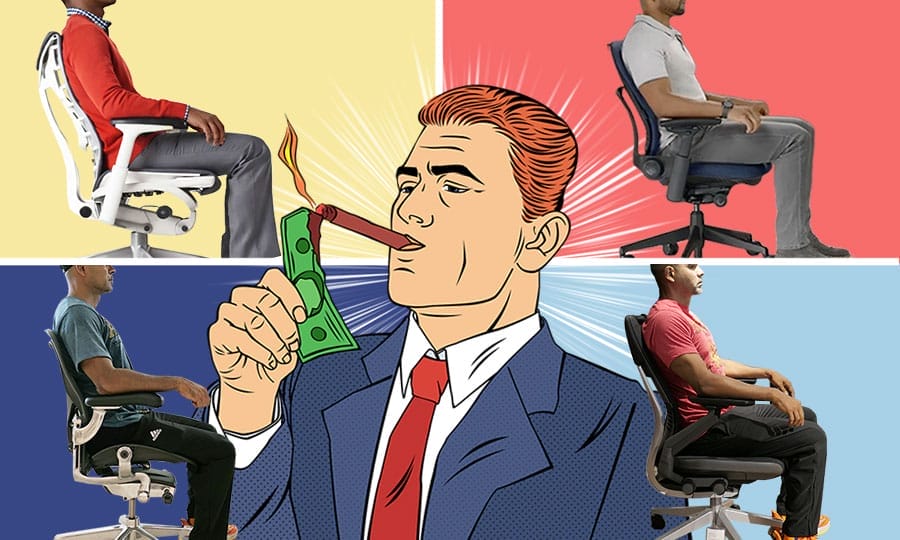
The models widely regarded as the best high-end ergonomic office chairs today cost between $1,100 and $2,100. They’re marketed as premium solutions for back pain, fatigue, and productivity loss during long desk-workdays — but do they actually deliver meaningfully better support than cheaper ergonomic chairs?
The short answer: not in the way many buyers expect.
Premium ergonomic office chairs priced over $1000 rely on the same core support concepts as more affordable models: adjustable lumbar support, adjustable armrests, and a reclining backrest designed to support neutral sitting postures.
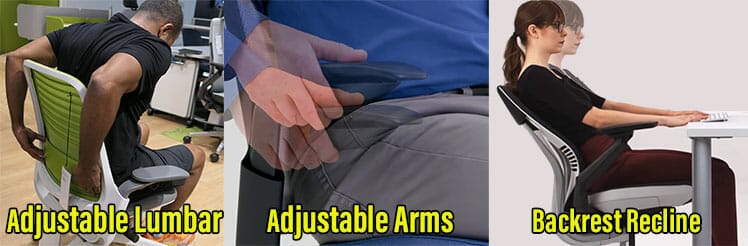
This distinction matters because it turns vague assumptions about “ergonomics” into objective factors you can evaluate.
Spoiler: Paying more does not unlock “medical-grade” back support. Instead, higher prices typically reflect better build quality, longer warranties, more refined materials, and brand prestige.
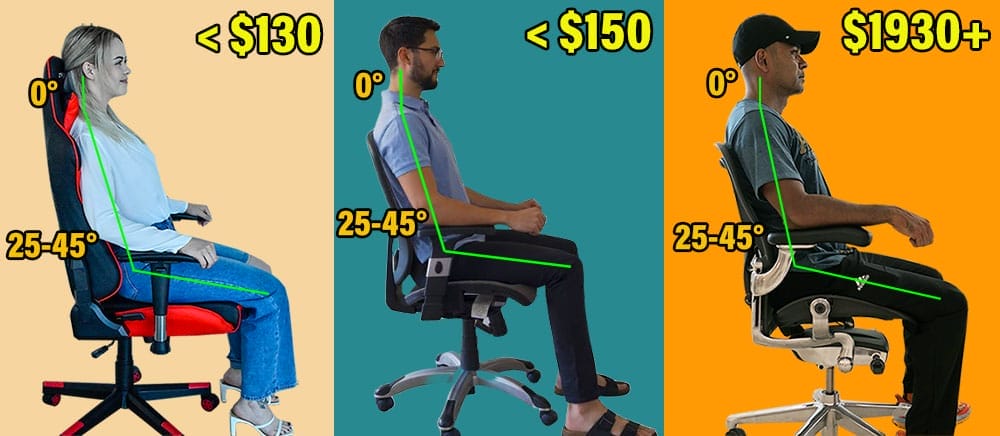
But do these extras justify premium pricing?
To answer that question, I’ve personally tested each chair in this review, evaluating them both objectively (neutral posture support) and subjectively, noting the psychological or experiential extras each model uses to justify its cost.
Best Elite Ergonomic Chairs
I found that with proper sitting technique, every chair reviewed here is capable of supporting clean, comfortable neutral working postures.
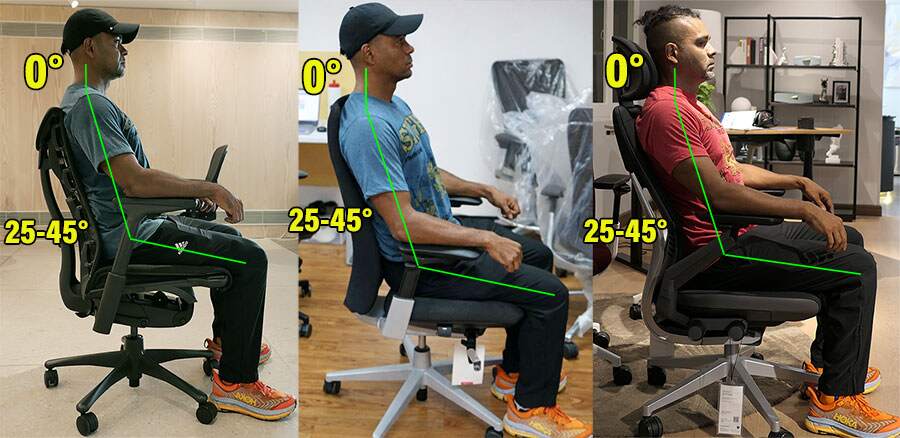
That baseline alone, however, does not justify a four-figure price tag.

Below, we examine the practical advantages each chair offers beyond neutral posture support and long warranties — and whether those differences meaningfully justify their premium prices.
| Chair & Rank | Pros | Cons | Price |
| 1. Herman Miller Aeron | Suspension mesh promotes balanced, neutral posture | Limited recline and bladed seat edges force strict postures | $1930+ from Herman Miller |
| 2. Herman Miller Embody | Distinctive upper-back support creates a suspension-like feel | Tricky to configure; limited lumbar support | $2045+ from Herman Miller |
| 3. Steelcase Gesture | Excellent build quality and versatile arm system | No functional updates since 2013 | $1,532 on Amazon |
| 4. Herman Miller Mirra 2 | More forgiving and adjustable alternative to the Aeron | Fewer standout features compared to flagship models | $1465+ from Herman Miller |
| 5. Steelcase Leap | Padded, flexible alternative to the Aeron | No major functional updates since 2006 | on Amazon |
| 6. Haworth Fern | Strong build quality with generous seat padding | Lumbar support sits low and feels overly aggressive | $1,505 on Amazon |
Herman Miller Aeron
$1930+ from Herman Miller | Rated #1
The Aeron forces clean, neutral sitting through its high-tension suspension mesh and fixed seat pan, which naturally keep the body upright and balanced.
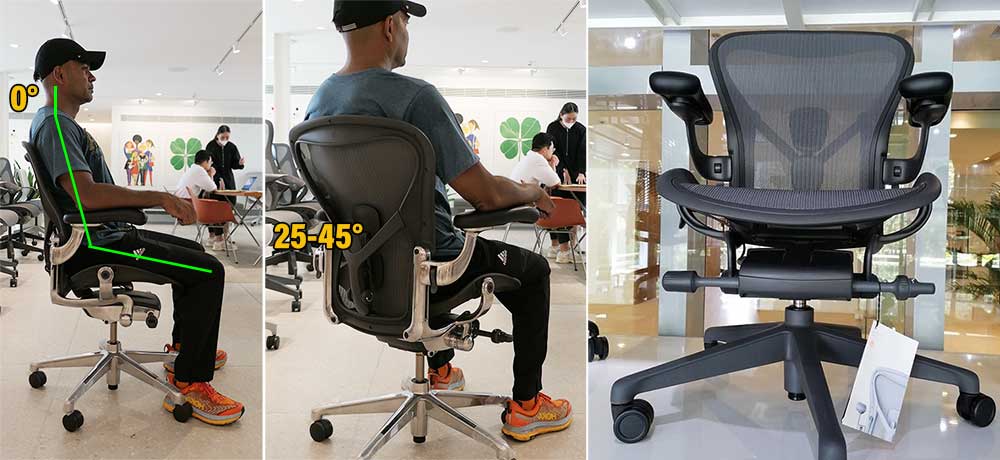
For desk work productivity, upright, well-aligned postures over long work sessions should, in theory, reduce musculoskeletal strain and preserve more energy for focused cognitive work.
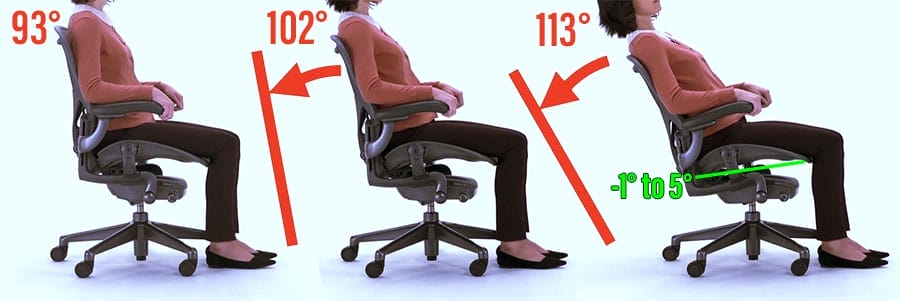
That said, the Aeron achieves this with functional restraint — an approach that may leave first-time buyers underwhelmed, given the price.
Key takeaway: If neutral posture support is your only goal, you can spend less. The Aeron’s real value lies in its reliability, exceptional mesh, 12-year warranty, and iconic design — not in an expansive or flashy feature set.
Aeron at a Glance
ChairsFX Rating: 4.5 out of 5.0 stars
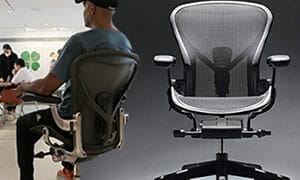
- Concept: adaptive mesh designed to keep the body balanced in neutral sitting postures
- Key features: 8Z Pellicle mesh, forward seat tilt, two lumbar support options
- Size range: three sizes (A, B, C) fitting users 4’10” – 6’6″, up to 350 lbs
- Warranty: 12-year manufacturer warranty
- Easy to use: The suspension mesh naturally guides users into clean, neutral postures.
- Forward tilt: One of the few chairs that allows a downward-sloping seat (supports active, forward-leaning postures).
- Configurable builds: Multiple frame finishes, lumbar options, and size variants are available.
- Limited ‘wow’ factor: Delivers function over flair, with few experiential extras.
- Restrictive seat design: Hard, bladed seat edges force users to sit with planted feet at all times.
- Narrow recline range: The limited 93°, 102°, and 113° recline enforces perpetual upright work postures.
- Outdated armrests: 3D adjustability is limited versus modern multi-axis (4D–6D) designs.
Aeron Remastered vs Aeron Gaming Chair: The Aeron Gaming chair is a preconfigured Aeron Remastered with Onyx Frame, Posturefit back support, 3D arms, and full tilt controls (available in sizes B and C).
Highlight Features

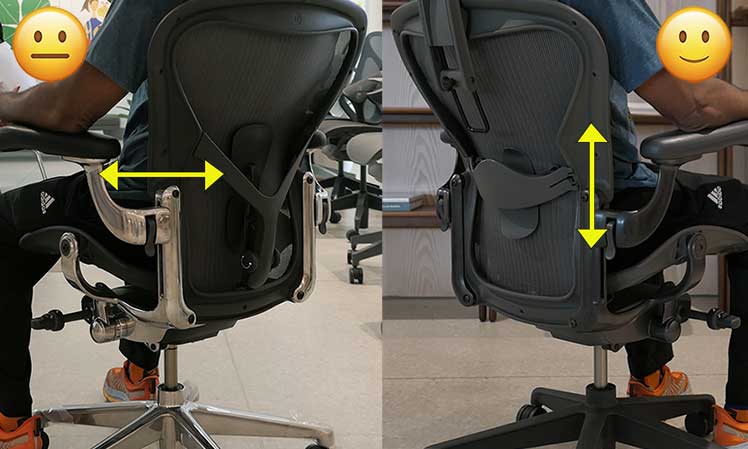
The alternative is a height-adjustable sliding lumbar pad. Position it slightly above the beltline to match your natural lumbar curve. Because it allows more precise fit, I generally recommend the sliding lumbar as the safer option. Learn more:
Learn more: Aeron Posturefit Vs Lumbar Pad Comparison
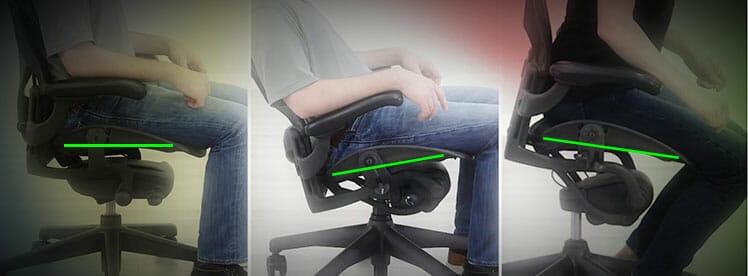
You can also merge seat and backrest motions into a synchronous tilt: as you recline, the seat tilts up by 5°. You can also tilt the seat down by -1° to support a forward lean. These angles keep the thighs parallel to the floor through all recline modes.
Features Summary
- Synchro-tilt: seat pan angle -1° to 5°; backrest 93°, 102°, 113° recline
- Forward tilt: slope the seat pan angle downward from -1° to 5°
- Upholstery: 8Z Pellicle mesh (eight zones of varying tension)
- Seat: adjust height; limit tilt range; adjust tilt tension; sync-tilt with the backrest.
- Armrests: 3D adjustable (height, width, pivot).
- Warranty: 12 years.
Sizing
The Aeron comes in three sizes:
| Aeron Size A | Size B | Size C | |
| Seat | 19″ (W) x 15.75″ (D) | 20″ (W) x 17″ (D) | 21.5″ (W) x 18.5″ |
| Backrest | 20.25″(W) x 21″ (H) | 21.5″ (W) x 22″ (H) | 22.75″(W) x 23″ (H) |
| Seat Height | 14.75″ to 19″ | 16″ to 20.4″ | 16″ to 20.5″ |
| Size Rating | 4’10” to 5’9″; 300 pounds | 5’2″ to 6’6″; up to 350 pounds | 5’2″ to 6’6″; up to 350 pounds |
Aeron Chair Advice
For users who want a durable, professional work chair that enforces clean sitting posture, the Aeron is a strong choice.
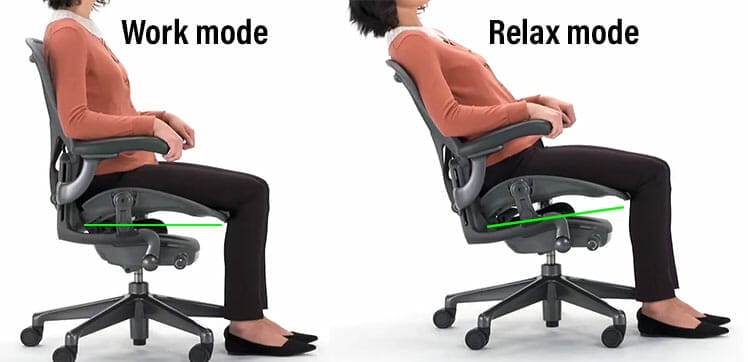
By contrast, users seeking more visual flair and a broader range of dynamic adjustments should consider another model.
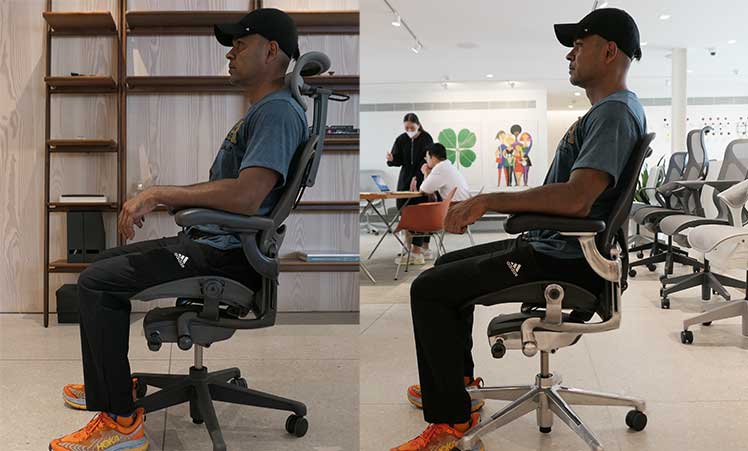
Final verdict: The Aeron’s mesh construction, bladed seat edges, and limited recline consistently enforce clean, neutral sitting postures. Although this delivers superb musculoskeletal support, it may feel too restrictive for some users.
Aeron from Herman Miller $1930+
Learn more: Aeron Remastered Review | Aeron Gaming Chair Review.
Herman Miller Embody
$2045+ from Herman Miller | Gaming edition $2045 | Rated #2
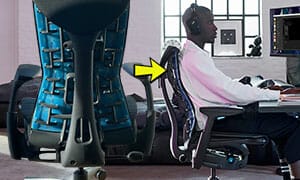
Unlike standard lumbar-powered chairs, the Embody prioritizes upper-back support with an adaptive ‘Pixelated’ backrest. Its height is fixed; you can only adjust its upper and lower angles.
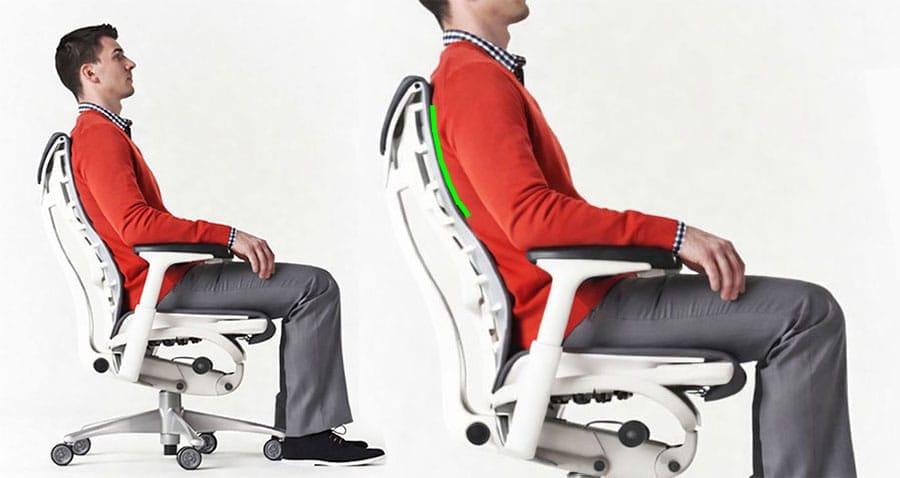
Users must adjust the upper backrest angle to “cup” the thoracic curve. This creates a ‘suspension’ effect that holds the torso upright – without muscular effort. In my tests, this works spectacularly.
In lumbar-driven chairs, the user still has to engage back muscles to remain upright. In contrast, the Embody genuinely feels like it suspends the torso up against gravity, making neutral sitting feel effortless.
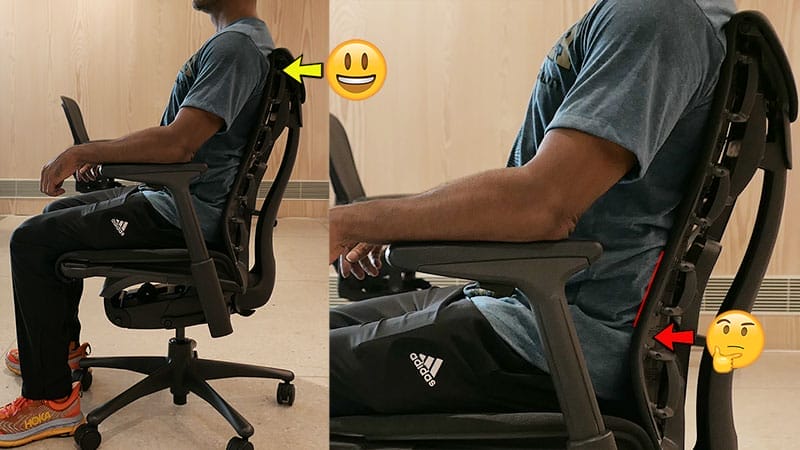
The major downside is the built-in lumbar support. Proper lumbar support should sit just above the beltline, yet the Embody’s lumbar element has no height adjustment — only angle adjustment. For my body size, it sat roughly two inches too low, rendering it ineffective.
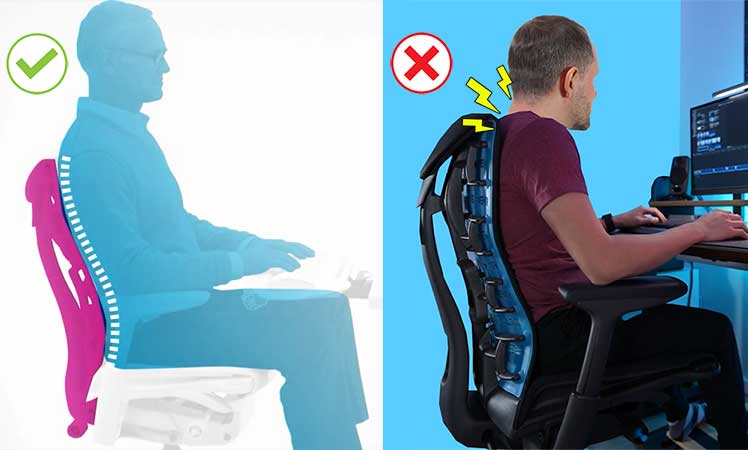
Key takeaway: this is a high-risk, high-reward chair. For users who can successfully tune the upper-back “cup,” it offers a uniquely powerful support experience. For those who can’t, the unconventional design may do more harm than good.
Embody at a Glance
ChairsFX Rating: 4.0 out of 5.0 stars
- Concept: Upper-back support that stabilizes the torso rather than emphasizing lumbar pressure
- Highlight features: Flexible pixelated backrest, wide flat seat pan, exceptionally wide armrest adjustment range
- Size rating: 5’4″ to 6’2″; 300 lbs
- Warranty: 12 years
- Gorgeous Pixelated backrest design
- Wide, flat seat pan accommodates varied sitting positions
- Excellent build quality
- Delivers exceptional back support – when properly configured and used
- The built-in lumbar support sits too low for average sizes, and is only angle adjustable
- The upper back support concept has a steep learning curve
- The armrests are only 2D adjustable
- Some users may find the thinly padded spring seat too firm
Standard vs. Embody Gaming Edition: Both versions share the same ergonomics and adjustment mechanisms. The Gaming Edition adds an extra foam layer to the seat and backrest and is offered in six styles.
Embody Specifications
Innovative backrest aside, I have two quibbles: first, lumbar support is angle-adjustable but lacks height adjustment. Second, the armrests are limited to 2D movement.
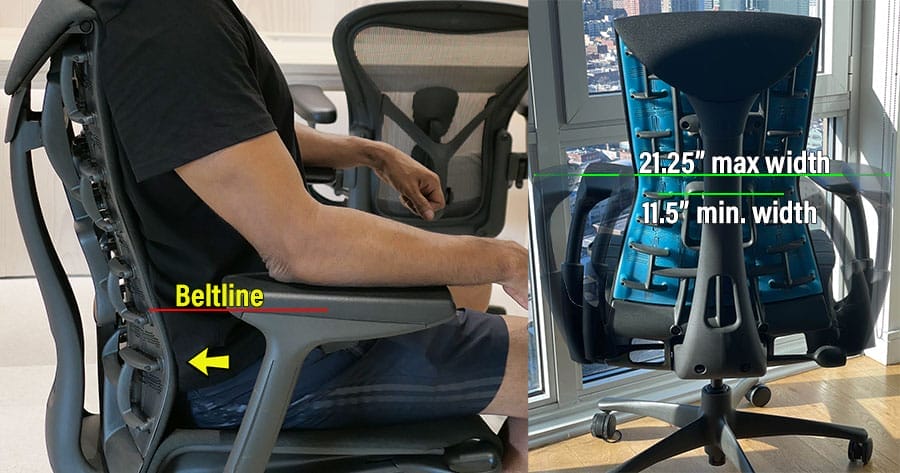
Both omissions stand out given the chair’s premium positioning.
Functionality
- Recline: backrest 94° to 120° with 3-position tilt limiter
- Seat sync-tilt: passive seat sync (upward tilt) during reclines
- Pixelated back support: flexible support matrix anchored to a central spine.
- BackFit angle adjustment: adjust the top and bottom backrest curves to fit your spine
- Seat adjustments: adjust height and depth.
- Armrests: 2D-adjustable (6-inch vertical and 6-inch horizontal range)
- Warranty: 12 years
- Seat: 21.25″ (W) x 15″-18″ (D)
- Backrest: 14″ (W) x 23.5″ (H)
- Armrests: 11.5-21″ width range; 4-8.75″ height range.
- Seat height: 16-20.5″
- Size rating: 5’4″ to 6’2″; 300-pound weight capacity
Embody Advice
Like many cheaper chairs, the Herman Miller Embody supports crisp neutral postures. What sets it apart is its upper-back–first support concept, which may justify a premium for some users.
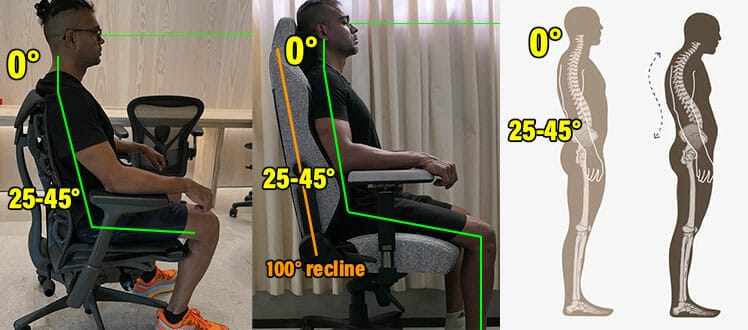
For example, compared with my lumbar-powered Secretlab Titan Evo, the Embody requires less conscious effort to stay upright. However, the Titan is easier to configure and more versatile.
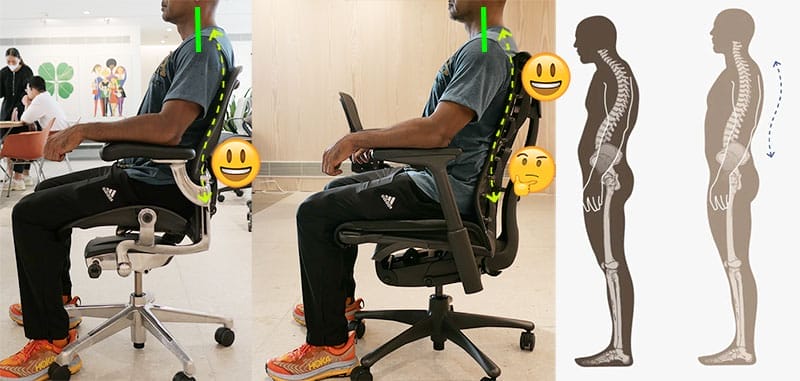
Versus the Aeron, the differences are less pronounced. Both chairs produce near-ideal neutral postures. The Aeron’s mesh creates a similar suspension effect, but requires less adjustment precision to achieve proper support.
Verdict: Ergonomic beginners may feel confused — or disappointed — by the Embody’s unconventional support concept. Those who manage to dial it in, however, will understand why the chair has such a devoted following.
Learn more: Detailed Embody Functionality Review
Embody Classic from Herman Miller $1880+
Gaming Editions: $2045 from Herman Miller (6 styles)
Steelcase Gesture
$1,532 on Amazon | Rated #3
The Steelcase Gesture was introduced in 2013. Aside from minor cosmetic or component changes, it has not undergone any major functional redesigns since its launch.
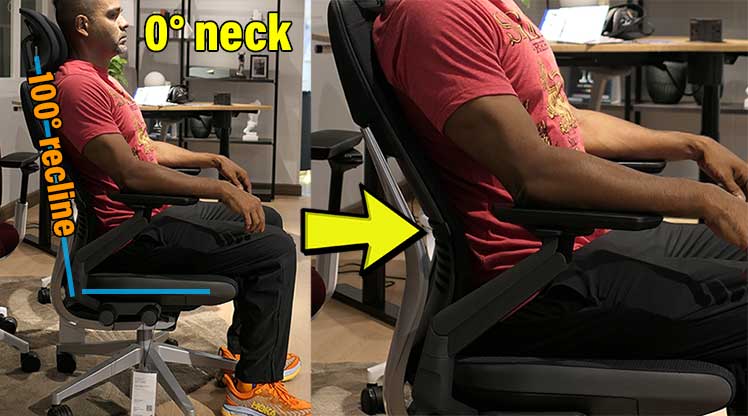
By 2025 standards, it’s a conventional lumbar-powered office chair – dressed up with premium features like a flexible backrest and synchro-tilt.
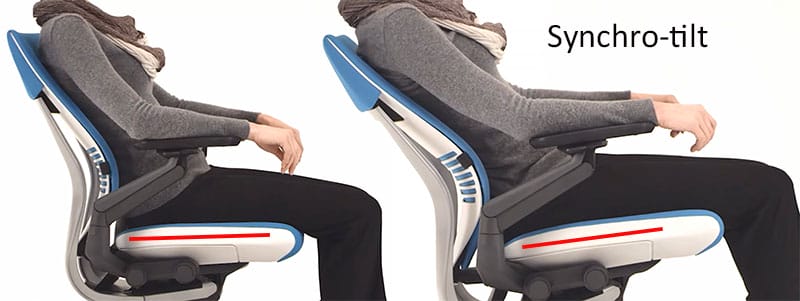
A closer look, however, reveals some odd design decisions (like an aggressive built-in lumbar curve and a subtly downward-sloping seat).
Key takeaway: The Gesture is a standard lumbar-powered chair built on a static 2013 design. Its premium price reflects build quality, warranty, and brand stature – not ongoing innovation.
Gesture at a Glance
ChairsFX Rating: 4.0 out of 5.0 stars
- Concept: Lumbar-powered support with an adaptive backrest and highly articulated armrests
- Highlight features: 3D LiveBack backrest that flexes with movement; 5D armrests with full 360° rotation
- Size rating: 5’4″ to 6’2″; up to 400 pounds
- Warranty: 12 years
- Easy to configure and maintain clean, dynamic neutral postures
- The adjustable seat depth accommodates a wide range of body sizes
- Cheaper than Herman Miller’s flagship chairs
- No meaningful functional updates since its 2013 debut (over a decade without evolution)
- Despite extensive adjustability, the armrests do not support cross-device use as well as newer 6D designs
- Fabric-upholstered seat absorbs sweat and dust, requiring periodic deep cleaning over time
- Built-in (non-adjustable) backrest curve can feel overly aggressive and may not suit all body types
- Mild downward seat slope can create a subtle “sliding forward” sensation for some users
Gesture Specifications
There are three aspects of this chair that may frustrate buyers (given its premium price). First, in addition to the height-adjustable lumbar support, the Gesture has a built-in, non-adjustable lumbar curve.
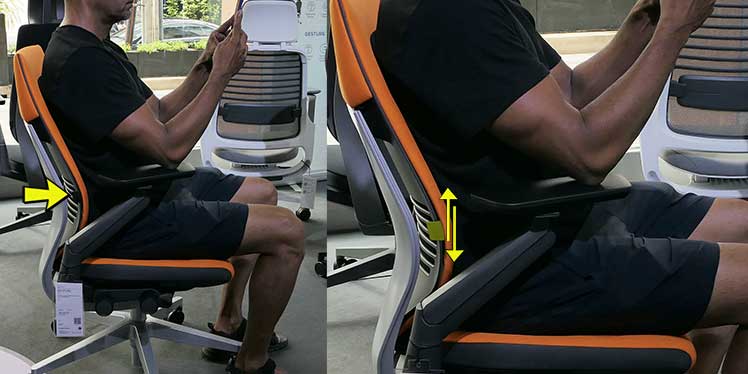
The built-in curve works reasonably well for my 5’9″ frame. However, shorter or taller users may find it either too aggressive or poorly positioned, with no way to fine-tune it.
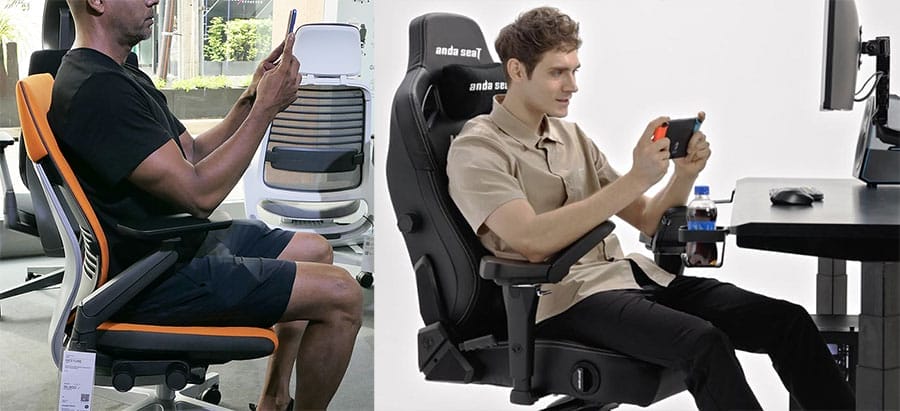
Second, the 360° rotational armrests — marketed at launch as “mobile-compliant” — have not evolved in 12 years. In the absence of functional updates, they now lag behind modern multi-axis (6D) armrest designs found on newer chairs, such as the AndaSeat Kaiser 4.
Third, the seat pan has a subtle downward slope that isn’t immediately noticeable. Over time, however, it can create a mild sensation of sliding forward in the chair.
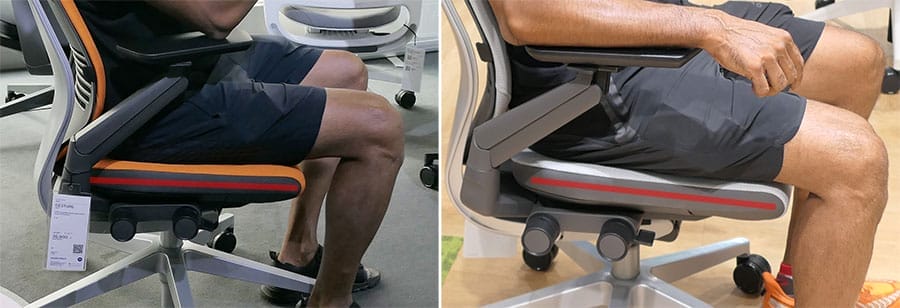
This might be an intentional ergonomic choice, rather than a flaw. However, I found it annoying and distracting — not expected in such a pricey chair.
Key takeaway: With no substantive updates in over a decade, none of the Gesture’s limitations have been addressed. For some buyers, this may raise concerns that its design is static – reliant on reputation, rather than ongoing development.
Functionality
- Synchro-tilt: seat angle 1°; backrest recline from 98° to 116°
- Seat: height and depth adjustments.
- Armrests: 4D 360° rotational armrests. Height range 7.25-11.5 inches; width range 10.25-22.5 inches.
- Back support: adjustable lumbar support; adaptive 3D Live Back system; 3-position seat and backrest tilt lock.
- Warranty: 12 years.
- Seat width x depth: 19.25″ (W) x 15.75 to 18.75″ (D)
- Backrest height x width: 24″ (H), 16.25″ (W)
- Floor to seat range: 16-20.5″
- Chair height: 38.5-43.5″
- Size rating: 5’4″ to 6’2″; up to 400 pounds
Gesture Chair Advice
The Steelcase Gesture does a solid job supporting neutral postures, with some flaws. For those still considering this chair, I have two pieces of advice:
First, like most high-end ergonomic chairs, the Gesture works better without a headrest. As you can see, in upright reclines, it can push the neck out of neutral alignment rather than supporting it.
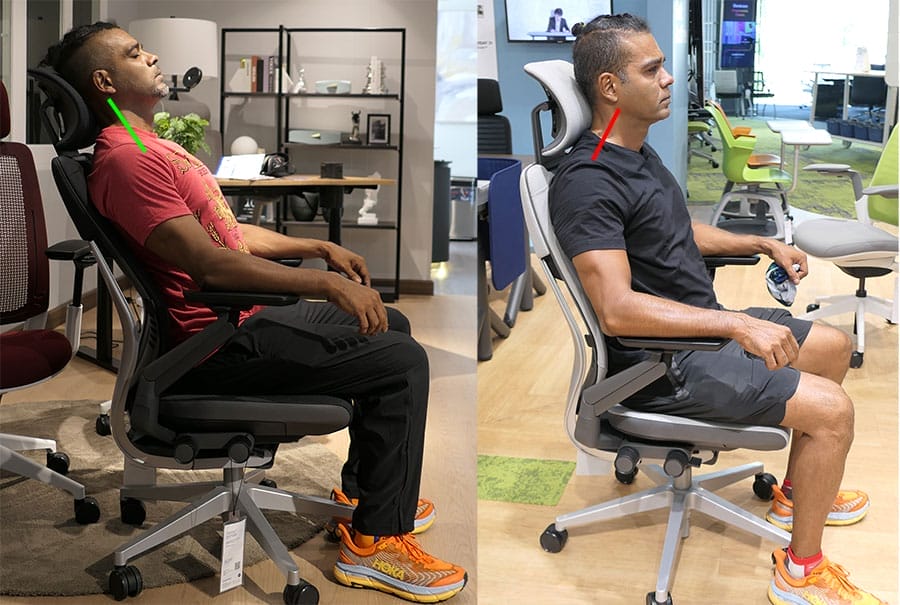
Second, beyond its distinctive styling and complex armrest design, it performs the same core ergonomic function as cheaper chairs like the $449 Steelcase Series 1.
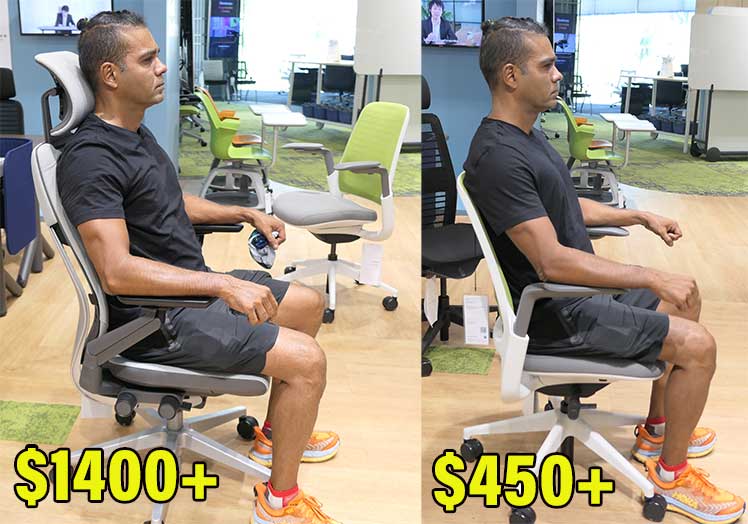
Final verdict: the Gesture’s 12-year-old design brings nothing special for 2025 buyers – beyond its iconic status and 12-year warranty. If your priority is high-quality back support alone, the Steelcase Series 1 — also backed by a 12-year warranty — offers similar support for well under half the price.
Alternative Pick: Steelcase Series 1 on Amazon $449
Herman Miller Mirra 2
$1465+ from Herman Miller | Rated #4
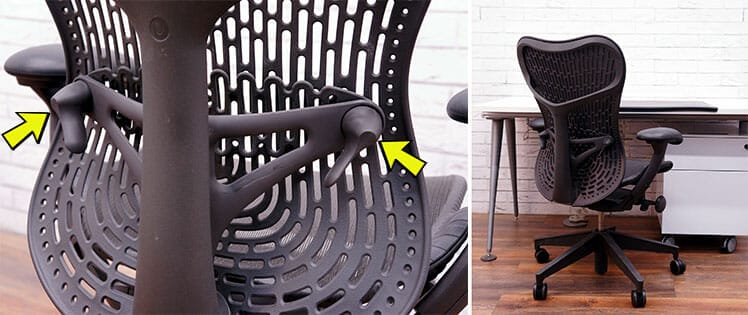
The original Mirra (2003) was a performance-oriented mesh chair positioned below the Aeron Classic. The Mirra 2 debuted in 2013 as Herman Miller’s only office chair with height x depth-adjustable lumbar support.
By 2013, iPhone and Android adoption had reached the mass market, yet most office chairs were still designed around a keyboard-and-mouse, single-monitor workflow.
Mirra 2 responded with more flexible armrests, improved lumbar adjustability, a lighter frame, and flatter, more forgiving seat edges.
Key takeaway: Mirra 2 is the only Herman Miller model to receive meaningful functional updates (reflecting user feedback and evolving desk-work patterns) during that period.
Mirra 2 at a Glance
ChairsFX Rating: 4.0 out of 5.0 stars
- Concept: a more flexible, lower-cost mesh alternative to the Aeron, with greater adjustability.
- Highlight features: height x depth-adjustable lumbar support; adjustable seat lip depth; adaptive upper backrest.
- Size rating: 5’3″ to 6’1″; 350 lbs
- Warranty: 12 years
- Cool, breathable mesh seat
- Adaptive backrest that flexes with movement (available in plastic or mesh-covered styles)
- Height x depth-adjustable lumbar support controls
- Intuitive, easy-to-use adjustments
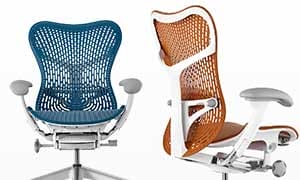
- Available in 8 upholstery styles, with light and dark frame options
- The default armrest width and 2″ adjustable range may feel too wide apart for shorter people
- The mesh-covered Butterfly backrest is harder to keep clean than the solid plastic version
- Although the seat edges are gentler than the Aeron’s, they remain noticeable when sitting with legs spread
- Lacks a standout support concept compared with flagship models
Key Mirra 2 Features
The Mirra 2 chair has the following functional highlights:
There are two backrest options. The Triflex Back is a breathable, flexible plastic unit. The Butterfly Back ($75 extra) adds a thin fabric layer over the backrest frame.
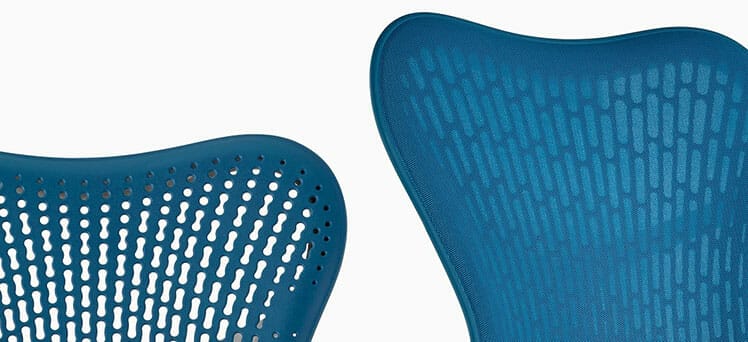
The Butterfly Back works like a suspension membrane, giving the backrest a greater degree of micro-adaptability. On the downside, its (non-removable) mesh membrane makes it harder to keep clean.
Harmonic tilt has two recline modes. In tilt-lock mode, you can lock the backrest at 95°, 99°, or 122°. In free recline mode, you get a range of 94.3° to 106.8°.
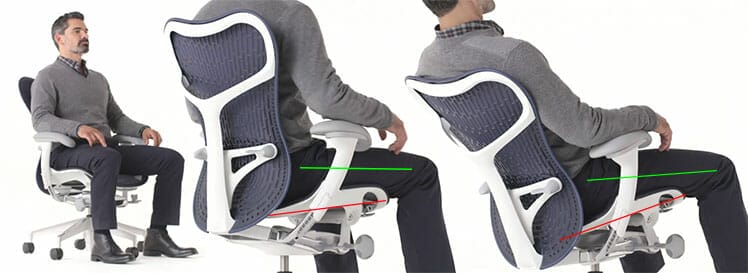
Both modes combine with a 5-degree seat tilt. The point of the Harmonic (synchro) tilt is to keep the feet flat and the thighs parallel to the floor.
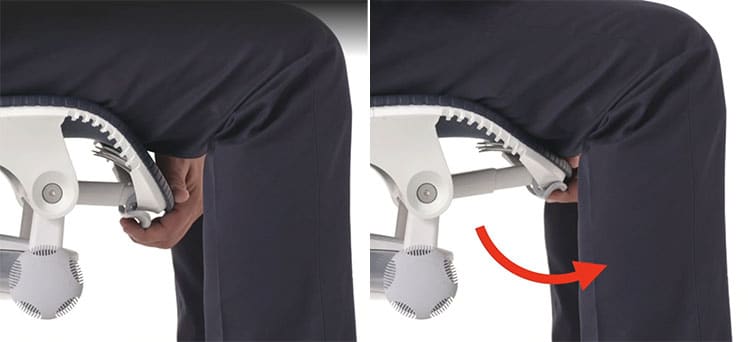
A depth-adjustable seat addon is available for an extra cost. This is useful for sizes shorter than 5’9″. Instead of sliding, the edge curls down to accommodate shorter legs.
Mirra 2 Chair Specifications
Functionality
- Backrest: Harmonic tilt with 3-position tilt-lock (95, 99, 122 degrees); triflex back.
- Synchro-tilt: 5° seat angle tilt + recline range of 94.3 – 106.8°.
- Posturefit lumbar support: 4.5″ height-adjustment range; 1″ depth adjustment.
- Seat: 5° seat angle tilt; height and depth adjustment.
- Armrests: 4D adjustable (5″ height range, 2″ width range)
- Upholstery: Airweave mesh over a flexible plastic frame.
- Seat width x height: 19.25″ (W) x 16.25-18″ (D)
- Backrest (mid-back): 21″(W) x 23″ (H)
- Floor to seat range: 16-20.5″
- Size rating: 5’3″ to 6’1″; maximum weight capacity 350 pounds
Mirra 2 Verdict
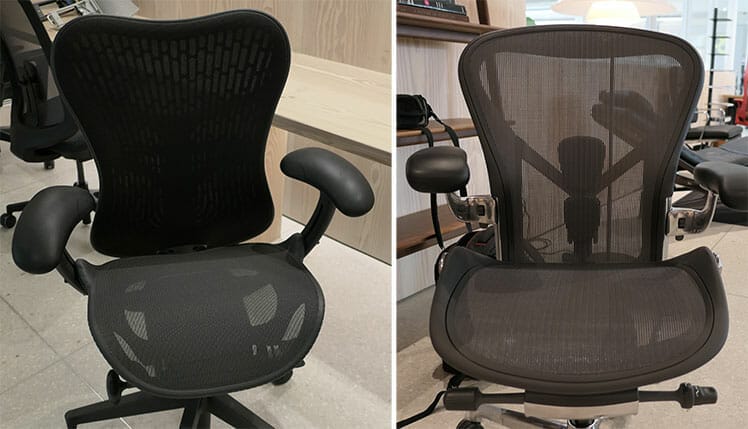
The Mirra 2 is a cheaper, gentler version of the Aeron. It has a similar mesh seat, but without the Aeron’s hard, bladed edges. It’s also more adjustable: 4D arms, 2D lumbar support, adjustable seat depth.
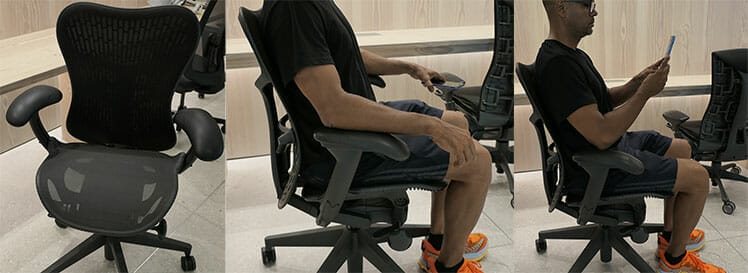
Mirra 2 verdict: A solid mesh alternative to the Aeron with broader adjustability. While it lacks the Aeron’s iconic status, it delivers comparable support and carries the same 12-year warranty.
Mirra 2 from Herman Miller $1465+
Learn more: Mirra 2 vs Other Herman Miller Chairs
Steelcase Leap
on Amazon | Rated #5
Herman Miller introduced the Aeron in 1994. Steelcase responded with the Leap in 1999, followed by a modernized update (the Leap V2) in 2006.
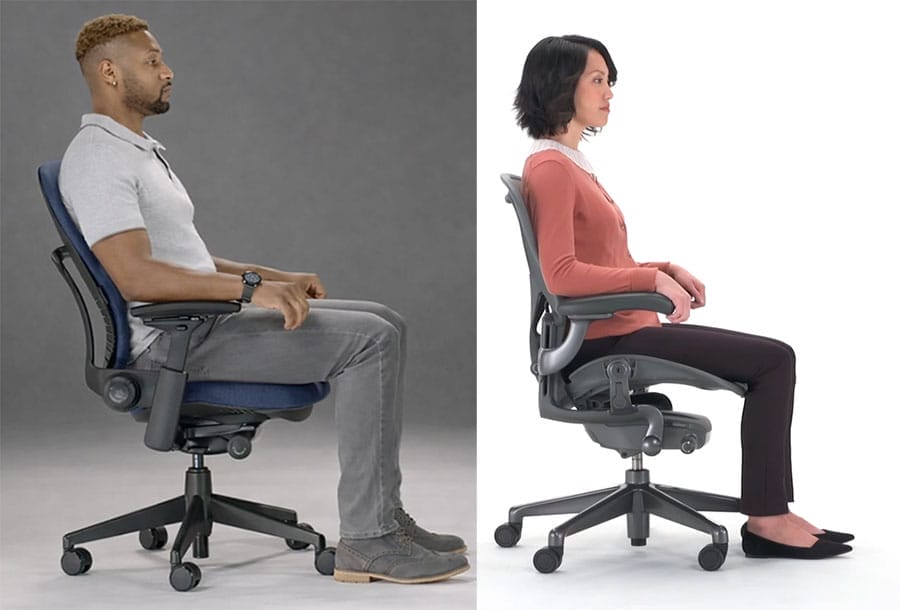
Functionally, both Leap and Aeron chairs are designed to support neutral working postures through adjustable lumbar support, adjustable armrests, backrest recline, and synchronized seat-tilt mechanisms.
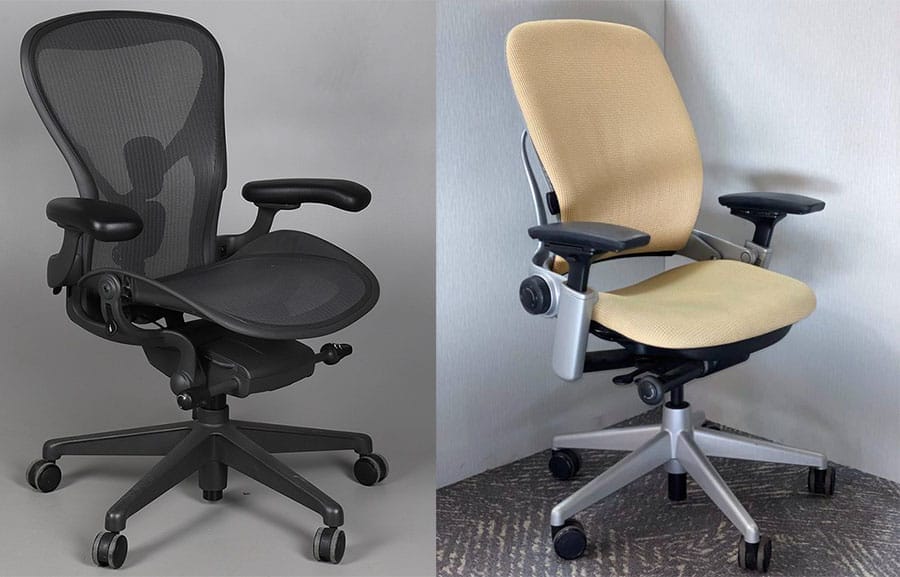
The Leap differs with a more forgiving seat. Unlike the Aeron’s bladed seat edges, its padded seat design allows greater freedom of movement.
Leap V2 at a Glance
ChairsFX Rating: 4.0 out of 5.0 stars
- Concept: a traditional lumbar-powered office chair with a padded fabric seat and backrest
- Highlight features: 3D LiveBack backrest that flexes with movement; depth-adjustable seat pan
- Size rating: 5’4″ to 6’2″ tall; 400 lbs
- Warranty: 12 years
- Easy to configure and use
- Comfortable for extended working sessions
- Includes all core adjustments needed for healthy neutral posture
- Excellent build quality backed by a 12-year warranty
- No meaningful functional updates since 2006, leaving the design effectively frozen in time
- Dated, cubicle-era aesthetics may feel uninspiring in modern home offices
- Many newer chairs now offer comparable posture support for significantly less money
- The fabric seat absorbs sweat and dust, requiring periodic deep cleaning
- The fixed built-in backrest curve may feel overly aggressive, and won’t suit all body types
Steelcase Leap Specifications
Minus the Gesture’s 360° arm system, the Leap offers similar core features: height-adjustable lumbar support, multiple recline positions, and a synchronized seat pan that tilts upward by about 1° in deep recline.
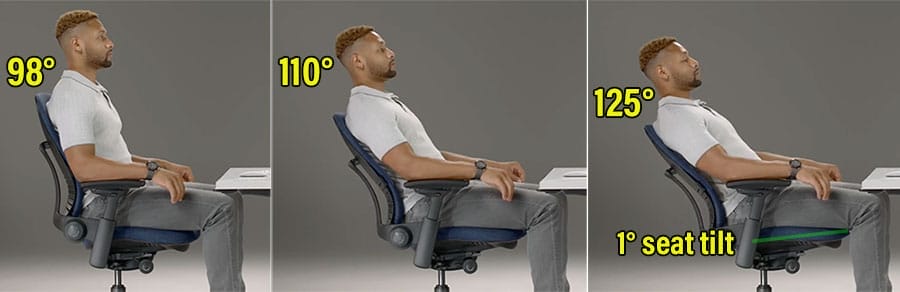
Summary of Leap V2 specifications:
Functionality
- Recline & Sync-tilt: backrest 98, 110°, 125°; 1° seat sync tilt.
- Seat: height and depth (3″ range) adjustments.
- Armrests: 4D adjustable (height, width, depth, and pivot)
- Backrest: 3D LiveBack system that flexes to follow the natural movement of the spine.
- Back support: height-adjustable lumbar support with optional depth adjustment.
- Warranty: 12 years on parts, lifetime on the frame.
- Seat width x depth: 19.25″ (W) x 15.75-18.75″ (D)
- Backrest width x height: 18″ (W), 25″ (H)
- Seat height: 16-20.5″
- Arms: 7-11″ height range
- Size rating: 5’4″ to 6’2″ tall; up to 400 pounds
For larger users, there’s also a Leap V2 Plus, with a larger frame, wider seat, and 500-pound weight capacity.
Steelcase Leap Verdict
The Leap is a solid ergonomic chair with good adjustability, a flexible, adaptive backrest, a 12-year warranty, and Steelcase’s design pedigree. The only technical quibble I found was the non-adjustable built-in lumbar curve – some users may find it overly aggressive.
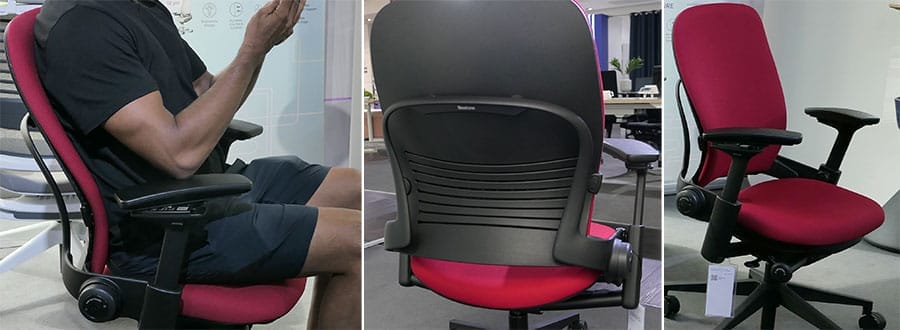
Although the built-in curve fits my 5’9″ frame well enough, it won’t suit everyone. The height-adjustable lumbar slider allows some fine-tuning, but the fixed backrest curve remains the dominant factor in how the chair’s lumbar support feels.
My other quibble is a lack of development. In 1999, a chair with genuinely adjustable back support was a standout concept. Today, it’s expected.
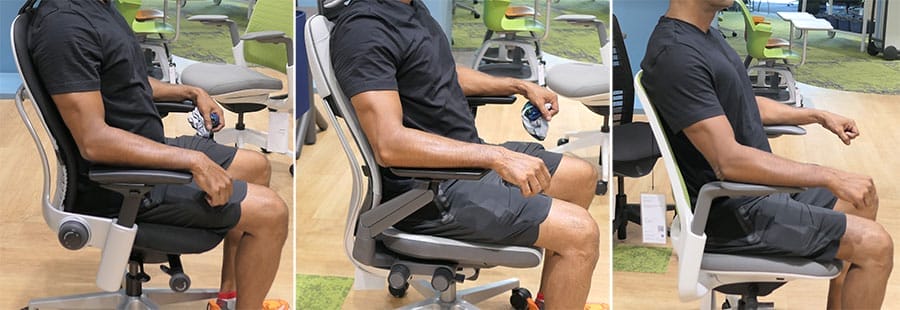
Final verdict: The Leap is solid, reliable, and comfortable — but remains a 2006 design with no significant functional updates since.
Learn more: Steelcase Leap ergonomic chair review.
Haworth Fern
$1,505 on Amazon | Rated #6
The Herman Miller Embody debuted in 2008 as an ultra-adaptive ergonomic office chair. Steelcase followed with the Gesture in 2013. In 2016, Haworth blended elements of both designs into an ambitious but imperfect hybrid: the Fern.
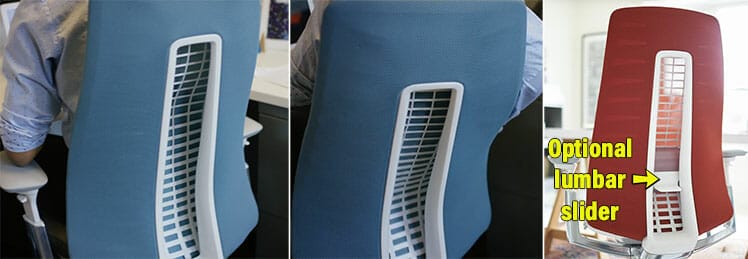
Its backrest flexes in a manner similar to the Embody, while its height-adjustable lumbar echoes the Gesture’s approach. Recline and seat-tilt behavior also borrows from both concepts.
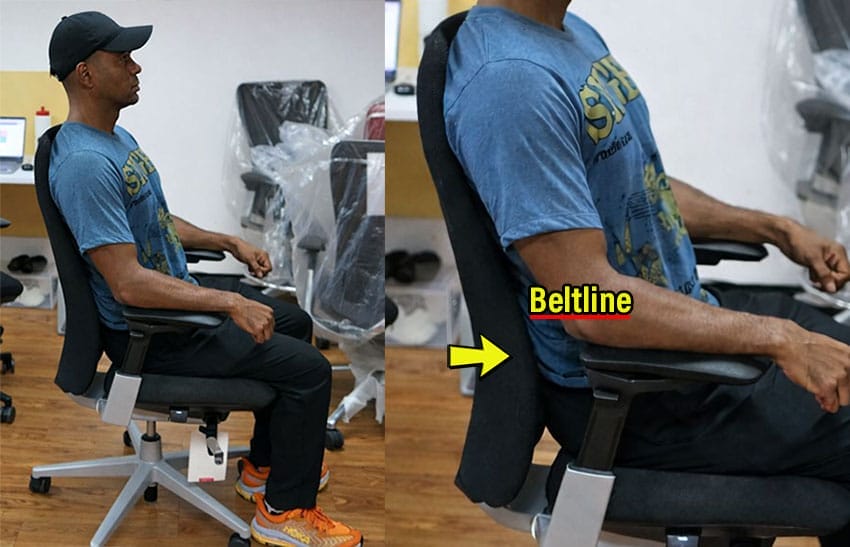
A common complaint (one I share) is the Fern’s lumbar support. The lumbar curve built into the backrest sits too low for my 5’9″ frame, landing roughly 2 inches below my beltline (the optimal target zone).
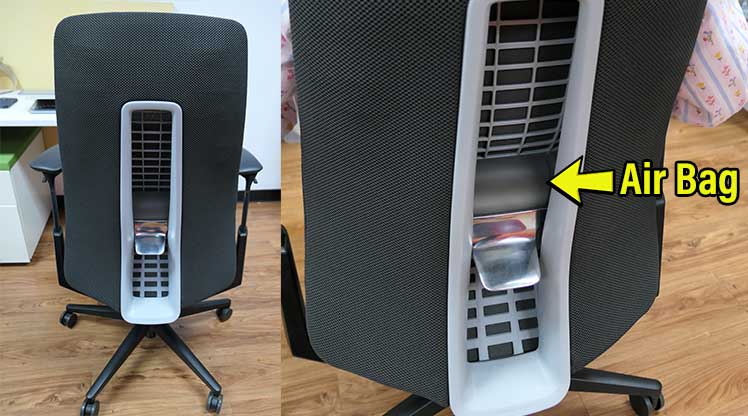
Beyond the built-in curve, there’s also a height-adjustable lumbar. It’s an odd-looking air-bladder with an aggressive depth that is not depth-adjustable. The result is lumbar support that feels simultaneously too prominent and too low to be comfortable.
Haworth Fern at a Glance
ChairsFX Rating: 3.5 out of 5.0 stars
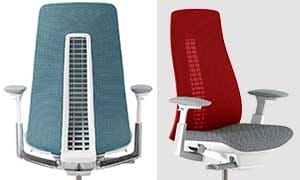
- Concept: a flexible, Embody-inspired backrest paired with a conventional lumbar-powered support system
- Highlight features: ultra-adaptive backrest that visibly flexes with movement; forward seat tilt; contemporary styling
- Size rating: 5’6″ to 6’2″, 325 lbs
- Warranty: 12 years
- Distinctive, modern aesthetics
- Backrest flex extends beyond the mid-back to also support the upper spine
- The only chairs on this list — besides the Aeron — to offer a forward-tilt seat option
- High build quality backed by a 12-year warranty
- The built-in lumbar curve sits too low, promoting anterior pelvic tilt for many users
- The optional lumbar add-on uses an air-bladder design that feels overly aggressive, with no depth adjustment
- Aside from styling and warranty coverage, offers few functional advantages over less expensive alternatives
Fern Specifications
For such an expensive chair, the Fern’s documentation is weak. The Haworth Online Store only gives bare-bones specs. I found the rest scattered across several Haworth PDFs:
Functionality
- Recline: 90-110° (5 lockable positions + tilt tension)
- Synchro-tilt: for each 2° backrest recline, the seat tilts up by 1° (max 110° recline + 10°)
- Forward tilt: 0° to -5° downward seat slope (supports forward leaning active postures)
- Lumbar support: built-in curve; optional lumbar slider with a 3.5″ range.
- Seat adjustments: 3″ depth adjustment; one-button 5° forward tilt mode.
- Armrests: 4D-adjustable with a 40° top cap pivot range
- Warranty: 12 years on parts; 3 years on upholstery
- Seat: 19.9″ (W) x 15.5″-18.5″ (D)
- Backrest: 14″ (W) x 23.5″ (H)
- Armrests: 6.7-11.5″ height range.
- Seat height: 16.5-21.5″
- Size rating: 5’6″ to 6’2″, 325 pounds
Haworth Fern Verdict
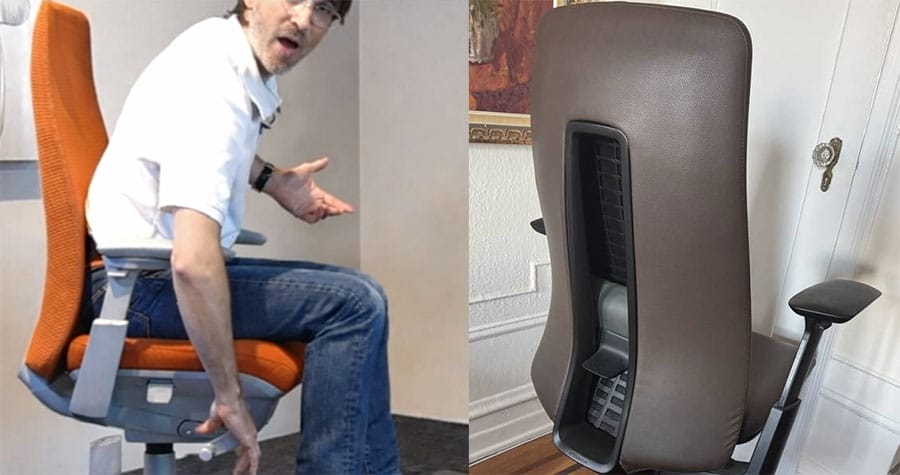
The Fern’s headline feature is its Embody-like, ultra-adaptive backrest. As a visual flourish, the rear cutout makes that flexibility highly visible, drawing attention as the user shifts and moves.
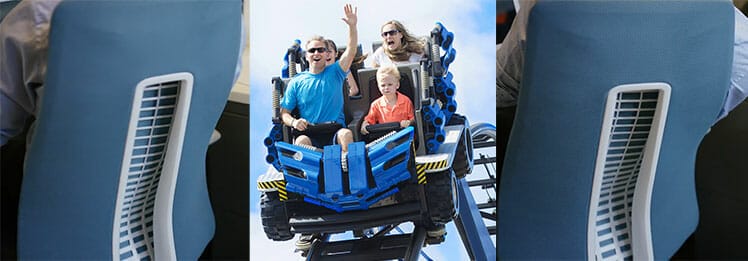
However, the Embody’s backrest flex serves a clear purpose: supporting and “cupping” the upper spine. The Fern’s feels more performative than functionally supportive.
Beyond visual appeal, an ergonomic chair succeeds or fails on posture support. This is where the Fern stumbles. Its built-in lumbar curve is positioned too low, creating an awkward fit that limits effective hip tuck and neutral pelvic alignment.
Compounding this issue, the sliding air-bladder lumbar is overly aggressive, with no depth control. Rather than feeling refined, it comes across as a crude solution layered onto an already compromised lumbar design.
Bottom line: The Fern prioritizes visual flair over functional reliability. In doing so, it overcomplicates lumbar support and delivers a sitting experience that feels risky rather than reliable.
Fully-Loaded Fern on Amazon $1,505
The Amazon version includes: lumbar and seat sliders; forward tilt; 4D arms; 5-position backstop tilt limiter.
Popular Premium Chairs Compared
By request, here are side-by-side comparisons of three widely debated premium chair pairings:
- Embody vs Gesture: flexible upper back support concept vs a lumbar-powered one.
- Steelcase Leap vs Aeron: flexible vs strict neutral posture support.
- Haworth Fern vs Embody: awkward lumbar support vs flexible upper back support concepts.
Herman Miller Embody vs Steelcase Gesture
Both chairs use flexible backrests designed to adapt to the user’s spine as they shift positions. The primary difference lies in how that support is distributed.
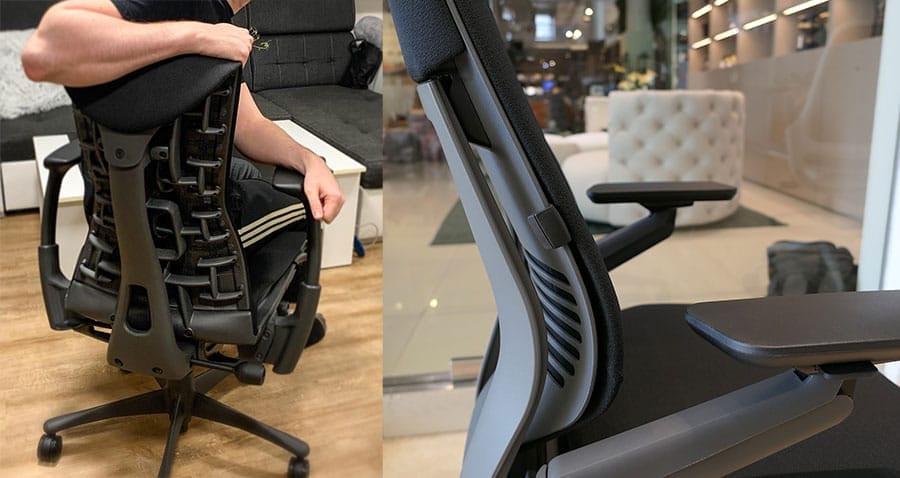
The Embody prioritizes upper-back support, with only minimal, secondary lumbar support.
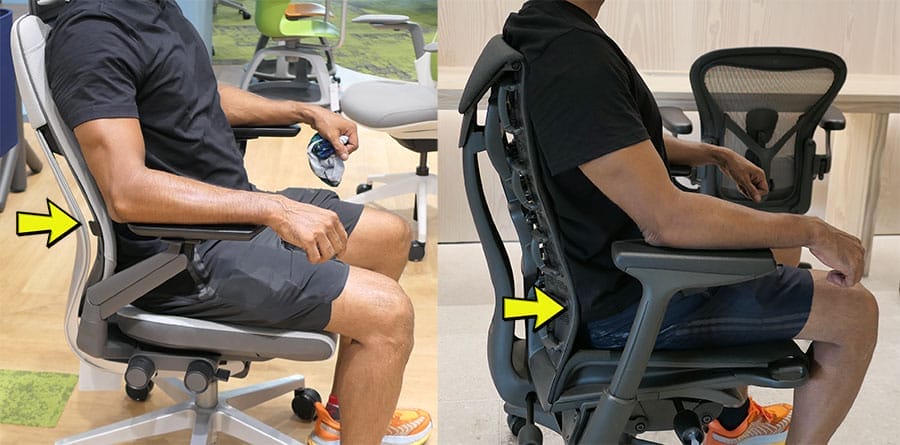
By contrast, the Gesture incorporates a built-in lumbar curve (suited to average-height users), plus a height-adjustable lumbar slider that allows for more targeted lower-back support.
| Feature | Embody | Gesture | Reviewer’s Verdict |
| Release date | 2008 | 2013 | — |
| Support concept | Primarily supports the upper-back curve | Traditional lumbar-focused support with flexible backrest | The Embody ’s upper-back “suspension” effect is unique and works well. |
| Lumbar support | Built-in, angle-adjustable lumbar (minimal) | Built-in lumbar curve with height-adjustable lumbar slider | The Gesture ’s height-adjustable lumbar is more practical for dialing in lower-back support. |
| Armrests | 2D (height and width adjustable) | 360° arms (height, width, depth, and full pivot) | Gesture armrests are more versatile and easier to fine-tune. |
| Recline & seat tilt | 94° to 120° recline; passive auto seat tilt | 98° to 125° recline; synchronized seat tilt (1° in working recline, increasing in deep recline). | Recline and seat tilt feels similar on both. |
| Adjustable seat depth | ~15–18″ (3″ range) | ~15.75–18.75″ (3″ range) | Essentially equal in usable adjustment range. |
| Price | $1880 from Herman Miller | $1,532 on Amazon | — |
Steelcase Leap vs Herman Miller Aeron
Both chairs support crisp neutral working postures, but the Leap’s padded seat is more forgiving than the Aeron’s taut mesh seat with bladed edges.
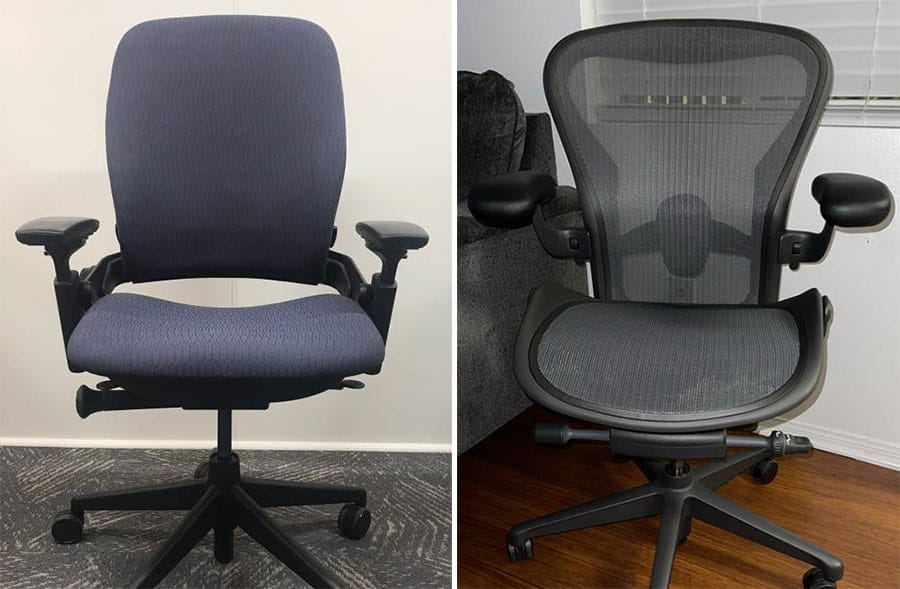
Two other differences stand out. The Leap offers adjustable seat depth, while the Aeron’s seat depth is fixed (though it is available in three sizes).
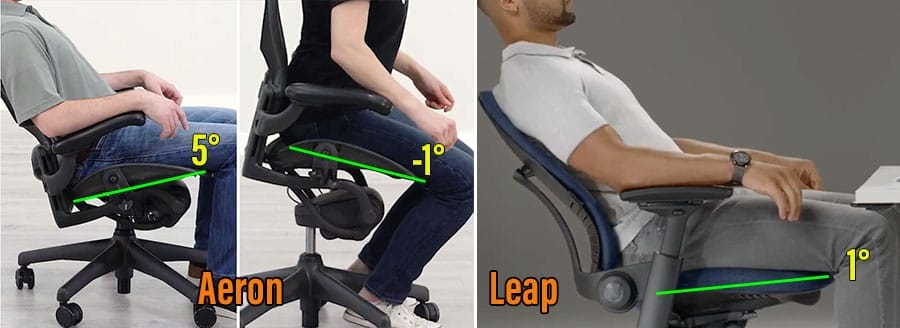
In addition, the Aeron includes a forward-tilt function that angles the seat downward, whereas the Leap’s seat tilt works only in the upward direction during recline.
| Feature | Leap | Aeron | Reviewer’s Verdict |
| Release date | 1999 | 1994 | — |
| Support concept | Padded seat with flexible backrest and adjustable lumbar support | Taut mesh seat designed to enforce neutral posture with lumbar/sacral support | The Aeron ’s suspension mesh feels more evenly balanced, while the Leap relies on a more conventional padded feel. |
| Lumbar support | Built-in curve with depth adjustability and height-adjustable slider | PostureFit SL (sacral support) or height-adjustable lumbar pad | A draw : the Leap’s sliding lumbar and Aeron’s sliding lumbar pad option provide comparable support. |
| Armrests | 4D (height, width, depth, and pivot adjustable) | 3D (adjust height, width and depth) | The Leap ’s armrests offer greater flexibility thanks to their pivoting top caps. |
| Recline & seat tilt | 98°, 110°, 125° recline; 1° seat sync tilt range | 93°, 102°, 113° recline; -1° to 7° seat sync tilt range | A draw : the Leap offers a wider recline range, while the Aeron provides a broader seat-tilt range. |
| Adjustable seat depth | 15.75-18.75″ (3″ range) | Fixed depth (available in 3 sizes) | A draw : both approaches allow effective seat-depth matching to user size. |
| Price | on Amazon | $1805+ from Herman Miller | — |
Haworth Fern vs Herman Miller Embody
The Fern borrows the Embody’s flexible backrest concept, but the two chairs apply it very differently. The Embody emphasizes upper-back support, while the Fern focuses on more traditional lower-back (lumbar) support.
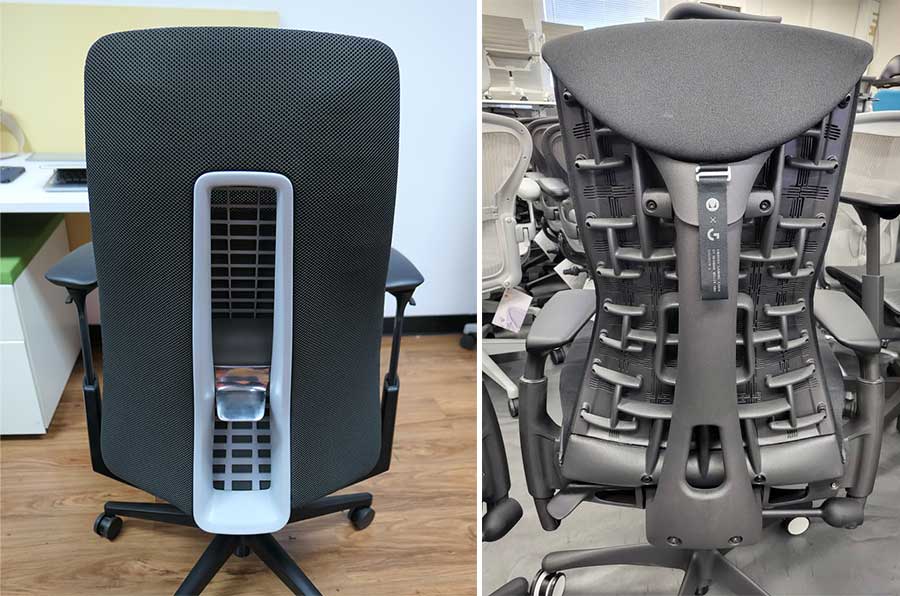
When properly tuned, the Embody’s upper-back “cupping” mechanism works exceptionally well. By contrast, the Fern’s split support approach is clumsy. Its built-in lumbar curve sits too low, while the height-adjustable (fixed depth) lumbar feels too aggressive.
Head-to-head, the Embody feels cohesive and refined, while the Fern feels pieced together — more like an assemblage of components than an integrated design.
| Feature | Embody | Fern | Reviewer’s Verdict |
| Release date | 2008 | 2016 | — |
| Support concept | Primarily supports the upper back curve | Primarily supports the lower-back (lumbar) region | The Embody ’s upper-back suspension effect feels more distinctive and effective than the Fern’s lumbar-focused approach. |
| Lumbar support | Built-in, angle adjustable | Built in curve & height-adjustable slider | Neither works well for me: the Embody’s lumbar sits too low, while the Fern’s is both too low and too aggressive for my 5’9″ (178 cm) frame. |
| Armrests | 2D (adjust width and height) | 4D (height, width, depth, and pivot adjustable) | The Fern ’s armrests are more adjustable and easier to dial in. |
| Recline & seat tilt | 94° to 120° recline; 94° to 120° recline; passive auto seat tilt during reclines | 90° to 110°, 5 lockable positions; 10° seat sync tilt (2:1 ratio) | The Fern has more robust recline and seat tilt functions. |
| Adjustable seat depth | 15-18″ (3″ range) | 16-19″; 3″ range | Effectively even. |
| Price | $1880 from Herman Miller | $1,505 on Amazon | — |
High Prices ≠ Better Back Support
Even at $2,000+, premium office chairs rarely provide objectively better back support. The price largely reflects build quality, warranty length, and finish — not objectively superior ergonomics.
Before paying for those extras, consider these factors to keep expectations grounded:
- Physical Vs Psychological Comfort: Most chairs support spinal alignment, but many premium features primarily enhance perceived comfort and emotional satisfaction.
- Stagnant ergonomic innovations: most high-end chairs use 10-year-old technologies, with no meaningful functional advancements.
- Overemphasized tilt functions: tilting seats are nice to have, but proven less beneficial than walking breaks.
- Healthy habits > fancy chairs: Esports and performance-medicine experts consistently show that movement, exercise, rest, and posture matter far more than the chair itself.
Physical Vs Psychological Comfort
Many researchers study comfort as ‘an absence of discomfort’. Chairs that support healthy neutral posture promote physical (physiological) comfort by reducing spinal misalignments and unnecessary muscular effort.
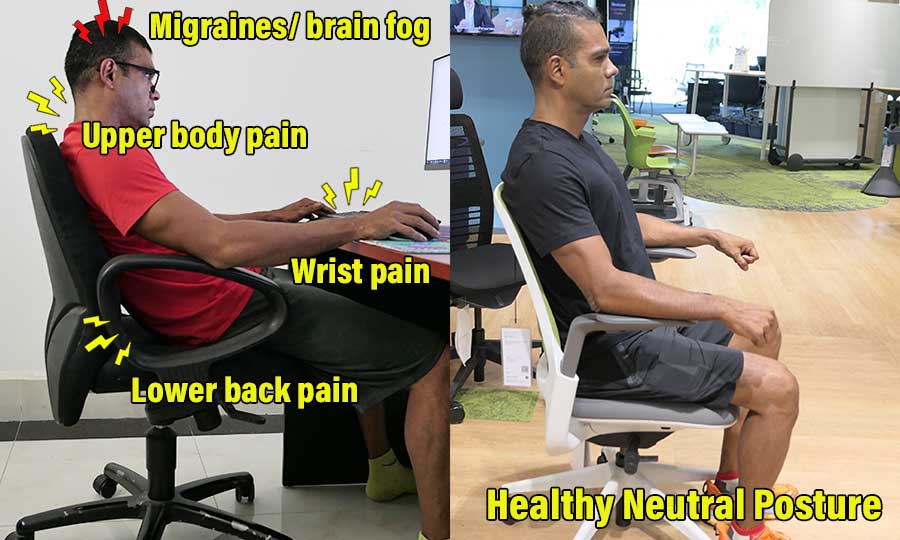
However, research on car seats(1) and aircraft seating(2) shows that comfort has both objective drivers (reduced pain through biomechanical support) and psychological ones.
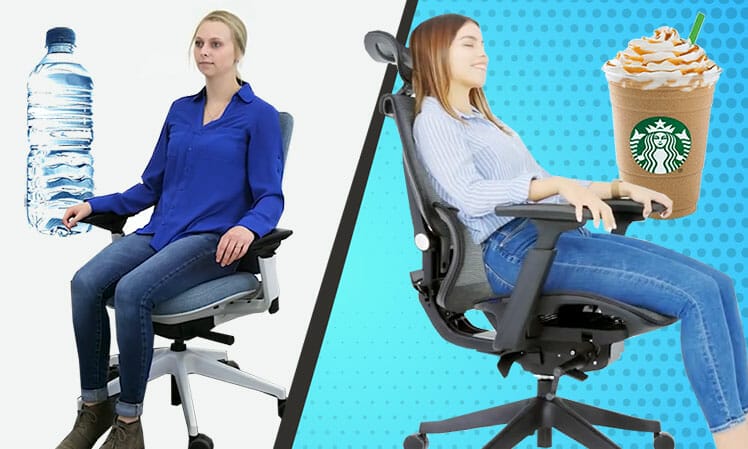
Notably, studies have also found that when users perceive a chair as comfortable, they are more likely to report greater physical comfort — even when objective support remains unchanged.
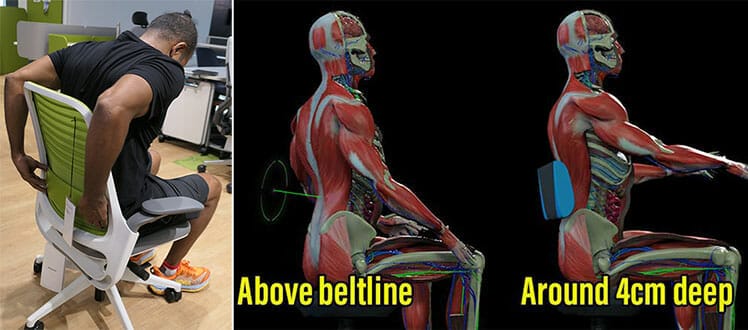
Understanding the distinction between physical and psychological comfort makes it easier to evaluate what a chair can realistically deliver. In short:
Physical Comfort Factors
- Sizing: proportions that fit your height, weight, and leg length.
- Neutral support: lumbar, armrest, and recline support that maintains neutral working postures.
- Lumbar fit & adjustability: the ability to position lumbar support to match your natural lower-back curve (slightly above the beltline).
Psychological Comfort
- Sync-tilt mechanisms: engaging recline and seat-tilt motion (pleasant to use, but not a substitute for movement breaks).
- Upholstery feel: breathable mesh or fabric versus easy-care faux leather.
- Aesthetics: colors and materials that improve the perceived quality of your workspace.
- Build quality & warranty: durability and long warranties that provide reassurance and peace of mind.
Bottom line: The most expensive ergonomic chairs often emphasize luxury features that increase perceived comfort and price, without meaningfully improving physical back support.
The article below links to all cited studies and explains how comfort is evaluated:
Top Office Chairs Use Decade-Old Designs
Herman Miller’s Aeron kicked off the ergonomic seating revolution in 1994. It introduced a then-novel idea: an office chair designed to support healthy, neutral sitting posture rather than passive comfort.
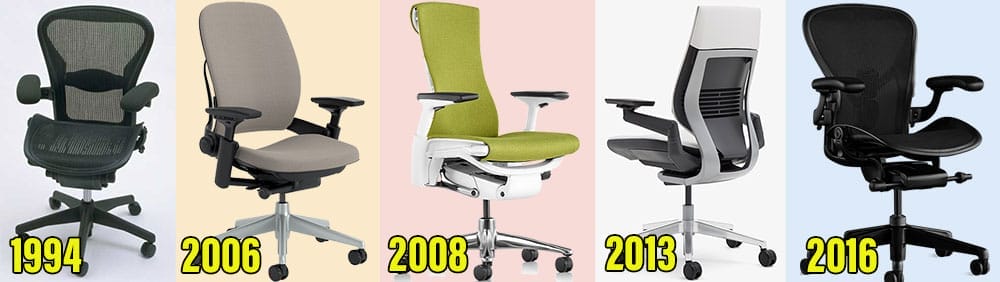
Since then, most chairs covered in this review are based on designs that haven’t seen any functional updates in over a decade.
For example, the last major update to the Steelcase Leap was in 2006. That same year, the world’s first gaming chair was released, Google acquired YouTube, and Facebook started to go mainstream. In 2007, the first iPhone launched.
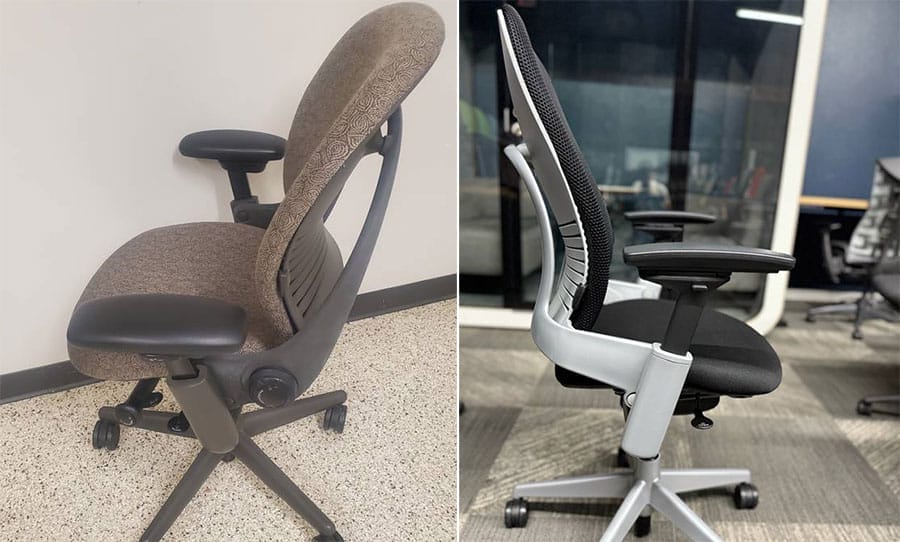
In the 19 years since, desk work has shifted toward constant connectivity, multi-device workflows, and longer seated sessions. The Leap, by contrast, has seen no substantive evolution during that period — making it, functionally, a static product.
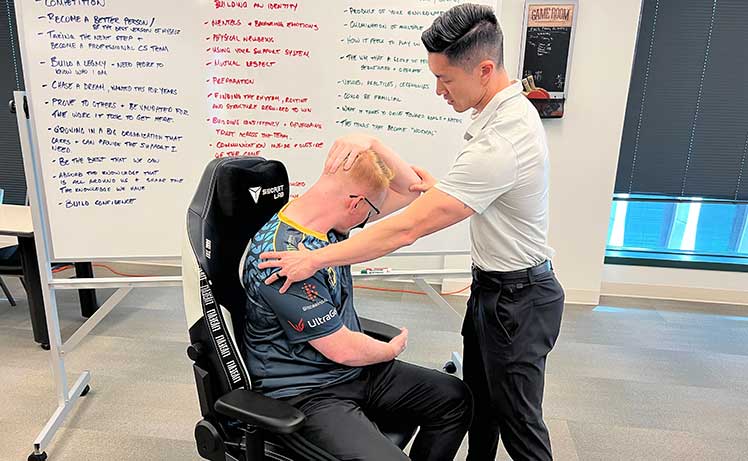
By contrast, gaming chairs have iterated rapidly. By partnering with professional esports teams and medical specialists, manufacturers have been able to collect direct feedback from users engaged in some of the most demanding desk-based work environments.
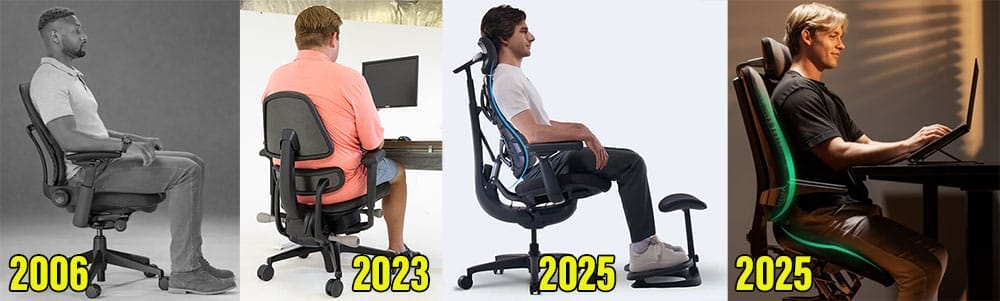
This has allowed brands to better adapt their designs for modern, multi-device users. More recently, hybrid ergonomic chairs have entered the market, introducing new approaches shaped by modern work habits and faster development cycles.
Recent Gaming and Hybrid Chair Ergonomic Innovations
While flagship office chair functions have remained largely static, gaming and hybrid ergonomic chairs have continued to evolve rapidly. Notable recent examples include:
- 2021: Secretlab releases height x depth-adjustable integrated lumbar support with a magnetic headrest pillow
- 2023: Anthros launches its posture-focused chair with a pelvic and lumbar support concept aimed at active, upright sitting
- 2024: AndaSeat debuts 6D adjustable armrests, including 360° rotation and flip-up modes to support mobile-device use
- 2024: Razer Iskur V2 introduces a “6D” lumbar system combining height and depth adjustment, flip-out support, and integrated adaptive upper-back support
- 2025: LiberNovo debuts the Omni, combining multi-axis lumbar adjustment, dynamic backrest support, and modern armrest configurations designed for multi-device workflows
- 2025: Levitask launches the Vision Chair, introducing an elevated, open-hip seating geometry that prioritizes posture through seat angle and pelvic positioning rather than traditional lumbar pads
Bottom line: The chairs in this review — though widely regarded as the pinnacle of ergonomic seating — share largely stagnant development cycles. They remain well-built and effective, but static.
In contrast, gaming and hybrid ergonomic chairs are evolving rapidly in response to user feedback and changing work habits. For buyers seeking truly cutting-edge back-support technology, this contrast is difficult to ignore.
Sync-Tilt Benefits Are Overstated
Some feel that high-end ergonomic office chairs justify their prices with sync-tilt mechanisms — where the backrest reclines while the seat tilts in tandem.

However, a 2013 systematic review found no evidence “to support the use of dynamic sitting approaches as an effective”. Instead, it found that joint loading and muscle activity are influenced far more by active movement than by dynamic chair designs (3).
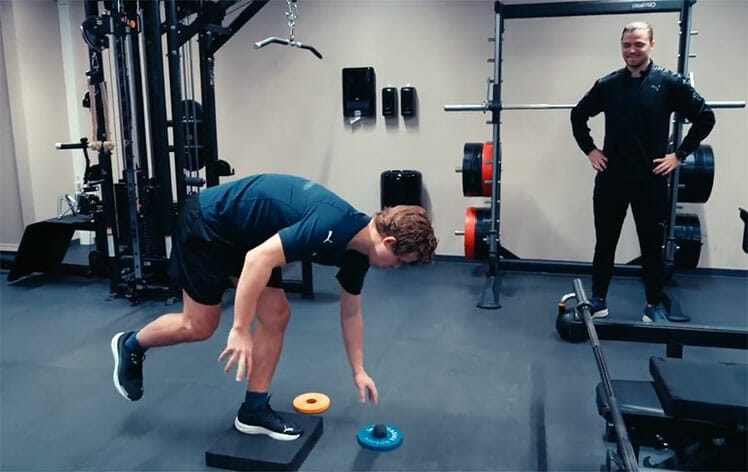
In practical terms, this means that passive movement within a chair offers limited benefit. Rather than relying on sync-tilt mechanisms, users are more likely to gain physical and cognitive benefits by periodically taking short walking breaks.
Healthy Computing Habits Beat Fancy Chairs
ChairsFX recently surveyed 200 U.S. IT workers (half remote, half on-site) about their desk-work habits. Respondents who reported weekly musculoskeletal pain commonly shared three traits: sitting eight hours or more per day, taking few movement breaks, and getting little to no regular exercise.
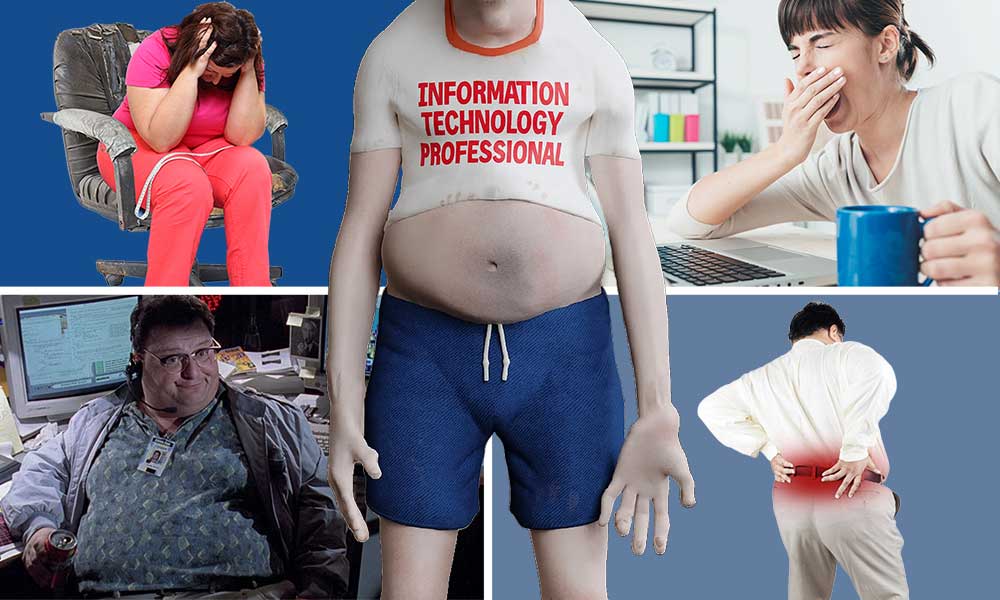
Notably, remote IT workers who reported frequent pain were five times more likely to get zero exercise per week compared to their pain-free counterparts.
In contrast, the subset of pain-free desk workers reported higher exercise frequency, more movement breaks, longer periods of focused productivity, and higher end-of-day energy levels.
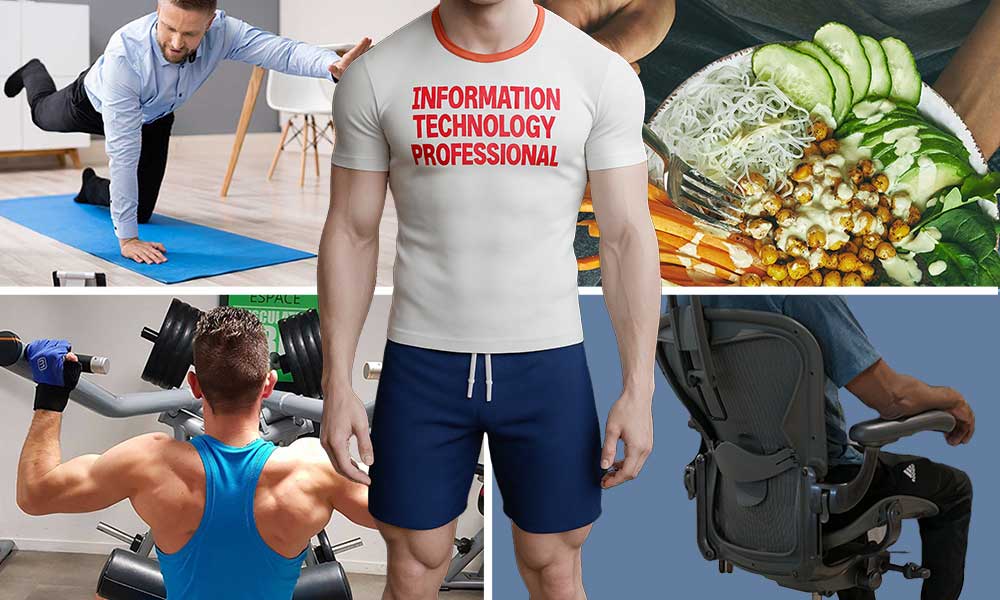
Their use of ergonomic chairs, however, was not meaningfully different from the pain group. This suggests that a chair alone won’t solve desk worker pain issues, a sentiment shared by Doctor of Physical Therapy William Duncan, who reminds ChairsFX readers:
These findings closely mirror the conclusions laid out in our 2025 Desk Work Guide. Its key takeaways include:
- Movement matters more than chairs: Frequent walking and movement breaks have a greater impact on pain reduction than any chair feature or tilt mechanism.
- Neutral posture conserves energy: Sitting with an aligned spine reduces muscular strain, leaving more energy available for focused cognitive work.
- Exercise beats medical interventions: Strength training, walking, and mobility work consistently outperform doctor-prescribed treatments for long-term back pain relief.
- Chairs play a supporting role: Ergonomic chairs help maintain neutral posture, but offer diminishing returns without healthy habits.
- Lifestyle compounds results: Sleep, nutrition, and regular exercise amplify posture benefits and reduce fatigue during long workdays.
Bottom line: Expensive chairs can support good posture, but they cannot compensate for long hours, inactivity, or weak postural muscles. Healthy computing habits—not premium hardware—remain the strongest predictor of pain-free, high-energy desk work.
The ‘Best’ Office Chair Is… Subjective
High-end ergonomic office chairs can be worth it — but rarely for the reason most buyers expect. They don’t unlock “medical-grade” back support or dramatically better spinal alignment.
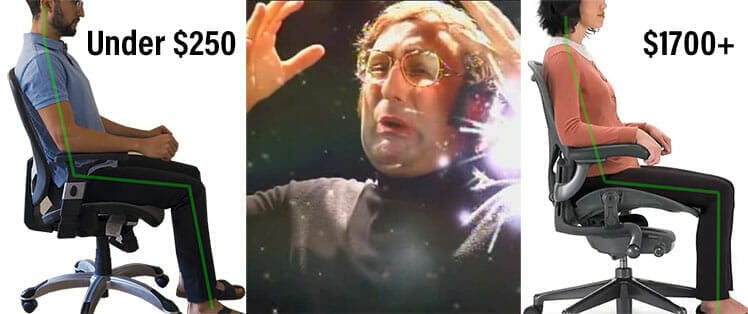
With proper setup and good sitting habits, a well-built midrange ergonomic chair can support the same clean neutral postures.
For example, I currently sit in clean neutral postures (0° neck and 25-45° lower back) in a Secretlab Titan, stand frequently using a Magnus Pro standing desk, and do core exercises in the gym 4 x per week. Results have been fantastic.
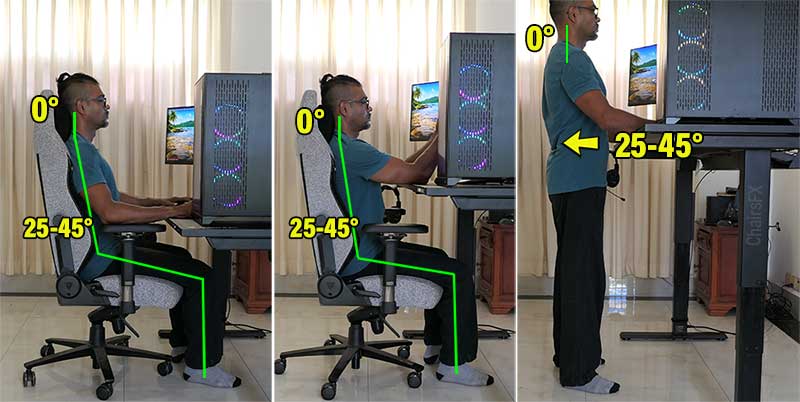
What premium chairs reliably do buy you is superior build quality, refined materials, iconic design, and a long warranty that reduces long-term risk. If those are your priorities, paying $1,100–$2,100+ can make sense.

The trap is buying an expensive chair with inflated expectations. Flashy features and prestige can make it feel like you’re purchasing superior back support — but most real benefits still come from movement, exercise, posture skill, and breaks.

Bottom line: Premium chairs are worth it if you value durability, warranty coverage, and design — not if you expect dramatically better back support. If you’re mainly chasing posture support per dollar, start with a strong affordable option instead:
Best Ergo Office Chairs Under $300
Footnotes
- Matthew P Reed, et al. ‘Posture and belt fit in reclined passenger seats’, Traffic Injury Prevention 20(sup1):S38-S42, June 2019. DOI: 10.1080/15389588.2019.1630733, (accessed 23 Dec. 2025).
- M. Smulders, et al. ‘Neck posture and muscle activity in a reclined business class aircraft seat…’, Applied Ergonomics Volume 79, September 2019, Pages 25-37. DOI: doi.org/10.1016/j.apergo.2018.12.014, (accessed 23 Dec. 2025).
- Jennifer Pynt. ‘Rethinking design parameters in the search for optimal dynamic seating’, J Bodyw Mov Ther. 2015 Apr;19(2):291-303; Epub 2014 Jul 22. DOI: 10.1016/j.jbmt.2014.07.001 (accessed 7 June 2023).