

Buying an ergonomic chair is the starting point of your desk work optimization journey, not the finish. A chair can support neutral posture, reduce strain, and preserve energy for focus. However, true optimization requires stepping away from your desk and moving. Grasping this reality can simplify your chair shopping experience and keep you focused on what actually matters: building a healthier, active routine, instead of sitting around waiting for a chair to magically fix everything.

ChairsFX was founded in 2018 to clarify the purpose and real-world benefits of ergonomic seating. Over the past eight years, I’ve analyzed biomechanical research, tested dozens of chairs, and lived the science full-time at my desk.
What I discovered was a reality widely understood outside of marketing circles—and one shared by high-pressure desk workers like chess grandmaster Magnus Carlsen and T1 esports icon Faker.

This reality is also supported by common sense, a trio of collaborating esports doctors, NASA (who discovered neutral posture biomechanics in the 1970s), and multiple randomized controlled trials. In sum:
- Ergonomic seating defined: Across institutions and references such as OSHA, BIFMA, and the Handbook of Human Factors and Ergonomics, ergonomic seating emphasizes three key adjustable components: armrests, lumbar support, and recline. Together, these features help support a neutral sitting posture, keeping the hips and spine in a comfortable, supported alignment.
- The benefits of ergonomic seating: When properly configured, an ergonomic chair can support neutral alignment, with a level head position and the lower back’s natural curve maintained. This helps reduce musculoskeletal strain, making prolonged sitting more comfortable and potentially reducing fatigue.
- The limitations of ergonomic seating: Neutral alignment can reduce strain while sitting, but a chair cannot build a strong, healthy body by itself. Exercise, good nutrition, adequate sleep, and regular movement do far more to develop the strength, endurance, and mobility that support physical health.
Sitting in Any Chair Is Bad For You
No matter your type of chair or sitting style, long periods of sitting is bad for you on multiple levels:
| Mechanism | Sitting Effect |
| Circulation | Causes lower-limb blood pooling. This reduces optimal oxygen delivery to brain tissue, leading to mid-day fatigue, diminished cognitive processing speed, and reduced alertness. |
| Metabolic | Triggers a “metabolic pause”—slashing fat-burning enzymes and leaving blood sugar floating in your system. This exacerbates the post-lunch energy crash and brain fog driven by poor circulation. |
| Musculoskeletal | Continuous hip flexion keeps the iliopsoas, rectus femoris, and hamstrings in a chronically shortened position. Over time, this tightening pulls on the pelvis, contributing to an anterior pelvic tilt and putting abnormal strain on the lower spine. |
‘Ergonomic’ Marketers Obscure the Facts
Many first-time buyers still get duped by “ergonomics” as an abstract, high-tech vibe with vague “medical-grade” promises.

By buying into the hype and overspending, consumers risk ending up disappointed—cycling through chair after chair in search of an elusive comfort no amount of technology can guarantee.
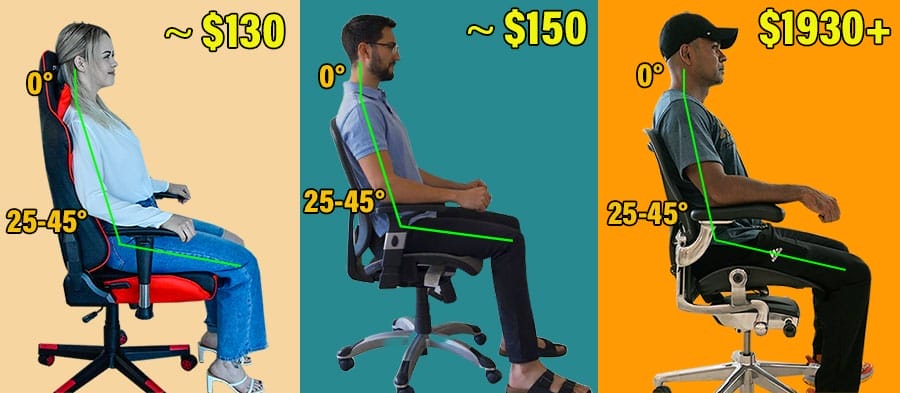
Even worse, treating a chair as a silver bullet for desk-work wellness blinds them to the big picture. Instead of hitting the gym to build real postural strength, they sit waiting for a magic fix that will never come.
Learn more: Gaming Vs Ergonomic Office Chairs: 7 Misconceptions Debunked
Seating Realities For 2026 Desk Workers
Overestimating the impact of an ergonomic chair can waste your time and money. Sitting for long periods in any type of chair is detrimental to your health.

However, if you have to sit, adopting neutral postures as part of a larger wellness routine (exercise, nutrition, rest) can yield noticeable posture and vitality benefits.
Below, you’ll learn how to differentiate between objective comfort (neutral posture support) and subjective (psychologically appealing extras) to understand what you’re actually paying for.

Then, you can harness the energy you would have wasted obsessing over chairs into developing the healthy lifestyle habits that will truly help you perform at your best.
Ergonomic Sitting Science Is Old Tech
Don’t get fooled into believing that ‘ergonomics’ is complex and abstract. The problem is that no single universal authority defines the functions of an “ergonomic” chair.

However, by tracing the scientific progression from NASA’s Neutral Body Posture discoveries into modern institutional standards, a clear, consistent definition and trajectory emerges:
- 1972: NASA discovered neutral body postures (NBP) while observing astronauts in zero gravity.
- 1994: NBP principles were ported into commercial office chairs with Herman Miller’s launch of the Aeron Classic.
- 2001: NBP sitting science was firmly established: adjustable features (lumbar, armrests, recline) support neutral sitting postures (~0° neck tilt, ~25-45° lower back curve).
- 2020: NASA reframes neutral posture as basic “proper sitting,” shifting primary emphasis toward movement breaks and exercise.
This 50-year timeline reinforces the core truth: while any properly equipped chair can support a neutral posture, no chair can build your posture for you.

An ergonomic chair gives you a baseline for alignment, but true postural strength requires active movement, exercise, and consistent health habits.
Full NBP Timeline: Neutral Posture Biomechanics For Ergonomic Beginners
1973: Neutral Posture Discovery
NASA observed astronauts naturally falling into neutral postures in zero gravity. NASA / Man-Systems Integration Standards (NASA-STD-3001) ported the discovery for use by other designers.
1980: Neutral Technology Translated for Office Furniture
Étienne Grandjean’s book Fitting the Task to the Man translated NASA-era postural physiology into workstation ergonomics. It rejected rigid upright sitting in favor of a posture-adaptive approach:
- Preserving lumbar lordosis
- Adjusting recline angles to reduce spinal load
- Adopting task-dependent, variable postures rather than a single “correct” position
1994: Aeron Chair Launches
Herman Miller translated the posture-adaptive philosophy into the Aeron, the world’s first commercial ergonomic chair.
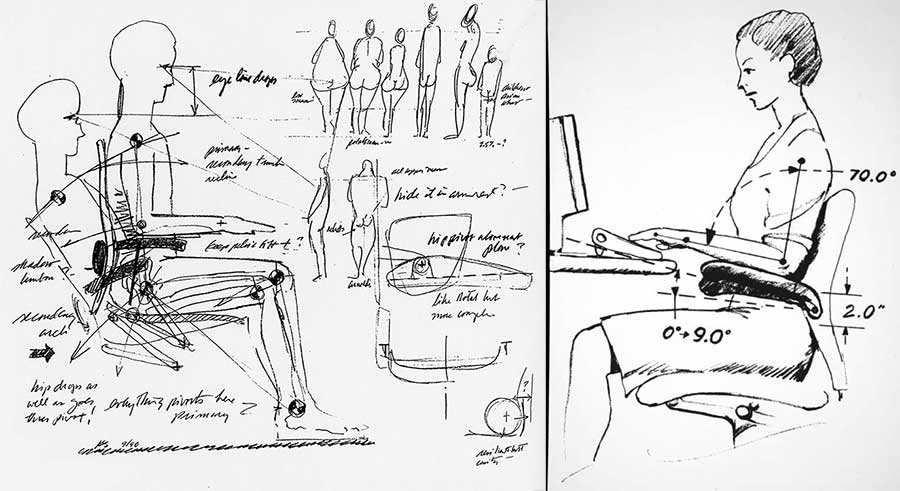
It featured adjustable lumbar support to preserve lordosis, a recline-biased sitting geometry to reduce spinal load, and a design intended to accommodate movement and task variation rather than enforce a single “correct” posture.
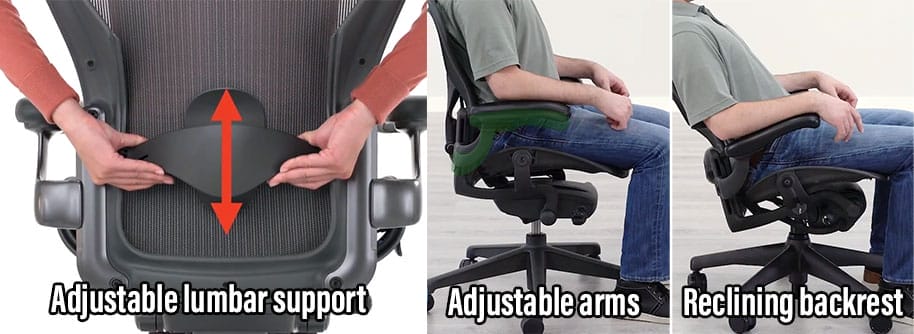
Notably, the Aeron did not introduce new biomechanical concepts. Rather, it was the first chair to successfully operationalize established neutral posture science at scale.
2001: Institutional Ergonomic Consensus
In 2001, the paper Seeking the Optimal Posture of the Seated Lumbar Spine(1) established practical biomechanical benchmarks for neutral sitting posture:
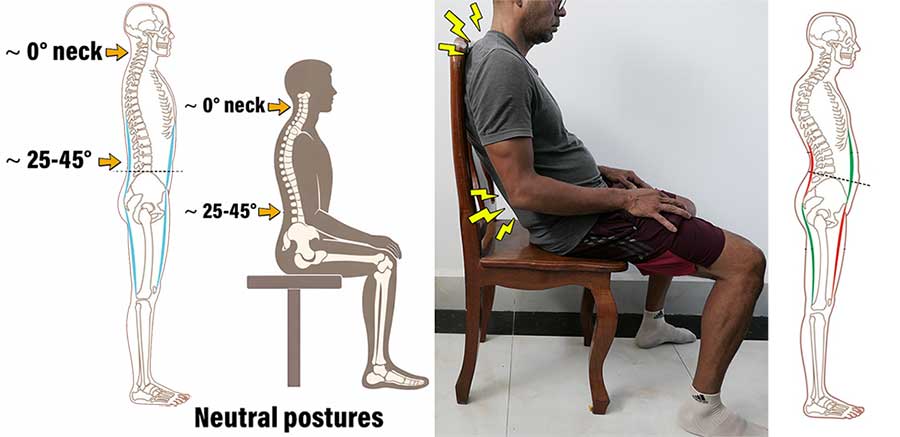
In 2005, the first edition of the Handbook of Human Factors of Ergonomics was released as a major reference work covering the science of designing work, equipment, and environments around human capabilities and limitations.
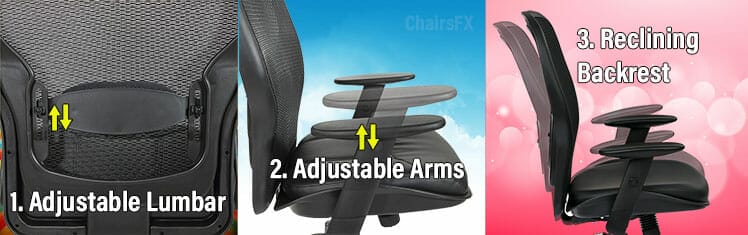
It reiterated how neutral biomechanics translate into seating design principles:
- Lumbar support: discussed as a means of preserving or restoring lumbar lordosis during seated tasks.
- Recline: treated primarily in terms of biomechanical load reduction (including references to reduced spinal loading at reclined angles); it also notes that recline alone does not restore lumbar lordosis without lumbar support.
- Armrests: referenced mainly in contexts such as reducing upper-limb load (e.g., wheelchair ergonomics and task support)
Over the next decade or so, these core concepts crystallized further into broader guidelines, like OSHA’s ergonomic seating guidelines(2) emphasize three essential adjustable features:
- Backrest: should recline at least 15° from a vertical position.
- Lumbar support: should be height-adjustable to fit the lower back.
- Armrests: should be adjustable so the arms fall freely from the shoulders.
2020: Neutral Sitting Posture Deprioritized
In 2020, shortly after COVID lockdowns began, NASA released a DeskFit Guide (3)for WFH employees. The book frames neutral sitting as “proper”. It then lists the problems caused by improper and excessive sitting. In essence:
A few years after the DeskFit Guide release, plenty of supporting evidence arose. For instance, a 2022 systematic review of 14 seating studies(4) found only low-to-very-low-quality evidence that any specific chair type reduces back pain or discomfort.
It concluded that a chair alone isn’t a recommended pain fix, regardless of how ‘ergonomic’ the chair is.

Further support came from a 2025 systematic review(5) of randomized controlled trials (the gold standard for establishing causal relationships). It found that exercise consistently reduced self-reported pain across studies, while seating choices were a non-factor.
Psychological Extras Drive Marketing
Neutral sitting support isn’t sexy or marketable. And any old chair with the core adjustable components (lumbar support, armrests, recline) can objectively support neutral posture.
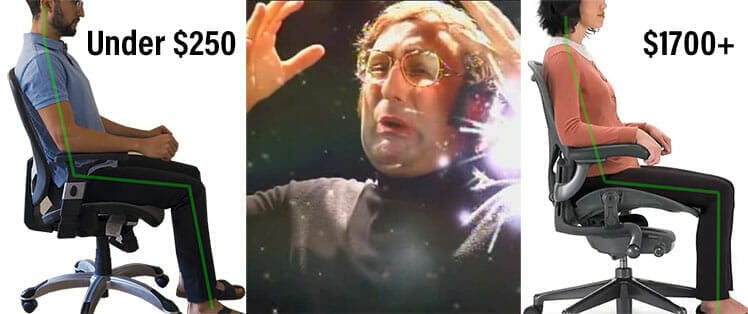
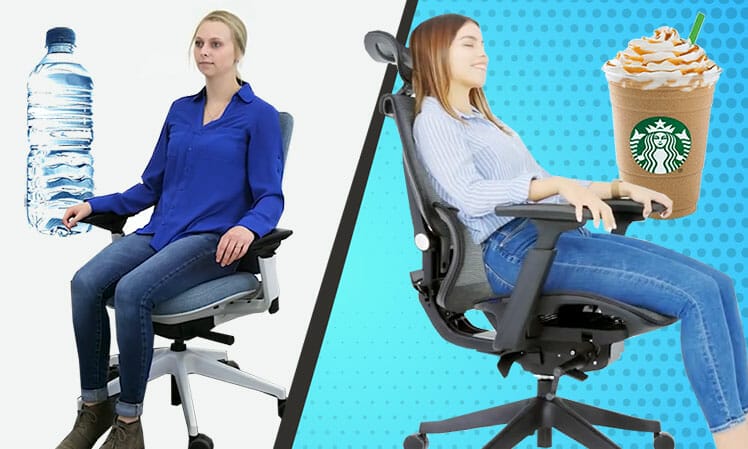
This is why no chair manufacturer can ever claim that their chair provides objectively “better” back support. Instead, to justify higher prices, they peddle psychologically titillating extras.
Physical (Objective) vs Psychological (Subjective) Comfort
Many researchers study comfort as ‘an absence of discomfort’. They test this by measuring physiological reactions to environmental stimuli. These can be objective (muscle activity measurements) or subjective (reported feelings).
For example, a major study on airplane seat design(6) found that passengers overwhelmingly preferred seats with headrests, even though headrest seats distort good posture. Another car seat study(7) explained how headrests distort posture.
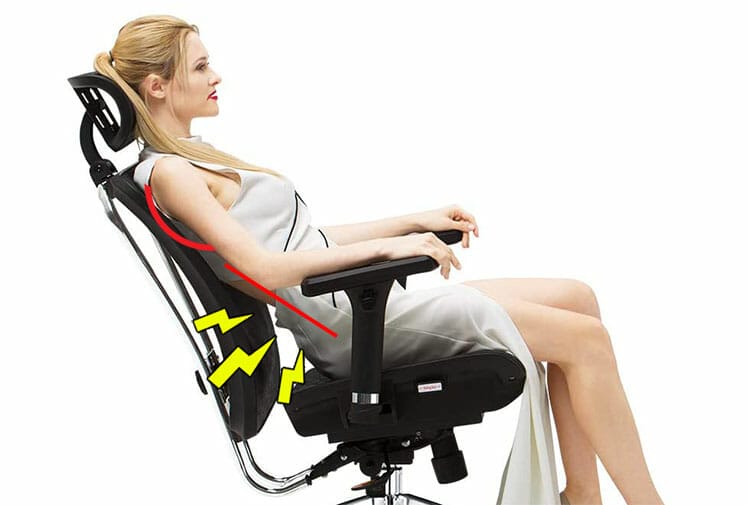
Set too far forward, headrests stress the upper body with a forward head tilt. In a reclined position, headrests promote a rounding of the upper spine and flattening of the lower back curve.
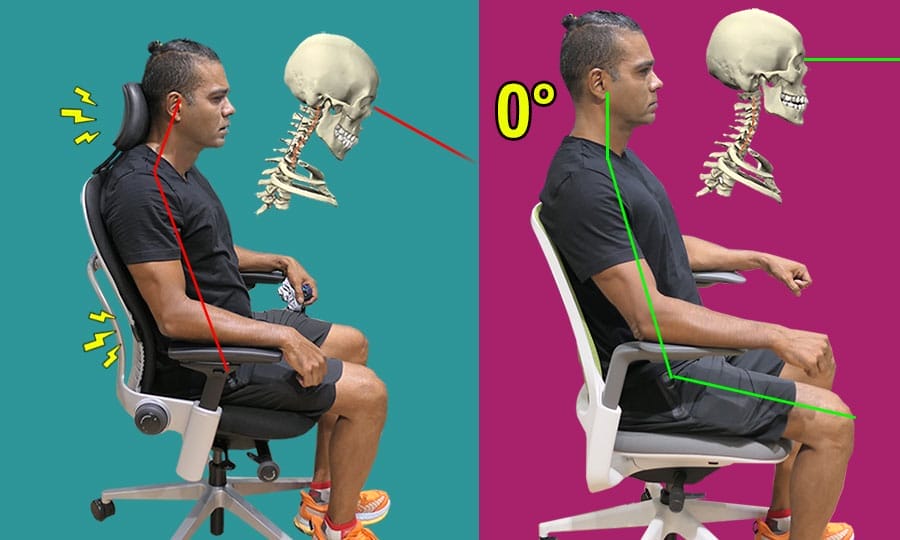
Despite these postural distortions, many prefer using mid-back office chairs with headrests. Herman Miller’s General Manager of Gaming(8) explained the appeal:
Key takeaway: good sitting posture alone does not define comfort. Perceived comfort (like using posture-distorting headrests) also determines how satisfied a user is with their sitting experience.
Physical vs Psychological Comfort Factors
Physical comfort is an “absence of discomfort” achieved by supporting neutral postures over long periods. Psychological comfort is perceptual: when a user perceives a chair as comfortable, it genuinely feels that way.
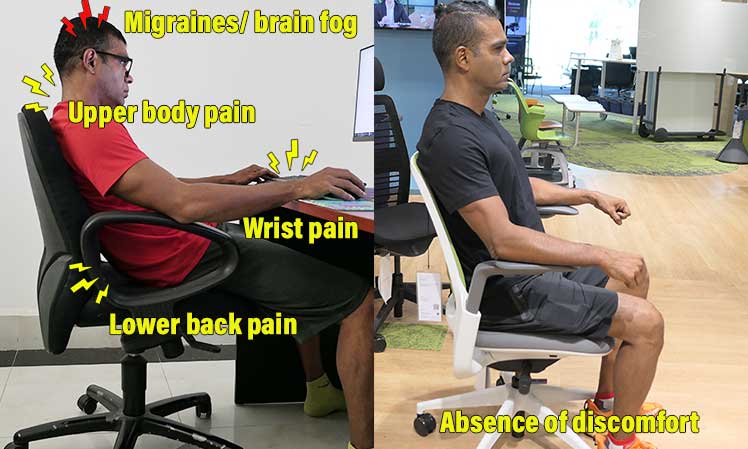
Understanding this distinction separates what you actually need from what you merely want:
| Physiological Chair Comfort Factors | Psychological Chair Comfort Factors |
|
|
Learn more: Physical Vs Psychological Seated Comfort Factors
4-year Test: Perfect Sitting Posture is Overkill
After a decade of full-time slouching in cheap office chairs, I bought my first gaming chair in 2017: a $280 DXRacer F-Series. After learning how to use it to sit sort of neutrally, the benefits felt life changing.

I enjoyed longer periods of comfortable, pain free sitting. Even better, I suddenly gained a surge of energy and super sharp focus, helping me lock into burst of insane productivity.
For around five years, I rotated through a few cheap gaming and ergo office chairs, enjoying consistent benefits across the board. In 2021 I upgraded to a Titan Evo chair. In 2022 I assessed my posture and found noticeable imbalances.
Can Perfect Sitting Posture Fix Forward Head Tilt?
When I assessed my relaxed sitting posture in 2022, I found a significant forward head posture. To address that, I asked Dr. Jordan Tsai (esports doctor and Secretlab Ergonomics Advisor) if my Secretlab Titan Evo could support biomechanically precise (~0° neck, ~25-45° lower back curve) postures.
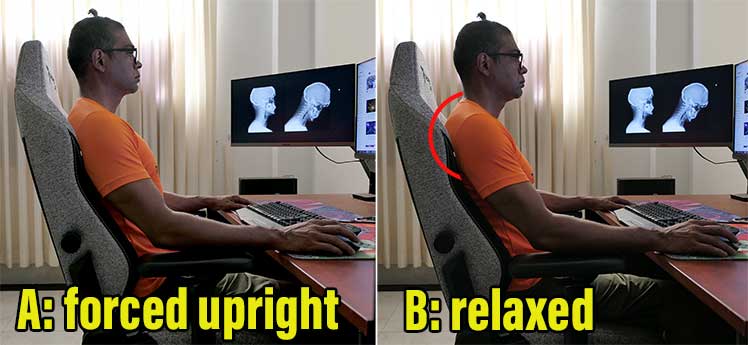
He confirmed the Titan was equipped for the job. He advised me to set the backrest recline to ~100° and use the headrest to brace my neck for a ~0° neck tilt.
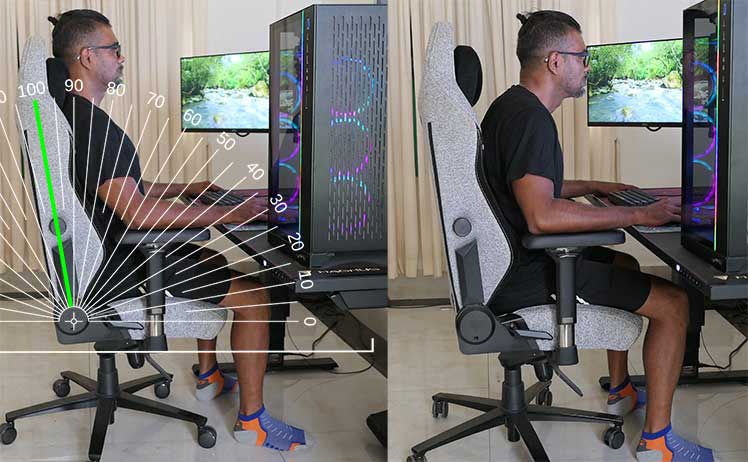
He also advised that sitting so sharply was overkill—relaxed neutral variations would do the same job. For posture rehab, he suggested:
For research purposes, I ignored his warning. I ramped up my core and back exercises in the gym, then forced myself to sit in sharp neutral postures.

Sitting in a sharp neutral posture felt disorienting at first. With a week of practice, muscle memories kicked in. Then, sitting upright (instead of lurching my head forward) started to feel like my natural default position.
Learn more: Sitting with Near-Perfect Posture in a Titan Evo Chair
How to Fix Anterior Pelvic Tilt
After a year of sitting ramrod straight, I felt great, and assumed my posture was now on-point. Unfortunately, a side-view posture assessment showed that my core issues (forward head tilt and anterior pelvic tilt) remained.

Another esports doctor advised:
ATP (anterior pelvic tilt) rotates the pelvis forward (anteriorly). This tightens lumbar extensors and hip flexors in the rear, while lengthening and under-using abdominal muscles in the front. You cannot fix these imbalances by sitting in a chair.
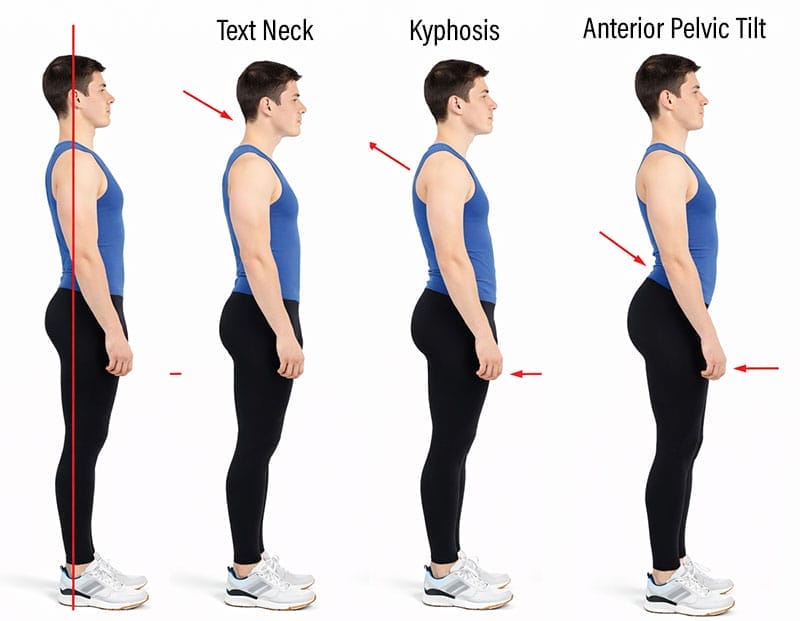
Following Dr. Duncan’s advice, I started researching exercises to tackle these specific issues.
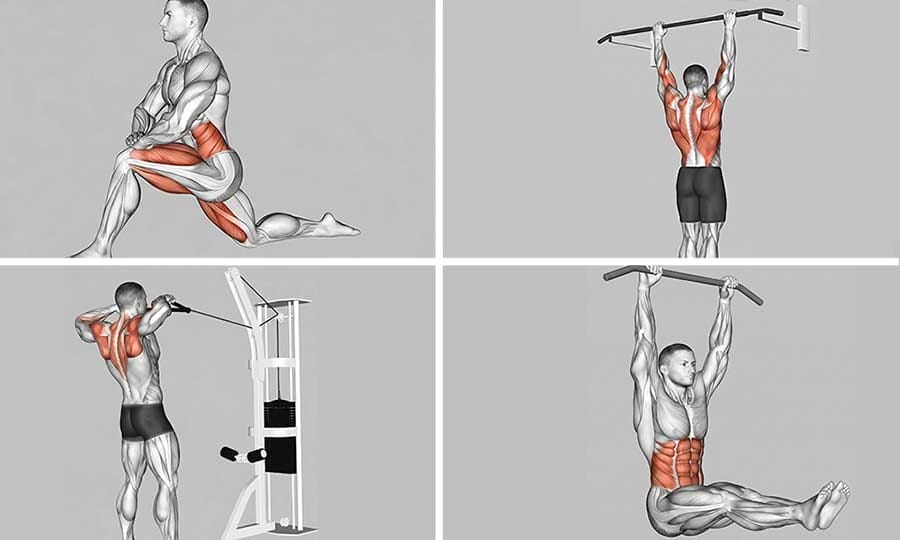
After around a month of integrating the following into my weekly gym routine, I started to notice improvements: open shoulders, neutral hips, head held upright as if with an invisible string. Listed in order of postural impact:
- Kneeling lunge stretch: lengthens the hip flexors, counteracting anterior pelvic tilt.
- TVA vacuum breathing: activates the deep transverse abdominis to draw the abdominal wall inward and stabilize the lower lumbar-pelvic region.
- Hip extensions: strengthens the gluteus maximus, which actively pulls the pelvis backward into a neutral alignment.
- 60-second dead hangs: decompresses the spine and stretches the lats and shoulders.
- Pull-ups: strengthens the lats, upper back, and core.
- Face pulls: strengthens the rear deltoids and upper trapezius, counteracting rounded shoulders and forward neck tilt.
- Hanging leg raises: builds lower abdominal and hip flexor strength for pelvic stability.
Key takeaway: good posture is built in the gym, not while sitting in a chair.
Actual Neutral Sitting Posture Benefits
Ergonomic seating can help you normalize maintaining a healthy lower back curve while you sit. That will reduce strain on your seated musculature and give you more energy for focused computing.

That’s because human body adapts to positions it holds most often. By sitting for long periods in supported neutral postures, these benefits arise:
- You internalize a good posture baseline: you can’t fix poor posture if you don’t know what good posture feels like. Learning how to sit upright in a clean neutral posture (~0° neck tilt, ~25-45° lower back curve) gives you a real point of reference.
- Muscle memory training: your body adapts to the positions it holds most often. After just a few days of sitting neutrally, your torso will get accustomed to holding itself upright.
- More energy for computing: feeling exhausted after a long day of sitting will become a distant memory. Neutral sitting minimizes musculoskeletal strain. This gives users more energy and focus every time they sit down.
- Enhanced body awareness: once you internalize the difference between slouched and neutral spines, you’ll gain greater awareness of your lower back and your core, neck, and shoulder muscles. This gives you clear targets to work on in the gym.
In my experience, these seated benefits acted as a launchpad into broader performance habits. Back in 2018, sitting in neutral posture freed up a surplus of daily energy that I was able to channel straight into a regular workout routine.
It also sharpened my physical self-awareness, making posture distortions instantly noticeable (whether sitting or standing). That feedback loop made it easy to catch and correct slouching in real time, breaking the cycle of unconscious slumping.
Related: Using Muscle Memory To Forge Healthy Sitting Habits
Neutral Sitting + Fitness Superstars
Several world-class desk workers over the years have powered their way to the top using the same approach: combining neutral sitting with healthy habits as the ultimate desk work optimization formula.

Neutral sitting minimizes strain while you work; exercise builds optimal body mechanics. At your desk, the net gain is a surplus of energy for hyper-focused work.
Away from it, you get bulletproof posture, pain-free vitality, and a higher quality of life. Notable examples:
Magnus Carlsen (Chess World #1 Grandmaster)
- Desk context: Online tournament preparation and long-form match play.
- Ergonomic Seating: adopted the Secretlab Titan Evo as his official match chair in 2021.
- Fitness integration: cut out sugary drinks after suffering energy crashes in 2017. Brought in personal trainer Bror Carlson in 2021 to build the core strength and cardiovascular endurance required for marathon sitting sessions.
Learn more: Magnus Carlsen’s Brainpower Boosting Hacks
Tim Cook (Apple CEO)
- Desk context: Long executive workdays involving strategic planning, product development oversight, meetings, and global business operations.
- Ergonomic Seating: Uses the Humanscale Freedom chair with headrest in his Apple office. Designed by ergonomics pioneer Niels Diffrient, the chair features weight-sensitive reclining, adjustable armrests, and dynamic head and neck support.
- Fitness integration: An early riser who prioritizes daily exercise, including strength training and cardiovascular workouts. Also enjoys hiking and cycling outdoors to maintain physical fitness and manage the demands of his executive schedule.
Learn more: From Skinny-Fat to Shredded: Tim Cook’s Transformation
Faker (T1 League of Legends World Champion)
- Desk context: Intensive esports training, tournament preparation, and professional matches requiring sustained concentration and precise motor control.
- Ergonomic Seating: Has used Secretlab chairs since 2019, including the Titan Evo. Credits their ergonomic support and adjustability with helping him remain comfortable and focused during competition.
- Fitness integration: Between competitions, Faker follows the team’s schedule: two 3-hour gaming sessions per day at its Seoul gaming facility(9). It has a Nike gym in the basement that he uses for yoga and fitness training: “Through self-management, I try to stay healthy both physically and mentally.”(10)
Bobby Fischer (Chess World Champion)
- Desk context: Marathon chess matches and intensive preparation sessions requiring hours of sustained concentration.
- Ergonomic Seating: Showed up with a Herman Miller Eames Executive Chair for his 1972 World Championship match against Boris Spassky(11). He reportedly found other chairs unsuitable. Facing him in a basic wooden chair, Spassky complained of a disadvantage, so an Eames chair was brought in for him as well.
- Fitness integration: Spent seven months training before the 1972 championship. His daily routine included swimming, tennis, weightlifting, skipping rope, stationary cycling, sit-ups, and heavy-bag training. He emphasized the importance of physical conditioning, saying, “You gotta stay in shape, or it’s all over.”
IT Worker Survey: Habits Beat Hardware
It’s not just esports and chess stars prioritizing fitness over sitting habits. A ChairsFX survey of 200 IT workers supports the idea that healthy habits impact desk worker wellness more than the type of chair they use.

Our December 2025 vetted panel survey was completed by 200 full-time USA-based IT workers: 100 working remotely, 100 working on-site. Our aim was to map how they sit, move, focus, and experience pain. Key findings:
- Pain: 69% of remote workers and 76% on site suffer weekly pain rated 5/10 or higher.
- Energy levels: 71%–74% of pain-free respondents report moderate-to-high energy reserves after hours; 58% of pain sufferers finish their workdays completely exhausted.
- Ergonomic seating: 75% of pain-free on-site workers use non-ergonomic seating; 48% of all respondents who use ergonomic seating still suffer from weekly pain rated 5/10 or higher.
- Exercise frequency: 34% of pain-free workers get 5+ days of vigorous exercise per week.
Overall, the survey found that pain-free respondents were more productive, more active, and more energetic after work, despite the majority of them using non-ergonomic seating.
Learn more: Habits Over Hardware: Remote vs. On-Site IT Worker Wellness Survey Results
ChairsFX Review Methodology
This article distills the ChairsFX methodology built into every chair review on this site. It’s grounded in the 50-year evolution of neutral posture science; objective, peer-reviewed biomechanics; institutionally defined functionality; and eight years of (esports doctor-assessed) in-house testing. In essence:
- Ergonomic seating defined: Across institutions and references such as OSHA, BIFMA, and the Handbook of Human Factors and Ergonomics, ergonomic seating centers on three adjustable components: armrests, lumbar support, and recline. Together, these features support a neutral sitting posture, aligning the hips and spine in a close approximation of healthy standing posture.
- The benefit of ergonomic seating: When properly configured, an ergonomic chair can support a comfortable neutral alignment (~0° neck tilt and a ~25–45° lower-back curve). This reduces musculoskeletal strain, helping users sit comfortably for longer periods while reducing fatigue.
- Physical Vs psychological comfort: Any chair with the essential adjustments can support neutral postures, provided it fits your body. Features beyond these basics primarily enhance comfort, luxury, and reliability through longer warranties, better build quality, refined aesthetics, and greater adjustability.
- The limitation of ergonomic seating: Sitting in neutral alignment can reduce seated strain, but a chair cannot create a strong, healthy posture by itself. Healthy habits—exercise, nutrition, adequate rest, and regular movement—do far more to build muscular balance, energy, strength, and flexibility that support physical health.
ChairsFX Review Methodology in Action
The ChairsFX review methodology evaluates a chair by balancing objective physical factors (adjustability that supports a neutral posture) against subjective psychological factors (aesthetics, build quality, and expanded feature sets).
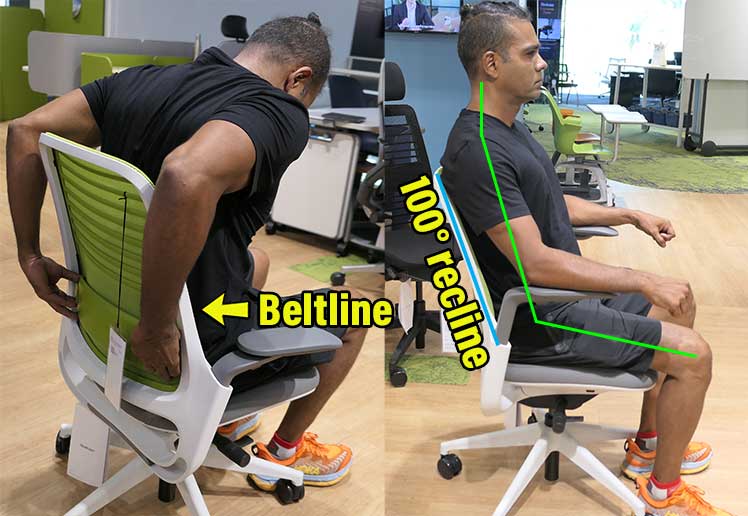
As an example, the Steelcase Series 1 ranks well by pairing solid physical support (height-adjustable lumbar, 4D arms, 100-120° recline) with impressive extras (solid build, 12-year warranty).
On the downside, its understated corporate aesthetic and upright-focused recline limit its versatility for deep relaxation. By weighing these pros and cons against its price tag, buyers can quickly determine if it fits their specific needs. Find similar breakdowns for the following genres:
| Roundup Review | Unique Selling Proposition |
| Best High-End Ergonomic Office Chairs ($1400-$2600) | Baseline neutral posture support paired with elite build quality, icon brand prestige, and 12-year manufacturer warranties. |
| Best High-End Full Back Gaming Chairs ($450-$750) | Baseline neutral posture support with superior versatility and adjustability (integrated lumbar systems, steeper recline angles), most with 5-year warranties. |
| Best Cheap Ergonomic Office Chairs Under $300 | Baseline neutral posture support without the markup. Expect functional mechanics, basic materials, and modest 1-year warranty coverage. |
| Best Cheap Gaming Chairs Under $300 | Baseline neutral sitting and lounging support. Trade-offs include rudimentary adjustments (external pillows, 1D arms) and minimal warranty protection. |
| Best Ergonomic Office Chairs For Programmers ($200-$2600) | Programming whiz Techlead tests the best high-end office chairs, but ultimately chooses the $200 Staples Hyken. He asks: “Why pay more, when a cheap chair does the same thing?” |
| Best Gaming Chairs With Footrests ($300-$800) | Baseline neutral sitting with an extendable footrest for reclined lounging. Highly popular, though physically clunky—a textbook case of feature-driven marketing appeal. |
Seven Rules for Choosing a Chair and Optimizing Your Deskwork Routine
Based on eight years of research and testing, these seven rules cover both what to look for in a chair and how to get the most out of your deskwork routine:
1. Prioritize neutral-posture support
Start with the chair’s dimensions, size recommendations, and fit for your body. Then assess the lumbar support: can you position it to accommodate your lower-back curve? Make sure the armrests and recline also allow you to sit comfortably without fighting the chair.
2. Don’t expect magic
Neutral sitting isn’t glamorous, and a well-designed chair won’t transform your life. Its job is to support you comfortably, help manage physical strain, and make prolonged deskwork more tolerable. That’s the payoff—not some mysterious ergonomic breakthrough that justifies any price.
3. Don’t obsess over perfect posture
You don’t need to hold a single rigid position all day. Start in a comfortable, supported neutral posture, with your torso upright and your lower-back curve maintained. Then change position as you feel the need. I like to begin work this way and return to neutral when I want to reset and refocus.
4. Don’t expect your chair to correct postural imbalances
Prolonged sitting can contribute to discomfort and physical deconditioning, regardless of which chair you use. A better chair isn’t a substitute for strength, mobility, and movement. Instead of endlessly tweaking your sitting position to fix problems a chair can’t solve, invest that effort in exercise.
5. Treat exercise as part of the job
Your deskwork routine doesn’t end at the chair. Exercise, movement breaks, good nutrition, and consistent sleep all contribute to your ability to work and recover well. A chair can help you sit comfortably, but it cannot compensate for an inactive lifestyle. If you want to perform at your best, train for it.
6. Don’t overspend on the chair itself
If a chair fits your body and provides adjustable lumbar support, armrests, and recline, it may offer everything you need for supported neutral sitting. While digital nomading across Asia, I’ve worked in cheap gaming chairs and basic ergonomic office chairs. The right fit and essential adjustments mattered more than the label. Premium chairs can be nicer to sit in, but the extra cost doesn’t automatically buy better postural support.
7. Keep optimizing beyond the chair
A healthier deskwork routine can become its own reward as you discover what improves your comfort, energy, and physical performance. There’s a practical roadmap: start with a chair you enjoy sitting in, establish comfortable neutral posture, build regular movement and exercise into your life, and keep refining the habits that help you perform and recover. The chair is the starting point—not the finish line.
Footnotes
- Jennifer Pynt, Martin G Mackey, ‘Seeking the Optimal Posture of the Seated Lumbar Spine’. Physiotherapy Theory and Practice 17:5, 2001, https://www.researchgate.net/publication/224029048_Seeking_the_Optimal_Posture_of_the_Seated_Lumbar_Spine, (accessed 4 Jan. 2026).
- OSHA. ‘Computer Workstation Components: Chairs’. https://www.osha.gov/etools/computer-workstations/components/chairs, (accessed 5 Jan. 2026).
- Tanya Johnson, Marceleus Venable, and Kimber Williams. ‘Desk Fit: 20 Essential Desk Exercises You Can Do Without Leaving Your Office or Home Workspace’, National Aeronautics and Space Administration (NASA) Headquarters Fitness Center. 2020 June 10; Access the PDF, (accessed 10 Oct. 2026).
- Channak, S., Klinsophon, T., Janwantanakul, P. ‘The Effects of Chair Intervention on Lower Back Pain, Discomfort and Trunk Muscle Activation in Office Workers: A Systematic Review’. International Journal of Occupational Safety and Ergonomics, September 2022. https://pubmed.ncbi.nlm.nih.gov/33970803/, (accessed 19 June, 2026).
- Castillo-Bellot, I., Peiró, A.M., Zandonai, T. ‘The Effect of Physical Exercise on Non-Oncological Musculoskeletal Chronic Pain and Its Associated Biomarkers: Systematic Review on Randomized Controlled Trials’. Life, September 8, 2025;15(9):1413. https://doi.org/10.3390/life15091413, (accessed 19 June, 2026).
- M. Smulders, et al. ‘Neck posture and muscle activity in a reclined business class aircraft seat…’, Applied Ergonomics Volume 79, September 2019, Pages 25-37. DOI: doi.org/10.1016/j.apergo.2018.12.014, (accessed 10 April 2022).
- Matthew P Reed, et al. ‘Posture and belt fit in reclined passenger seats’, Traffic Injury Prevention 20(sup1):S38-S42, June 2019. DOI: 10.1080/15389588.2019.1630733, (accessed 10 April 2022).
- Herman Miller Press Release. ‘Herman Miller and Logitech G Introduce Vantum, a Modern Gaming Chair’, October 6, 2022. Vantum Gaming Chair Press Release, (accessed Oct. 7, 2022)
- Joe Ellison. “League of Legends superstar Faker reveals his training secrets,” Red Bull, 13 May 2021. https://www.redbull.com/int-en/work-from-home-tips-faker-lol-interview, (accessed 16 October 2026).
- Joseph Asuncion. “The new T1 gaming facility lets you take selfies with Faker,” ONE Esports, 9 June 2021. https://www.oneesports.gg/league-of-legends/new-t1-gaming-facility-selfies-with-faker/, (accessed 16 October 2026).
- “Check this out, mate: A history of chess chairs”, Hindustan Times, 27 November 2024. https://www.hindustantimes.com/india-news/check-this-out-mate-a-history-of-chess-chairs-101732646861026.html, (accessed 16 October 2026).
