

Most people researching the Aeron already know it’s iconic — and expensive. But the real question isn’t whether the Aeron is a good chair. It’s whether it’s the right chair for you. This Herman Miller Aeron review is built around answering this question.
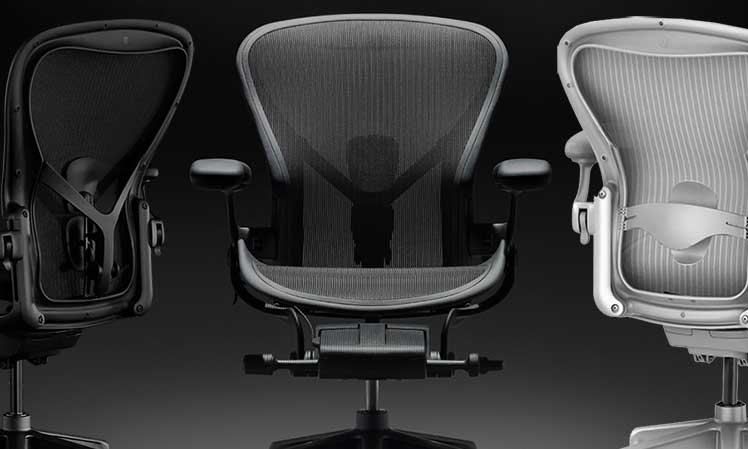
Rather than simply listing features, this review explains what the Aeron’s posture-first design, mesh suspension system, and limited recline style actually mean in daily use.
Learn how this chair’s traits affect your body, your work habits, and your overall comfort:
- You prioritize strict posture support and neutral spine alignment.
- You want a high-quality, durable chair with a 12-year warranty.
- You value adaptive mesh that balances your weight and supports movement.
- You spend long hours at a desk and want a chair that encourages focus.
- You enjoy premium design and the psychological “luxury” appeal of iconic furniture.
- You’re okay with a limited recline range (93–104°) for long-term spinal alignment.
- You like to sit cross-legged while working.
- You prefer a chair with a deep recline for lounging or relaxation.
- You’re on a tight budget and want similar ergonomic support for less.
- You prefer a softer, cushioned seat over a firm, supportive one.
By the end of this review, you’ll know whether the Aeron truly fits your needs – or whether another chair would serve you better.
Aeron Remastered from Herman Miller $1930+
Aeron: Key Buying Considerations
Is the Aeron the right chair for your needs? To answer that, here are three key factors worth considering before you buy:
- Physical vs. Psychological Appeal: Learn how the Aeron’s luxury extras — while not essential for posture — shape the overall comfort and experience, and help justify the higher price.
- PostureFit vs. Sliding Lumbar Support: Your lumbar choice significantly affects how the chair feels day-to-day. Understanding the difference is crucial to getting the right fit.
- Aeron Remastered vs. a Gaming Chair: the Gaming Edition is simply a preconfigured Remastered chair.
Aeron Physical Vs Psychological Appeal
In the seating world, “comfort” is defined as the absence of discomfort. Research on car and airplane seats shows that both physical and psychological factors play a role in determining overall comfort.
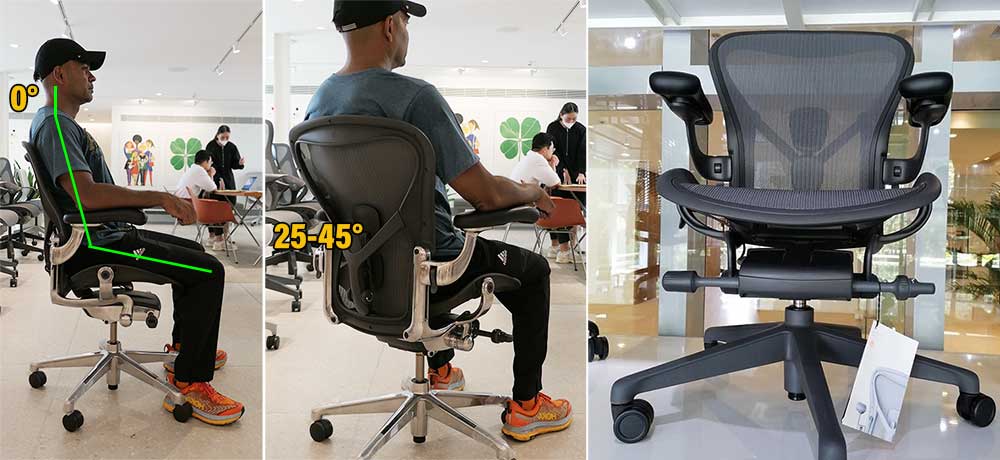
The Aeron sets the gold standard for physical comfort by encouraging proper sitting posture better than most chairs. Three key features make this possible.
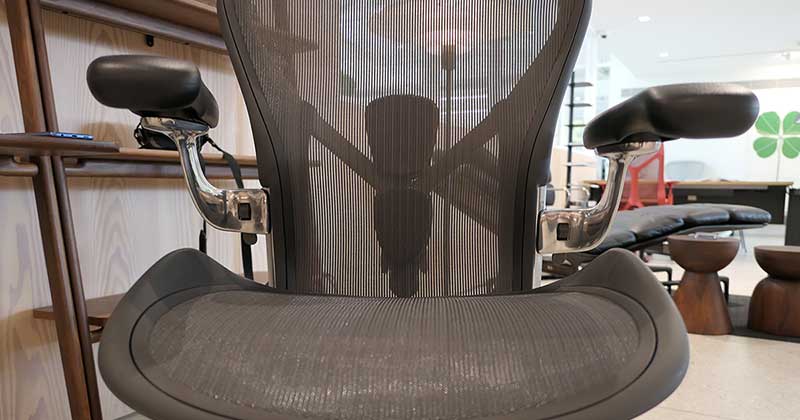
Bladed seat edges prevent users from putting their feet up, a limited recline range keeps them upright, and high-end mesh with variable tension zones maintains balance as they shift positions. Together, these qualities deliver first-class physical comfort.
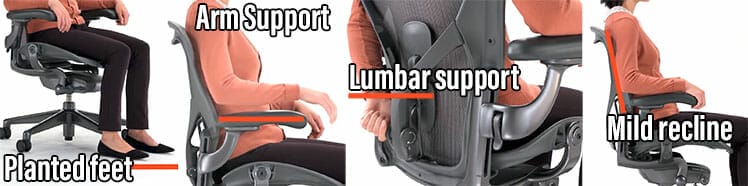
However, in 2025, ergonomic support for neutral postures is widespread. Even a $130 gaming chair with adjustable lumbar support, arms, and recline can maintain a neutral posture — provided it’s set up correctly and used properly.
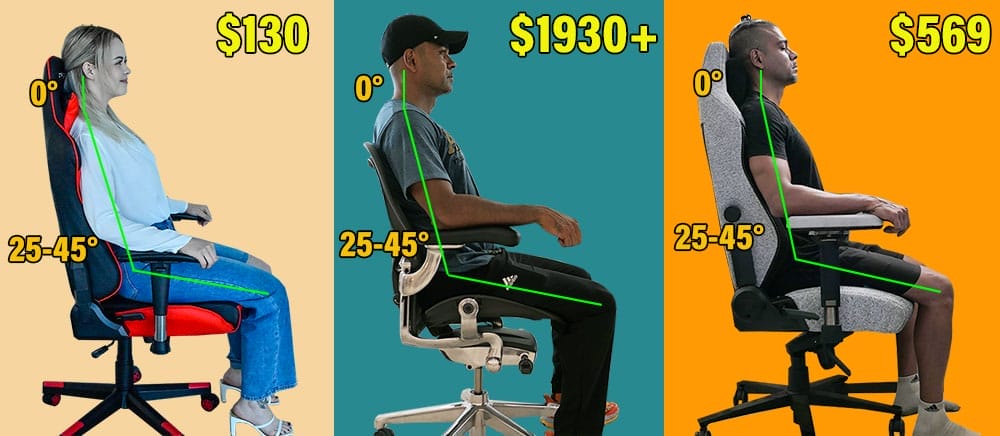
If neutral posture is your only goal, a more affordable chair can give you the support you need. Where the Aeron shines is in the layering of luxury extras (psychological comfort) on top of these core ergonomic features.
These elevate comfort, usability, and the overall sitting experience. They appeal to the psyche, making users feel more satisfied and confident while sitting.
Aeron Physical Support Features
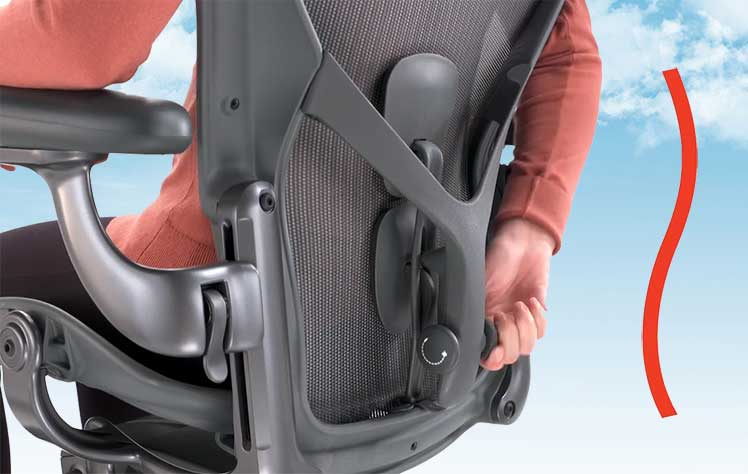
- Adjustable lumbar support: choose the Posturefit or sliding lumbar to align your lower back
- 3D Adjustable Arms: adjust the height, width, pivot
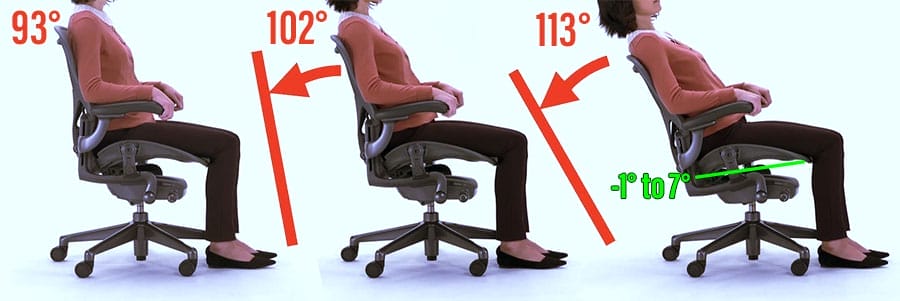
- Reclining backrest: a 93-113° recline enables seated movement
Psychological Luxury Extras
- 12-year warranty: brings long-term peace of mind.
- 8Z Pellicle Mesh: high-end mesh with variable tension zones that promote consistent balance.
- Synchronous tilt: auto tilts the seat up (0-7° range) as you recline, or up to -1° in forward-leaning mode.
- Forward tilt: tilts the seat slightly forward and down (-1° range). Paired with a 90° backrest recline, this supports forward-leaning neutral postures.
- Iconic design: everyone using a sexy Aeron chair will gain instant prestige.
Posturefit vs Sliding Lumbar Support
When you buy an Aeron from the Herman Miller Store, you can choose between two lumbar systems: PostureFit SL or a traditional sliding lumbar pad. This choice has a major impact on how the chair feels.
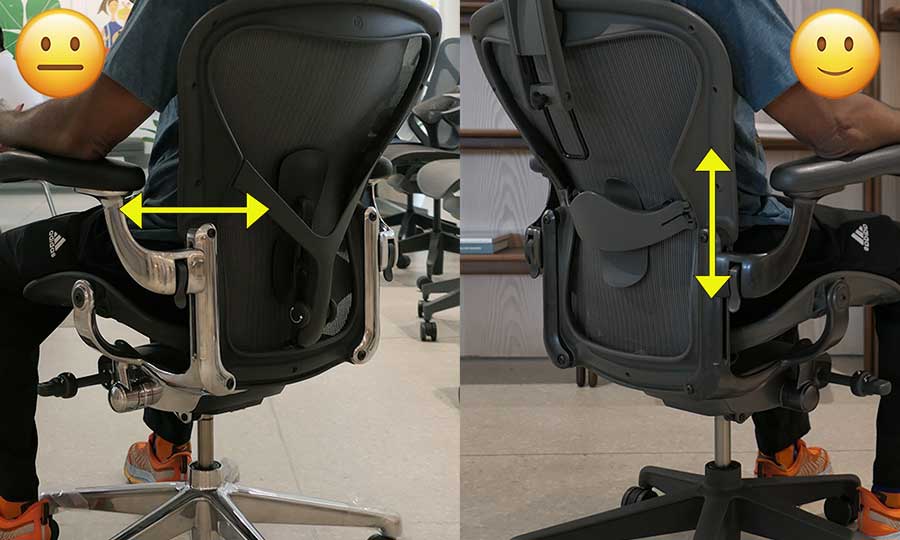
PostureFit SL is a unique design. Instead of focusing solely on the lower lumbar curve, it uses two pads—one that supports the pelvis and another that supports the upper lumbar region. In theory, this creates a more anatomically precise fit.
However, PostureFit has a limitation: you can adjust its depth, but not its height. Because the Aeron is built for users from 5’2″ to 6’6″, its fixed height won’t fit everyone.
If Posturefit’s pads don’t line up with your anatomy, the lumbar support benefit disappears – frustrating, after investing so much to buy it.
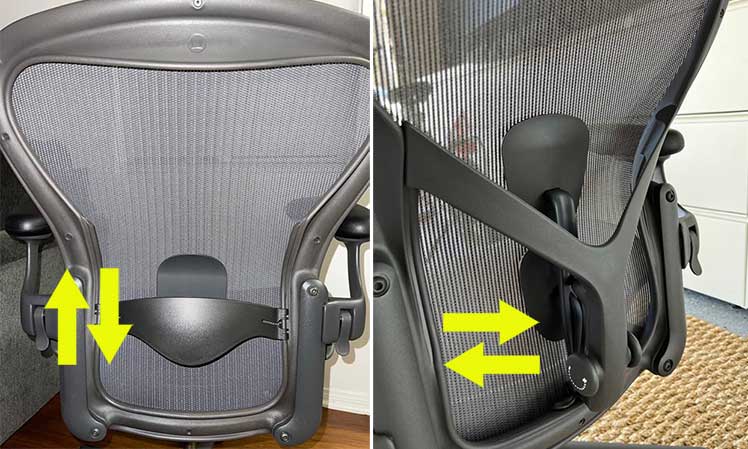
Recommendation: the sliding lumbar pad offers conventional height-adjustable lower-back support. It’s more compatible across body types, and easier to position (just set it slightly above your beltline). Learn more:
Aeron Remastered Vs Gaming Chair
The Aeron Gaming Chair is a pre-configured Remastered edition with an Onyx frame, 3D arms, a Posturefit system, and a Tilt Limiter + Seat Tilt. You can choose Size B or C Sizes, plus an extra-long gas cylinder if you wish.
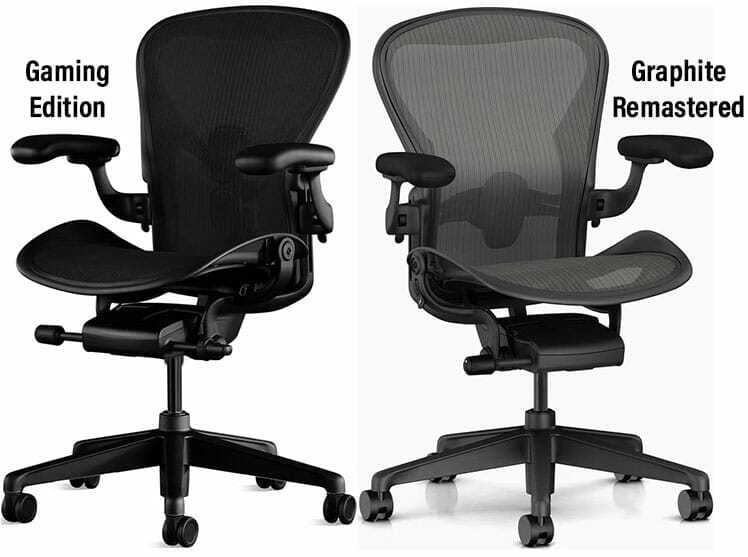
The simplified buying process is supposed to make buying easier for gamers. It’s a great idea — except for the lack of Posturefit height-adjustability. If that doesn’t fit, the chair’s back support tech won’t work for you.
Advice: try out an Aeron with Posturefit in a Herman Miller showroom. If you can’t, a Remastered chair with a height-adjustable lumbar pad is a safer pick.
Aeron Gaming Chair From Herman Miller $1930
Learn more: Aeron Gaming Vs Remastered Chairs Compared
Aeron Remastered Specifications
Here’s a quick overview of the Aeron’s specifications:
- Functionality: see highlight functions and complete specs
- Sizing: see dimensions for A, B, and C-sized options
- Frame options: browse six different frame color configurations
Highlight Functionality
The Aeron’s 8Z Pellicle mesh is its most outstanding feature. It’s durable, easy to clean, pleasant to the touch, and ultra-adaptive. Varied tension zones keep body weight evenly distributed, even when you change positions.

This effect takes pressure off his spine by adapting to movements, so users remain balanced. This creates a floating sensation that provides constant encouragement to maintain a balanced working posture.
Other Highlight Features
Beyond the Aeron’s mesh are athese notable features:
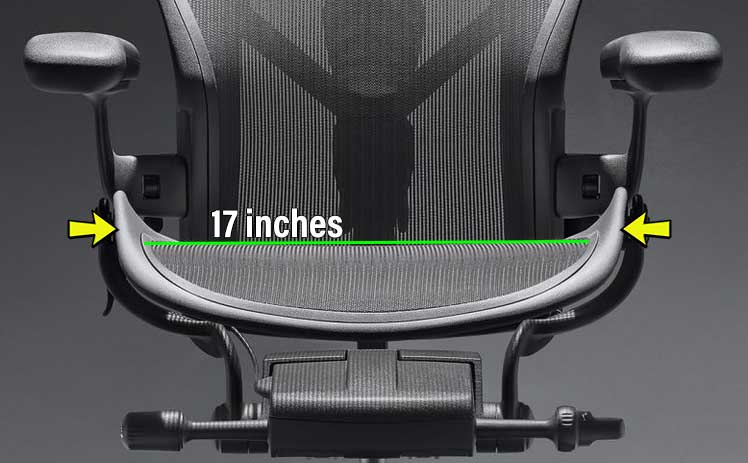
Posturefit’s lack of height adjustability isn’t an issue. It’s only supposed to provide generalized mild support. In contrast, the Lumbar Support Pad ($80) is flimsy — with moderate body weight applied, it often pops out of its sockets!
Learn more: Herman Miller Aeron Posturefit Vs Lumbar Pad
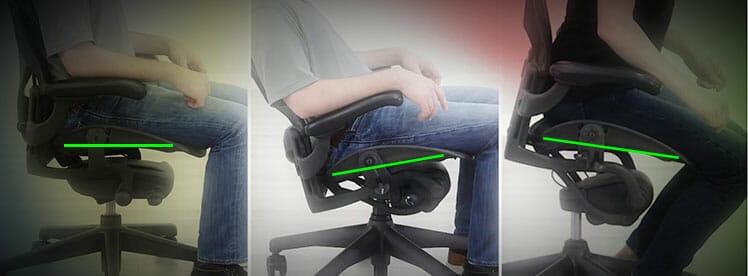
You can also combine the seat and backrest into a synchronous tilt. When the backrest reclines, the seat tilts up (max 7°). When leaning forward, the seat tilts down(max -1°).
Summary of Features
- Upholstery: 8Z Pellicle mesh with variable tension zones.
- Lumbar support: depth-adjustable Posturefit ($95) or height-adjustable lumbar pad ($75).
- Backrest recline: lock tilt at 93°, 102°, 113°.
- Seat: -1° to 7° sync-tilt; height-adjustment.
- Armrests: fixed; height-adjustable ($125); 3-directional (up, down, pivot for $255)
Aeron Size Options
Choosing the right size chair is crucial. Use Herman Miller’s size ratings to pick the right model for your body type.
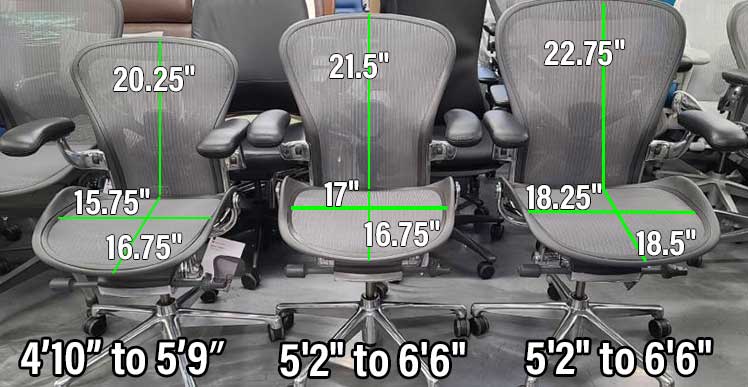
For example, I stand 5’9″, which makes sizes A and B technically suitable. However, for a more spacious fit, the Size B version is the better choice.
| Aeron Size A | Size B | Size C | |
| Seat | 19″ (W) x 15.75″ (D) | 20″ (W) x 17″ (D) | 21.5″ (W) x 18.5″ |
| Backrest | 20.25″(W) x 21″ (H) | 21.5″ (W) x 22″ (H) | 22.75″(W) x 23″ (H) |
| Seat Height | 14.75″ to 19″ | 16″ to 20.4″ | 16″ to 20.5″ |
| Size Rating | 4’10” to 5’9″; 300 pounds | 5’2″ to 6’6″; up to 350 pounds | 5’2″ to 6’6″; up to 350 pounds |
Frame Options
The Herman Miller store and SmartFurniture both offer six frame styles. On Amazon, you can choose Graphite, Onyx, or Mineral.
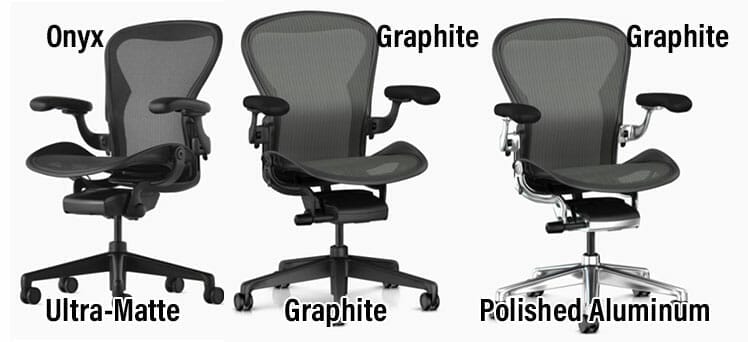
The Graphite frame is the default option in the Herman Miller Store. Other styles cost extra:
- Standard Graphite: default color
- Black frame with Onyx matte base: $150 extra
- Graphite frame + polished aluminum base: $200 extra
- Mineral frame with satin aluminum base: $220 extra
- Mineral frame with polished aluminum base: $320 extra
- Black frame with polished aluminum base: $300 extra
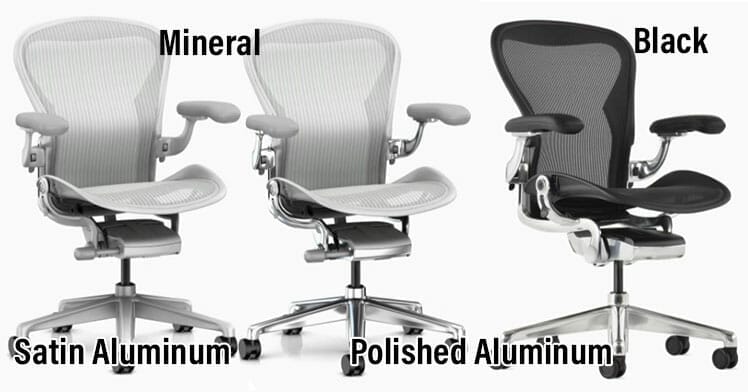
Beyond frame options, users can also choose custom armrests, tilt functions, lumbar support, and caster wheel types. Learn more:
Herman Miller Aeron Alternatives
Here are five viable alternatives to the Aeron chair:
| Model | Compared to Aeron Remastered | Price |
| 1. Embody | Flashier design with a wider seat and adaptive upper-back support | $2045 |
| 2. Anthros Chair | Delivers Aeron-level neutral posture support for the pelvis and upper spine | $1833 |
| 3. Mirra 2 | Aeron-style chair with better lumbar adjustability and greater sitting versatility | $1495 |
| 4. Secretlab Titan | Aeron-tier neutral-posture support – with more flexibility and complete spinal coverage | $579 |
| 5. Staples Hyken | Cheap Aeron clone that delivers essential features without luxury extras | $140 |
Herman Miller Embody vs Aeron
The Embody differs with flashier aesthetics, an adaptive backrest and a wide, spacious seat. But it’s trickier to use. Its upper-spine–focused support depends on complex dual-angle settings.
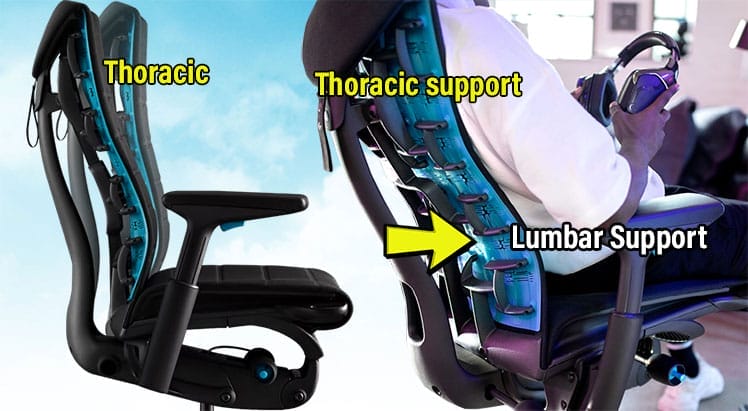
Without a solid understanding of neutral posture and how to adjust the backrest’s top and bottom angles, achieving true comfort in the Embody can be difficult.
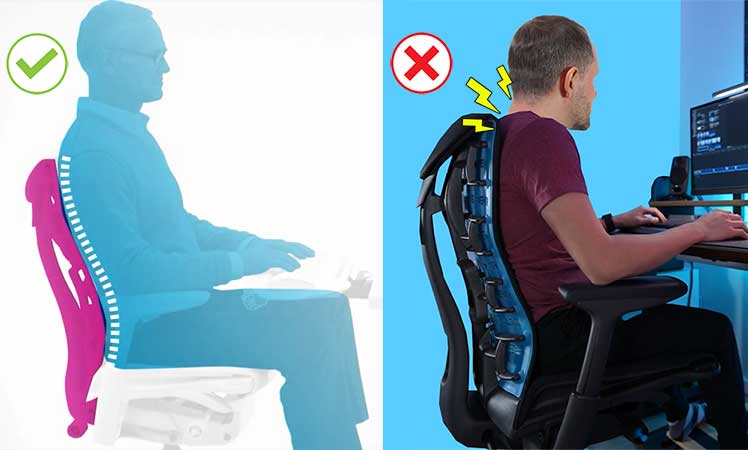
In contrast, the Aeron delivers more straightforward, “dummy-proof” posture support.
Embody vs Aeron Specifications
| Embody | Aeron | |
| Concept | Upper back support with a flexible, adaptive backrest | Suspension mesh + lower back support |
| Tilt functions | 94-120° recline; passive seat sync-tilt | 93-113° recline; -1° to 7° seat tilt |
| Armrests | 2D | 3D |
| Ease of use | Difficult to configure | Easy to use |
| Size rating | 5’4″ to 6’2″, 300 pounds | 4’10” to 6’6″, 350 pounds |
| Price | $2045 from Herman Miller | $1930 from Herman Miller |
Embody vs Aeron Back Support
The Aeron with Posturefit supports the pelvis. With a sliding lumbar pad, it primarily supports the lower spine. In contrast, the Embody prioritizes support for the upper spine.
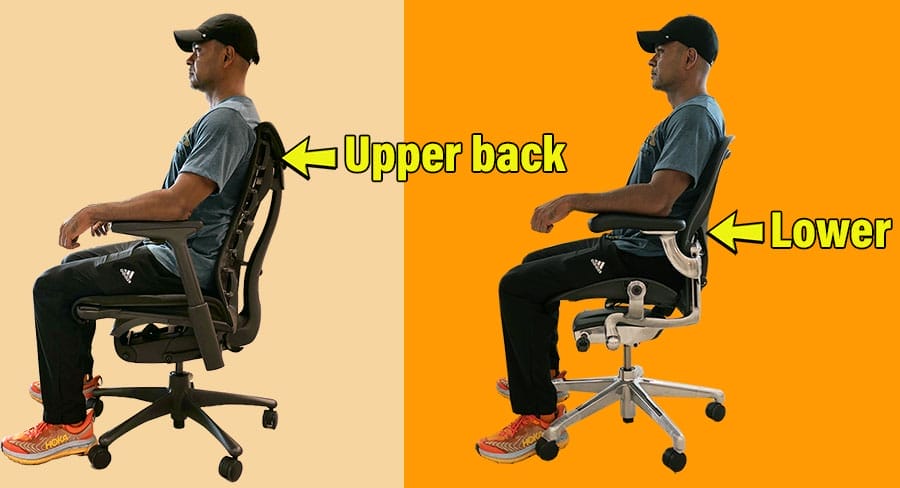
Both have the same end: support for clean neutral postures (a 0° neck tilt and 25-45° lower back curve). However, while the Aeron’s support is straightforward, the Embody’s is complex.
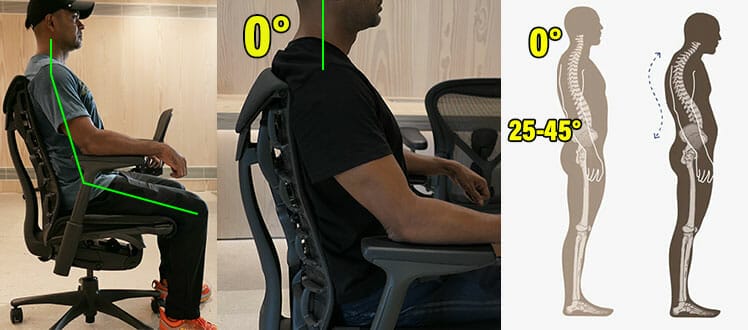
You can’t adjust the height of the Embody’s backrest; you can only toggle the angles of the upper or lower backrest curves. Ideally, the upper curve should cup your upper spine.
Once the upper curve cups your upper spine, it suspends it up against gravity. That makes sitting upright very easy. However, the built-in lumbar support curve is almost non-existent.
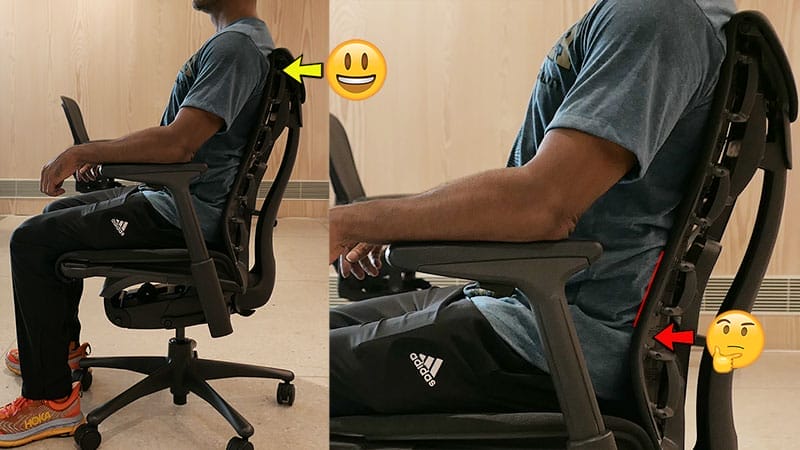
As a result, while delivering superb upper back support, an Embody chair leaves you with a flattened lower back curve.
Advice: Not recommended for ergonomic beginners. If you don’t get the backrest angle settings correct, this pricey chair may harm your posture rather than helping it.
Learn more: Herman Miller Embody Gaming Chair Review
Embody Gaming Chair From Herman Miller $2045
Embody Office Editions are also available from Herman Miller for $1880+.
Anthros Chair vs Aeron
The Anthros chair mirrors the Aeron’s PostureFit concept by focusing its support on the pelvis to promote neutral posture.
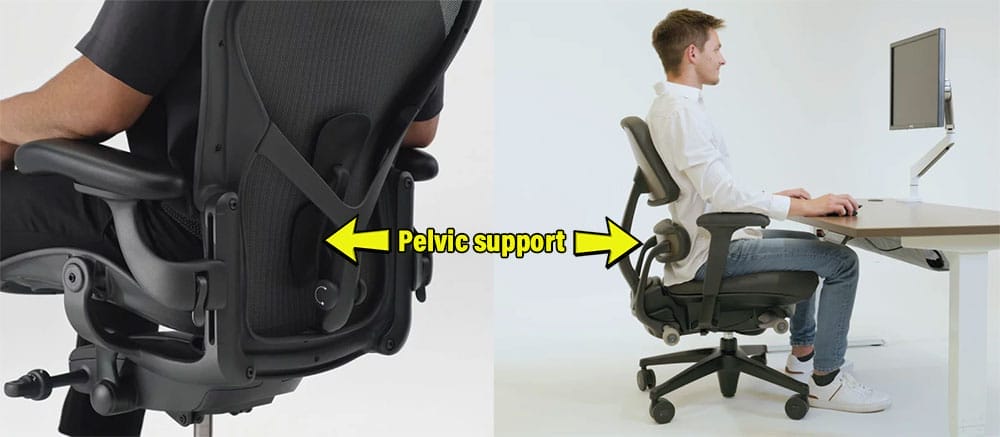
The lower pad stabilizes the pelvis, while the upper section supports the upper spine. Together, they make it easy and intuitive to maintain a neutral sitting position as your default.
Anthros vs Aeron Specifications
| Anthros chair | Aeron | |
| Concept | Depth-adjustable pelvic support with secondary upper spine support | Suspension mesh + strict posture support |
| Tilt functions | 0°–16° seat tilt with a mild synchronous backrest recline | 93-104° recline; -1° to 16° seat tilt |
| Armrests | 4D | 3D |
| Adjustable seat depth | No | No |
| Size rating | 4’11” to 6’1″, 300 pounds | 4’10” to 6’6″, 350 pounds |
| Ease of use | Easy to use | Easy to use |
| Price | $1833 from Anthros | $1930 from Herman Miller |
The Aeron is one of the best—and strictest—posture-correcting chairs available. In terms of promoting precise neutral posture, the Anthros is its closest competitor.
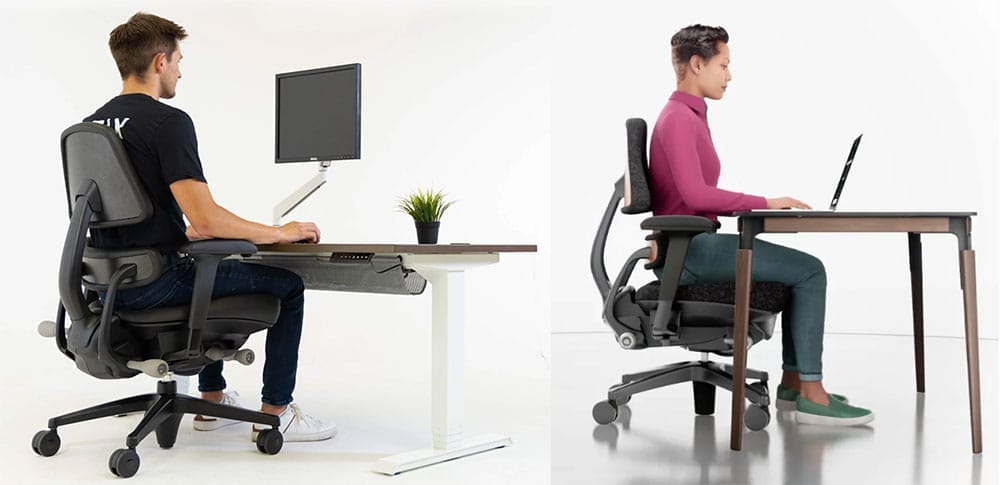
Once you dial in your pelvic support and upper-backrest depth, all you need to do is plant your feet and sit upright—the chair takes care of the rest.
Buying advice: the biggest downside is the Anthros chair’s limitation to neutral postures — you can’t kick back or lounge deeply in this chair. Users who enjoy more relaxed, “loungy” positions may find the strictly neutral support a bit psychologically dull.
Herman Miller Mirra 2 vs Aeron
The Mirra 2 is a softer, more forgiving alternative to the Aeron. Both chairs use mesh seats, but the Aeron’s seat has firm, bladed edges designed to discourage putting your feet up.
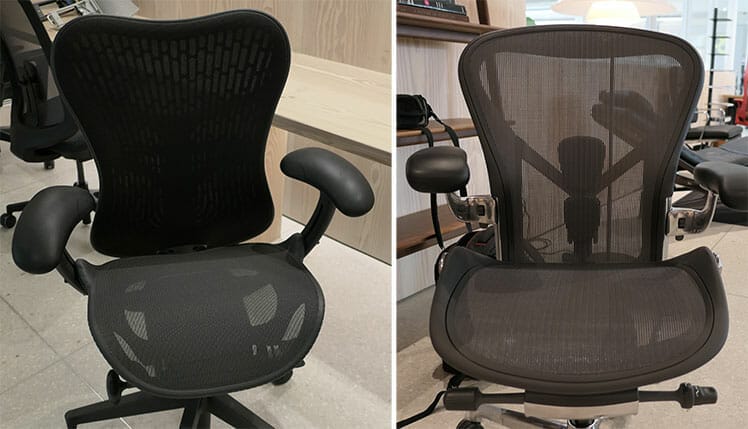
The Mirra 2, by contrast, has a smoother, ridgeless seat frame that makes cross-legged sitting far more comfortable. In addition, it’s the only Herman Miller chair with height x depth-adjustable lumbar support.
Mirra 2 vs Aeron Specifications
| Mirra 2 | Aeron | |
| Concept | Adaptive mesh with flexible posture support | Suspension mesh + strict posture support |
| Tilt functions | 95-122° recline; 0-5° seat tilt | 93-104° recline; -1° to 16° seat tilt |
| Armrests | 4D | 3D |
| Adjustable seat depth | Yes | No |
| Size rating | 5’3″ to 6’1″, 350 pounds | 4’10” to 6’6″, 350 pounds |
| Ease of use | Easy to use | Easy to use |
| Price | $1495 from Herman Miller | $1930 from Herman Miller |
The height x depth-adjustable lumbar support is my favorite Mirra 2 feature. It lets you fine-tune lower-back pressure precisely to your body.
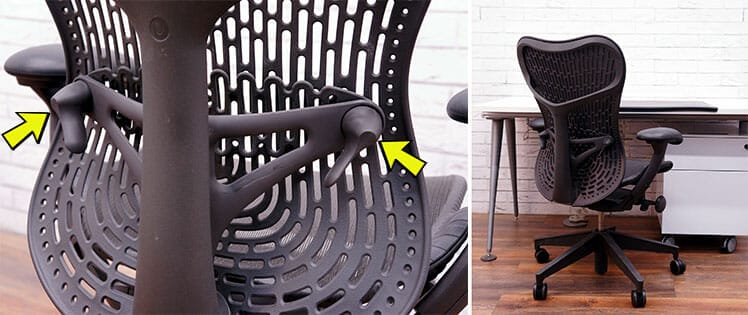
Combined with the depth-adjustable seat, it’s easy to get an excellent fit in this chair across a wide range of body sizes.
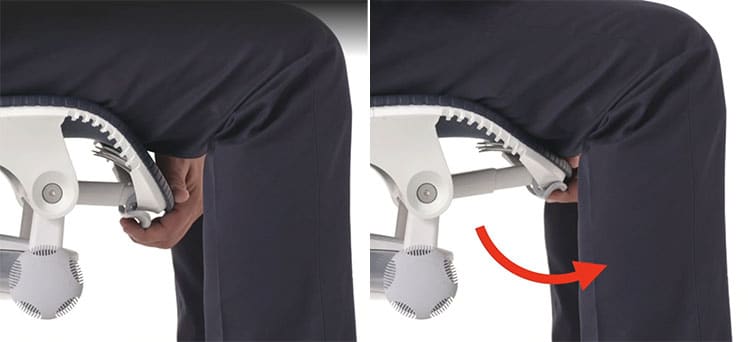
Buying advice: Choose the Mirra 2 if you want the flexibility to sit cross-legged or shift into more relaxed positions. Choose the Aeron if you prefer (or benefit from) stricter posture support that keeps your feet planted and your spine aligned.
Mirra 2 from Herman Miller $1495+
Learn more: Mirra 2 vs Other Herman Miller Chairs
Secretlab Titan Evo vs Aeron
If you’re aiming for biomechanically precise neutral posture, the Titan Evo (in my testing) offers support that’s comparable to the Aeron. The difference is in how that support is delivered.
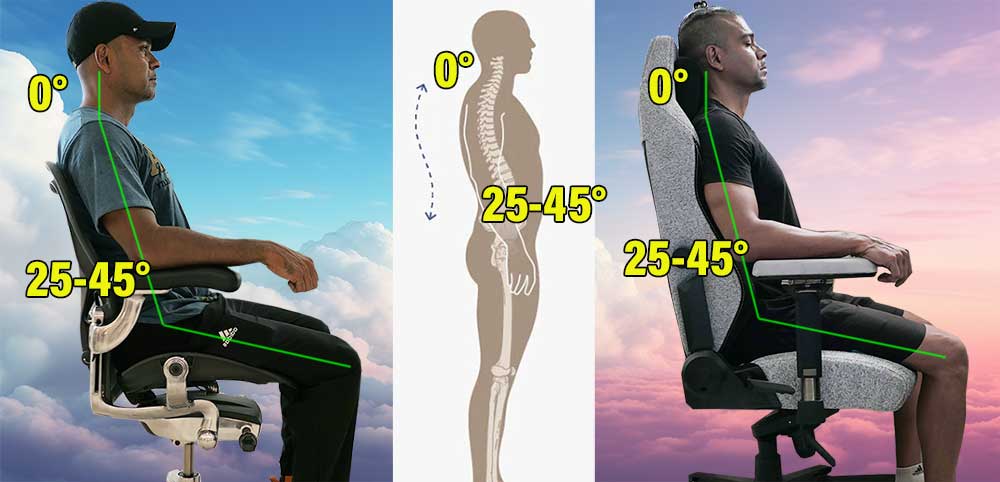
The Aeron forces you to sit upright, while the Titan offers upright support as one of several comfortable options. If you want strict posture support available — but not enforced — the Titan is the better choice.
Titan Evo vs Aeron Specifications
| Titan Evo | Aeron | |
| Concept | Full-back, flexible posture support | Suspension mesh + strict posture support |
| Tilt functions | 85-165° recline; 0-12° (manual) seat tilt | 93-104° recline; -1° to 16° seat tilt |
| Armrests | 4D | 3D |
| Ease of use | Requires discipline to sit properly | Strict support, easy to use |
| Size rating | 4’11” to 6’9″, 395 pounds | 4’10” to 6’6″, 350 pounds |
| Warranty | 5 years | 12 years |
| Price | $579 from Secretlab | $1930 from Herman Miller |
The Titan Evo’s freedom comes with a trade-off. Because the Aeron keeps you upright at all times, it naturally builds consistent sitting habits.
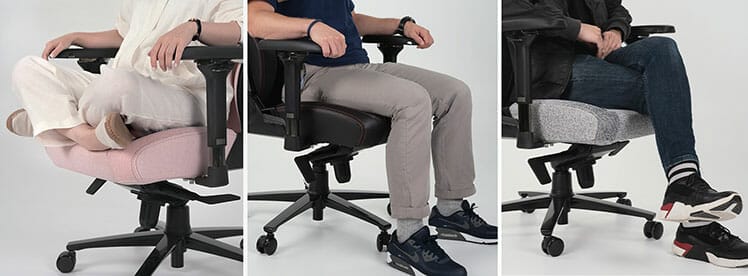
The Titan Evo, on the other hand, lets you sit however you want — so maintaining good posture becomes a choice rather than a guarantee.
After four years of use, I’ve found that maintaining good posture in the Titan requires constant vigilance. The chair is comfortable even when you’re slouching, which makes it easy to fall into bad habits.
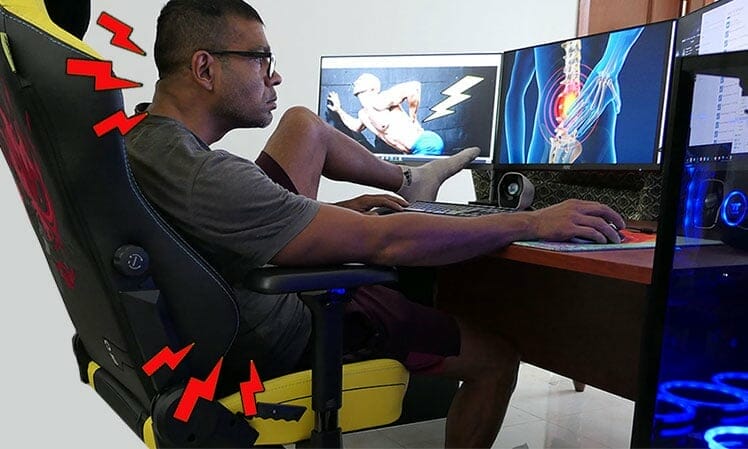
Advice: If you struggle with posture, the Aeron will nudge you into healthier habits by keeping you upright. The Titan offers more freedom, but you’ll need discipline to maintain good sitting form on your own.
Learn more: Titan Evo vs Aeron Chair Comparison
Staples Hyken vs Aeron
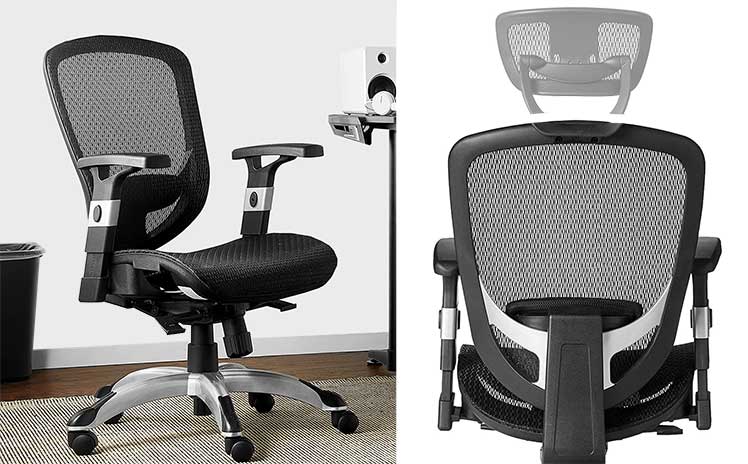
The Hyken is a budget-friendly take on the Aeron. It offers a similar full-mesh build, adjustable armrests, adjustable lumbar support, and even a synced tilt mechanism.
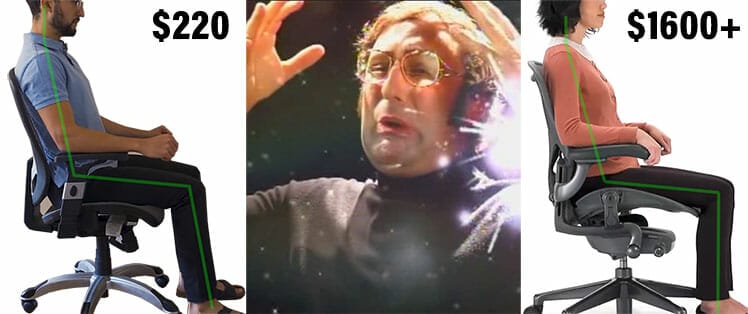
The key difference is that the $130 Hyken delivers neutral-posture support without any of the premium extras. It’s built with cheaper components, has more limited adjustments, and typically won’t last more than a year of full-time use.
Hyken vs Aeron Specifications
| Titan Evo | Aeron | |
| Concept | Full-back, flexible posture support | Suspension mesh + strict posture support |
| Tilt functions | 85-165° recline; 0-12° (manual) seat tilt | 93-104° recline; -1° to 16° seat tilt |
| Armrests | 4D | 3D |
| Ease of use | Requires discipline to sit properly | Strict support, easy to use |
| Size rating | 4’11” to 6’9″, 395 pounds | 4’10” to 6’6″, 350 pounds |
| Warranty | 5 years | 12 years |
| Price | $140 on Amazon | $1930 from Herman Miller |
At a glance, the Hyken is unmistakably a budget version of the Aeron, with plastic components and a noticeably less refined build.
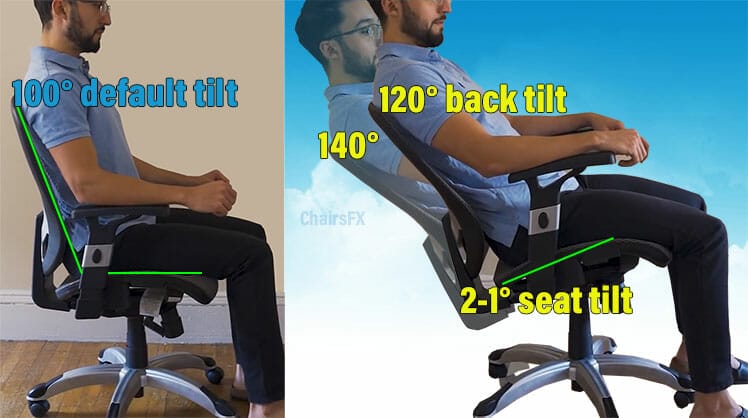
Even so, for its price, it offers surprisingly sophisticated synchronous tilt functions—features that are rare at this budget tier.
Advice: The Hyken’s biggest drawback is durability; with full-time use, it typically won’t last more than a year. A close second is the lack of luxury extras. While it supports neutral posture just fine, the overall experience feels spartan compared to the Aeron.
Learn more: Hyken Vs Other Cheap Office Chairs
Conclusion: Gold Standard Work Chair
The Aeron chair, first released in 1994, has spent over three decades establishing itself as the gold standard for office seating. This is thanks to its reliable performance, durability, and posture-focused design.

However, a chair that enforces strict upright postures isn’t the right fit for everyone. In a corporate or SMB office setting, where consistent ergonomic habits can boost productivity, the Aeron excels.

For home offices or more casual setups, its posture-enforcing design may feel restrictive.
The decision ultimately comes down to how much value you place on luxury extras beyond the fundamentals (neutral posture support). If these premium features matter to you, the Aeron is an excellent investment:
- You prioritize strict posture support and neutral spine alignment.
- You want a high-quality, durable chair with a 12-year warranty.
- You value adaptive mesh that balances your weight and supports movement.
- You spend long hours at a desk and want a chair that encourages focus.
- You enjoy premium design and the psychological “luxury” appeal of iconic furniture.
- You’re okay with a limited recline range (93–104°) for long-term spinal alignment.
- You like to sit cross-legged while working.
- You prefer a chair with a deep recline for lounging or relaxation.
- You’re on a tight budget and want similar ergonomic support for less.
- You prefer a softer, cushioned seat over a firm, supportive one.
Bottom line: The Aeron is best suited for buyers who want a posture-first chair with high-end materials, customizable features, and long-term durability. If you prioritize comfort, luxury, and “set-it-and-forget-it” support, it’s worth the premium.
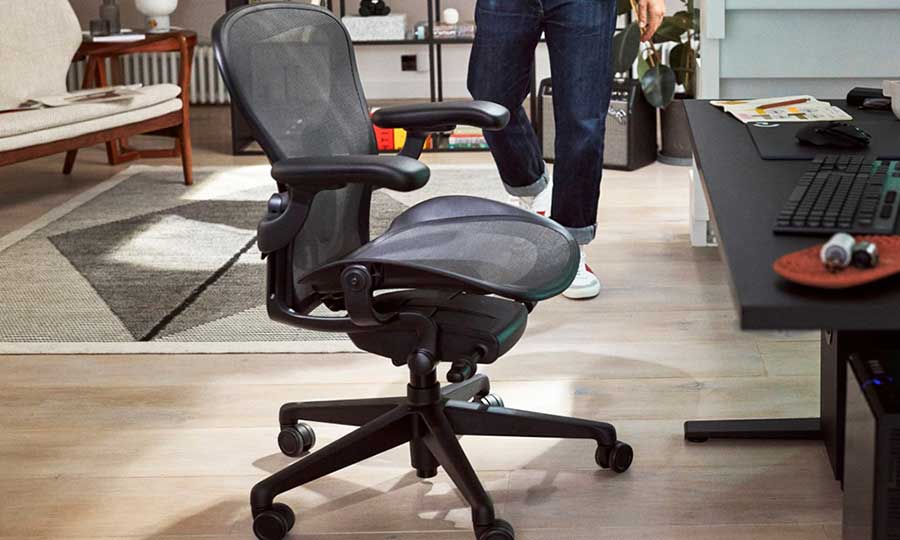
For those who only need ergonomic fundamentals, less expensive chairs can deliver similar health benefits at a fraction of the cost.
