


How to sit in an ergonomic office chair? They all work the same way. Every chair that qualifies as ‘ergonomic’ has three components that support good posture. Adjustable lumbar support aligns the spine. Adjustable arms provide extra bracing. A reclining backrest adds movement. Using this trio correctly yields the best results. Here’s a healthy sitting quick start using a Steelcase Series 1 office chair.
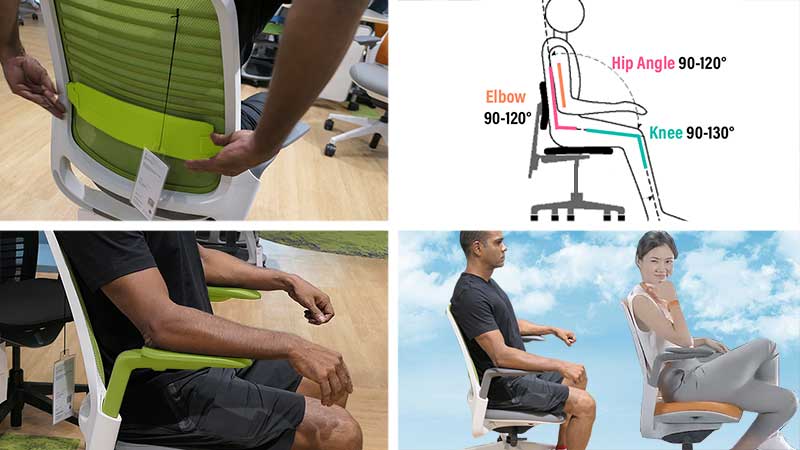
For good back support, institutional guidelines have a clear consensus. Any chair with adjustable lumbar + arms + reclining backrest qualifies. But regardless of the chair, two things are necessary for the best results:
- Proper chair settings: the core components must be adjusted to sync with the user’s proportions.
- Proper user technique: the user must plant their feet, tuck their hips deep into the seat, and focus on sitting upright.
Ergonomic Office Chair Quickstart
The point of any ergonomic chair is to support neutral postures. The Steelcase Series 1 is used here as a practical example — its three core components are straightforward to adjust. The same steps apply to any ergonomic chair with equivalent features.
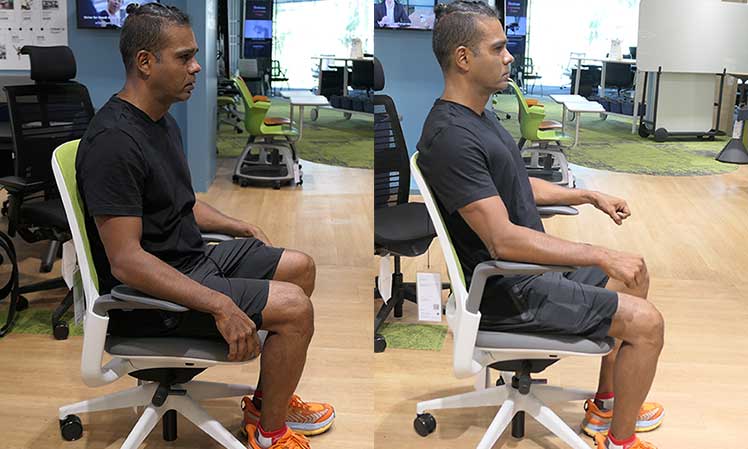
Make it a priority to master these steps:
- Adjust the lumbar to support your back just above your beltline.
- Adjust the seat height to allow for a 90° (or greater) hip and knee bend.
- Lock the backrest angle at its default 100° recline.
- Apply neutral sitting techniques: tuck your hips, plant your feet, etc.
Set Lumbar Support Above The Beltline
The 2009 paper Seeking the Optimal Posture of the Seated Lumbar Spine calls for a lumbar support depth of around 4 cm (1.5″). Regarding height, the general rule is to set the lumbar to provide support just above your beltline.
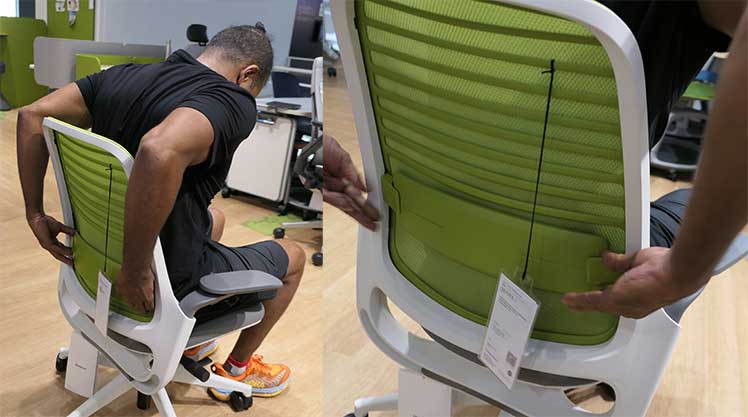
For average-sized men (5’8″to 6’2″), ‘above the beltline’ is around 7.5″ above the seat. For average women (5’4″ to 5’7″), it should be around 5.5″ above the seat. Using these guidelines, simply play around with the Series 1 lumbar slider until you find your sweet spot.
Set An Optimal Seat Height + Depth
The optimal seat depth should allow 1-2 inches of space between the back of your knees and the seat lip. The optimal seat height varies. A standard recommendation is to shoot for 90-degree or greater angles of your knees, hips, and elbows(1).
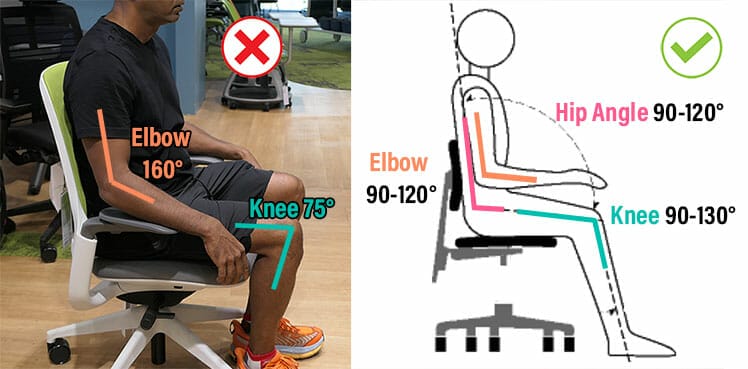
Meanwhile, a seated knee bend of less than 100° (with hips slightly above the knees) is reported to reduce lower back pressure(2). In practice, I’ve found that claim accurate.
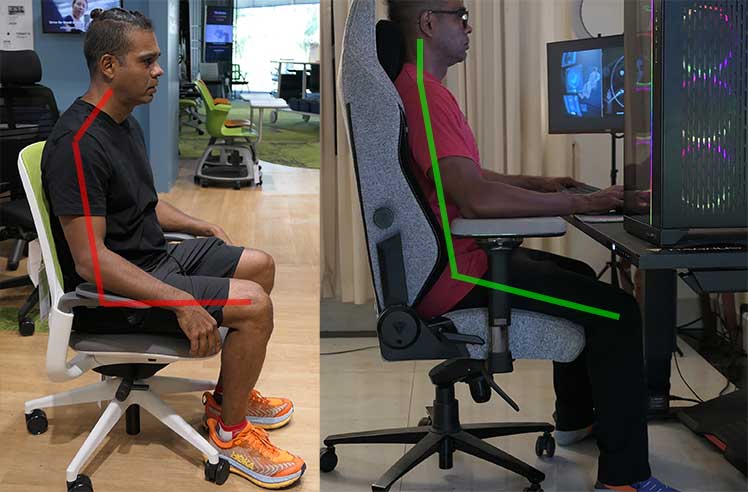
In my experience, the ideal seat height places your hips slightly higher than your knees. At the same time, it allows for a knee bend of between 90-120°.
Lock The Backrest At 100°
Famous ergonomist Dr. Alan Hedge (Cornell) has stated that lumbar disc pressure and back muscle activity are lowest with a supported recline angle of 110° – 130°.
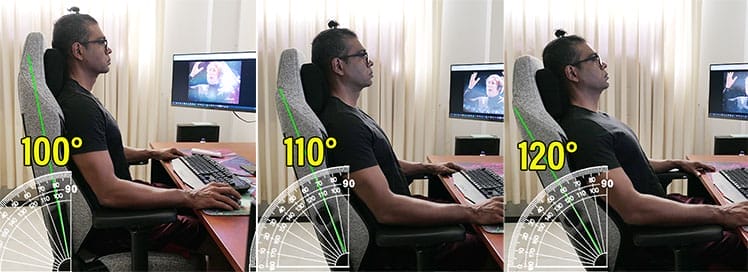
However, while researching text neck syndrome, I found my 110° recline angle problematic. While it did support good lower back posture, it also induced a rounding of the upper spine.
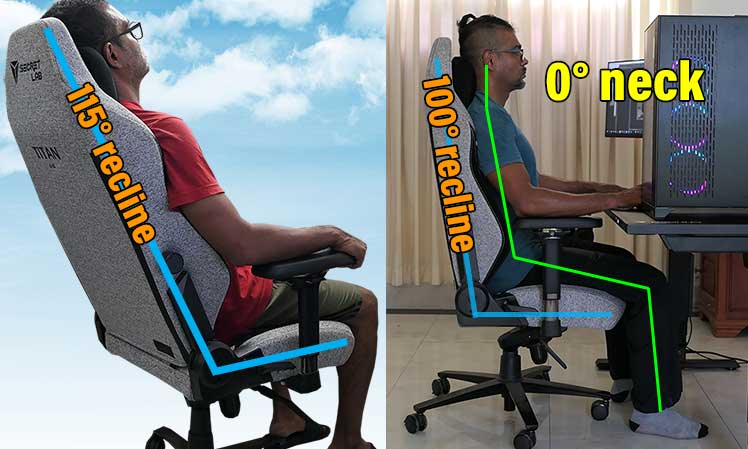
These days, I prefer sitting with a steep 100° backrest recline. I find that doing so best supports good back and neck posture.
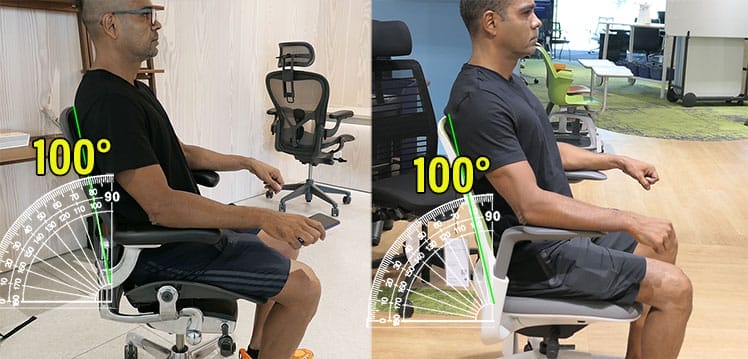
Steelcase engineers seem to agree. Here are the upright and recline positions of the best Steelcase chairs:
- Gesture: 98°-116°; 5-position backstop
- Leap: 96-120°; 5-position backstop
- Think: 98-116°; 3-position backstop
- Series 1: 100-120° rocking with tension
Bottom line: the Series 1 comes with a 100° recline angle as its default. To master neutral postures, simply lock it in place. Once you’ve got the gist, unlocking it will add a rocking function.
Apply Neutral Sitting Techniques
The point of an ergonomic chair is to support neutral sitting postures. These replicate the lower back and neck angles of healthy standing postures.
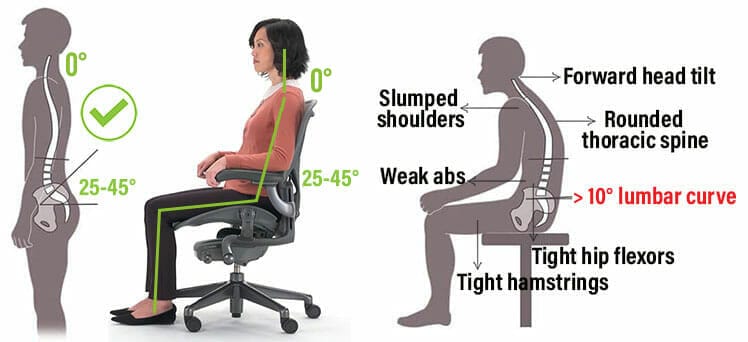
As a result, users can sit comfortably for longer periods — without suffering from musculoskeletal stress. Good sitting posture yields many benefits. These include supercharged energy levels, sharper cognitive focus, enhanced spatial awareness, and more.
To unlock these benefits, configure your Series 1 chair’s settings:
- Set the lumbar to support your back just above your beltline.
- Adjust the seat height to allow for a 90° (or greater) hip and knee bend.
- Lock the backrest angle at its default 100° recline.
Once you’ve got the settings down, apply these techniques:
- Adjust your seat height so you can plant your feet firmly on the floor.
- Tuck your hips as deeply as possible into the seat.
- Adjust your lumbar support to apply mild pressure to your lower back curve.
- Rest your forearms on the armrests.
- Push up with your forearms until your back is straight.
To see how these techniques apply to various gaming and office chairs, see this:
Beyond Neutral Postures: Healthy Sitting Habits
A properly configured ergonomic chair supports neutral postures — but that’s only one part of the desk work wellness equation. Exercise, clean eating, and adequate rest build the core strength and stable energy needed to sit upright for long periods. A chair alone cannot substitute for those foundations.

With proper settings and technique, any ergonomic chair — including the Steelcase Series 1 — delivers solid posture support. But the bigger gains come from pairing good sitting habits with a broader healthy lifestyle.
Learn more: 2026 Summary of Healthy Deskwork Factors
2026 Desk Work Guide: Key Trends and Top Chairs for Optimal Health
Footnotes
- Canadian Centre for Occupational Health and Safety. ‘Working in a Sitting Position’. Ergonomic Fact Sheet, revised September 28, 2022. https://www.ccohs.ca/oshanswers/ergonomics/sitting/sitting_position.html, (accessed April 2, 2023).
- Physio Med. ‘Correct Sitting Posture: Office’. Access the PDF, (accessed April 2, 2023).
