


How to sit in an ergonomic office chair? How to use one? This guide answers both questions. Learn step-by-step neutral sitting posture mechanics in any chair with adjustable lumbar support, adjustable armrests, and a reclining backrest. Then explore data-backed solutions to optimize your routine when away from the chair. Learn how to sit neutrally within the context of a healthy, professional desk work routine.

Under established ergonomic standards, a chair earns the “ergonomic” label when it offers adjustable seat height, lumbar support, armrests, and recline. Those controls exist to support neutral sitting positions.
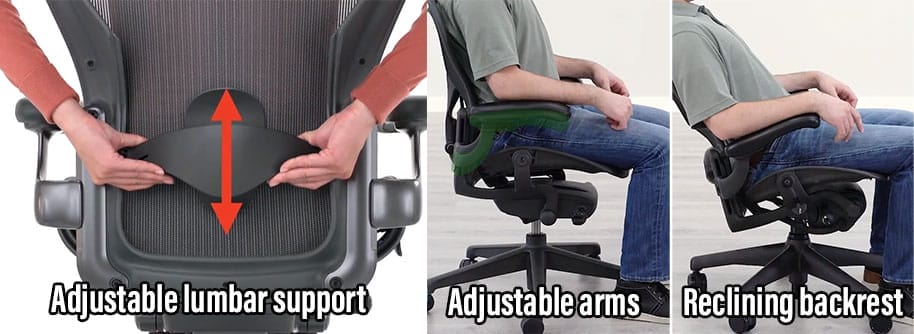
This neutral support functional floor isn’t expensive. Any model with the requisite features will suffice. Higher prices typically buy brand cachet and styling rather than better spinal mechanics.
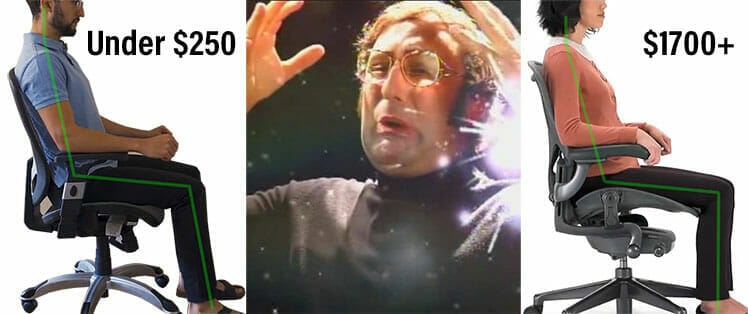
No matter how much you spend on an office chair, you’ll get the best results by using neutral postures efficiently. Occupational medicine has long shown that frequent movement—not holding rigid postures—drives desk-worker health. Yet neutral sitting still shapes how fast fatigue and lower-back strain build up between breaks.
How to Sit Neutrally in an Office Chair
Adjust your chair’s seat height, armrests, and lumbar support; use the default ~100° recline. Then tuck your hips deep into the seat, lean your bodyweight into the backrest, and plant your feet firmly on the floor.

Pushing up with your feet and the armrests will give you the power to hold your torso upright with a clean neutral posture.

If you find sitting upright too difficult, spend a few weeks working on your core strength. Then, follow these steps:
- Tuck your hips deep into the seat for maximum contact between the backrest and your spine.
- Plant your feet firmly on the floor; adjust your seat height for a 90° (or greater) knee bend.
- Adjust the lumbar to support your lower back (aim for slightly above your beltline).
- Lock the backrest angle at its default 100° recline, or at 110° for a more relaxed neutral posture.
Tuck Your Hips Deep Into the Seat
The first step in sitting neutrally in any ergonomic chair is to tuck your hips as deep as possible into the seat. Wedging your hips as far back as possible ensures maximum contact between your spine and the backrest.

That close contact will allow your adjusted lumbar support to apply proper pressure to your lower back’s natural curve—the key to maintaining good posture throughout the day.
Adjust the Seat And Plant Your Feet
The key here to plant your feet firmly on the floor with an optimal seat height and depth. The optimal seat depth should allow 1-2 inches of space between the back of your knees and the seat lip.
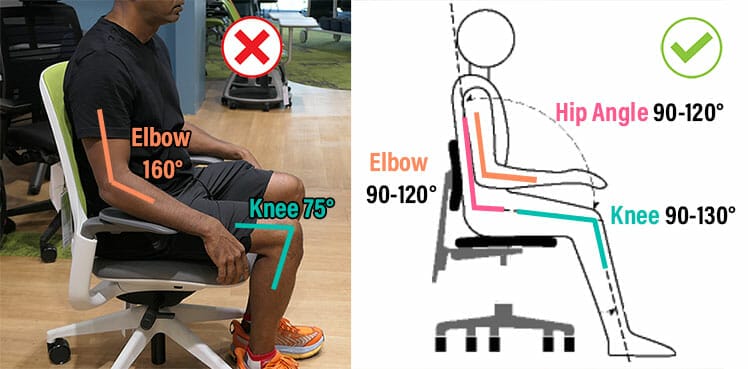
The optimal seat height varies. A standard recommendation is to shoot for 90-degree or greater angles of your knees, hips, and elbows(1).
Meanwhile, a seated knee bend of less than 100° (with hips slightly above the knees) is reported to reduce lower back pressure. In practice, I’ve found that claim accurate.
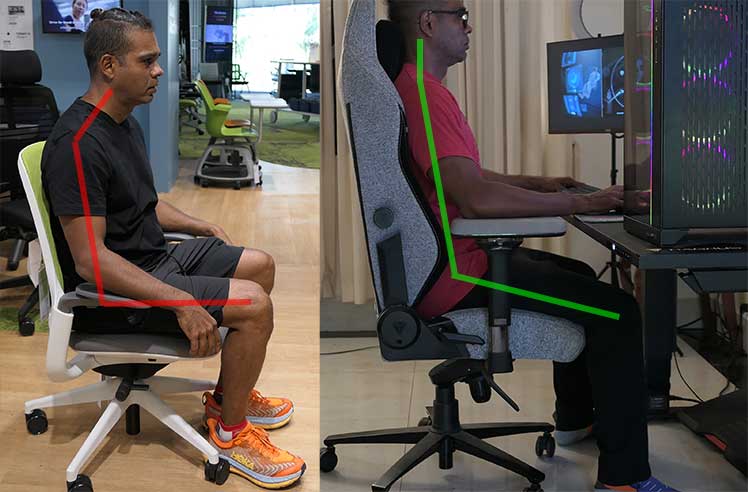
In my experience, the ideal seat height places your hips slightly higher than your knees. At the same time, it allows for a knee bend of between 90-120°. Once you’ve found your sweet spot, plant your feet.
Set Lumbar Support Above The Beltline
Most of the top-rated ergonomic office chairs on the market (Aeron, Gesture, Fern, etc) have height adjustable lumbar support systems. Simply slide your unit up or down until you feel supportive pressure in your lower back curve.
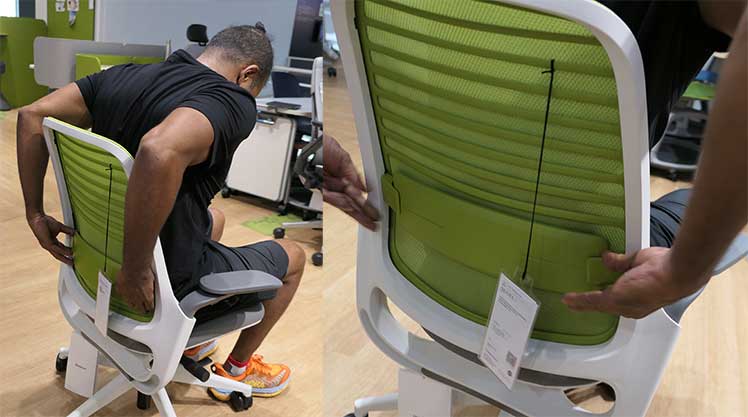
As outlined in our lumbar support biomechanics guide, applying gentle pressure to this sweet spot reflexively straightens your upper spine, while heightening your awareness of proper spinal alignment.
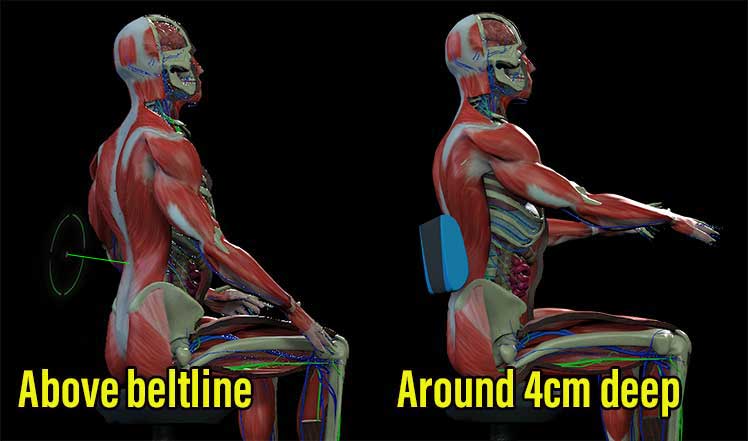
While fixed depth offers less fine-tuning than models like the Titan Evo, its simplicity makes it virtually foolproof to set up and adjust.

If you feel lower back tightness, height is your primary lever. Tuck your hips deep into the backrest and adjust the lumbar pad until it locks into your sweet spot.
Lock The Backrest At 100°
Esteemed ergonomist Dr. Alan Hedge (Cornell) has stated that lumbar disc pressure and back muscle activity are lowest with a supported recline angle of 110° to 130°.
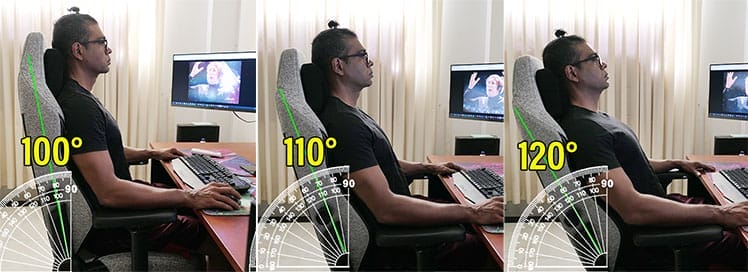
However, while researching text neck syndrome, I found my 110° recline angle problematic. While it did support good lower back posture, it also induced a rounding of the upper spine.
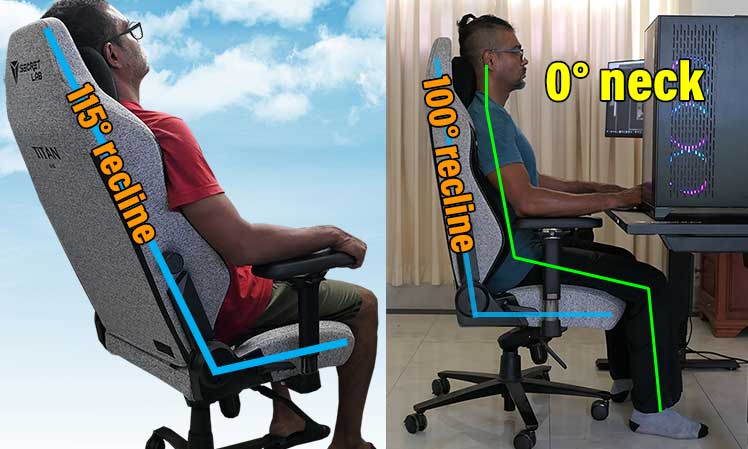
These days, I prefer sitting with a steep 100° backrest recline. I find that doing so best supports good back and neck posture.
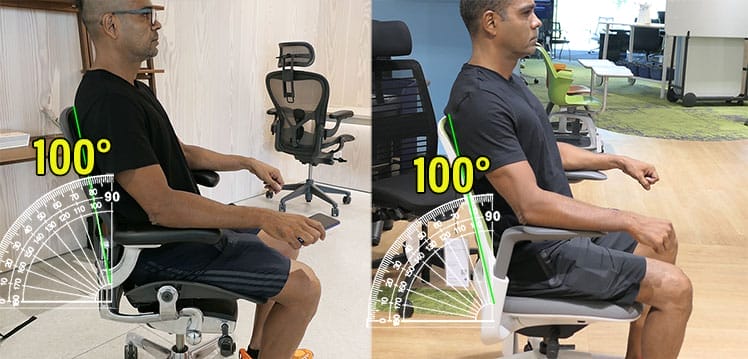
Bottom line: Most ergonomic office chairs come with a 100° recline angle as its default. To master neutral postures, simply keep it locked in its default position.
End Result: Neutral Sitting Posture
The point of an ergonomic chair is to support neutral sitting postures. These replicate the lower back and neck angles of healthy standing postures.
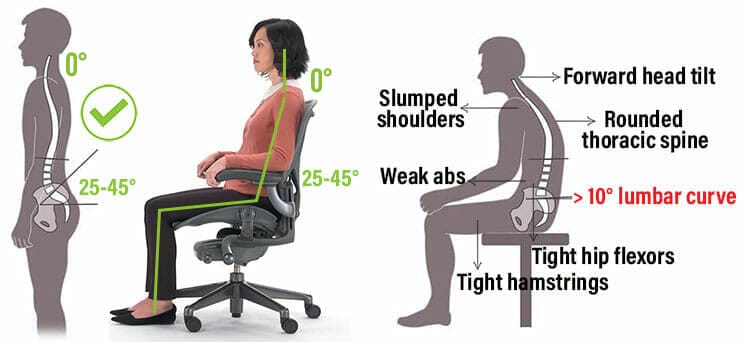
As a result, users can sit comfortably for longer periods — without suffering from musculoskeletal stress. Good sitting posture yields many benefits. These include supercharged energy levels, sharper cognitive focus, enhanced spatial awareness, and more.
To unlock these benefits, configure your chair’s settings:
- Set the lumbar to support your back just above your beltline.
- Adjust the seat height to allow for a 90° (or greater) hip and knee bend.
- Lock the backrest angle at its default 100° recline.
Once you’ve got the settings down, apply these techniques:
- Adjust your seat height so you can plant your feet firmly on the floor.
- Tuck your hips as deeply as possible into the seat.
- Adjust your lumbar support to apply mild pressure to your lower back curve.
- Rest your forearms on the armrests.
- Push up with your forearms until your back is straight.
Posture Optimization Beyond the Desk
A recent ChairsFX empirical audit of desk worker health statistics found rising sedentary behavior and obesity levels manifesting as desk worker musculoskeletal injuries.

The data shows that musculoskeletal desk worker pain typically follows prolonged sitting, low movement, and weight-related load.
That aligns with a broader shift in occupational health away from posture analysis toward movement-first principles:
- Fixed postures create strain: Staying locked in one seated or standing position restricts disc fluid and nutrient exchange while keeping muscles under steady low-grade tension.
- Micro-breaks and posture shifts: Occupational health guidance from OSHA and ISO favor frequent posture changes plus brief standing or walking breaks every 30–60 minutes.
Sit Dynamically, Take Walking Breaks
According to ISO guidelines(2), the ideal chair should support a neutral spine across multiple recline angles. By shifting between upright and reclined positions, users can vary load distribution while they sit.

However, a 2013 systematic review(3) found no clear evidence that dynamic chair functions (like synchronous tilt) actually improve user outcomes.
Joint and muscle activity is influenced more by user behavior (standing, walking, task variation) than by chair mechanics.
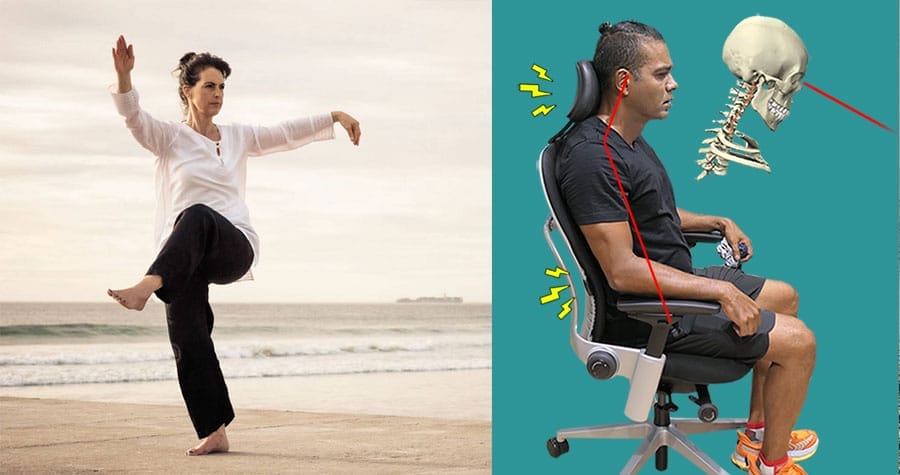
Indeed, rather than flopping around in a chair, I find it’s a lot easier to simply stand up for a short movement break every 15 minutes or so. Beyond boosting blood flow and refreshing muscles, this gives your brain precious downtime to recharge.
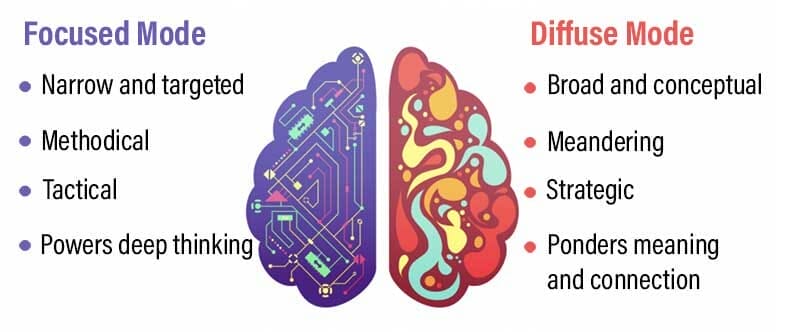
Specifically, stepping away from a task switches your brain from focus to diffuse mode, a more relaxed, dreamlike information processing state. Try this the next time you’re stuck on a desk work problem:
Take a break, stroll around, and let your brain find the solution in its diffused state. It works!
Learn more: Mental & Physical Microbreak Benefits
Best Desk Worker Posture Exercises
If you struggle to sit upright in a clean neutral posture, Doctor of Physical Therapy William Duncan has this advice:
After a year sitting in near-perfect neutral positions, a posture assessment showed traces of my anterior pelvic and forward head tilt remained.

So I took Dr. Duncan’s advice by combining neutral sitting with targeted mobility and core conditioning work. As he predicted, the exercises fixed my misalignments in a way a chair could not.
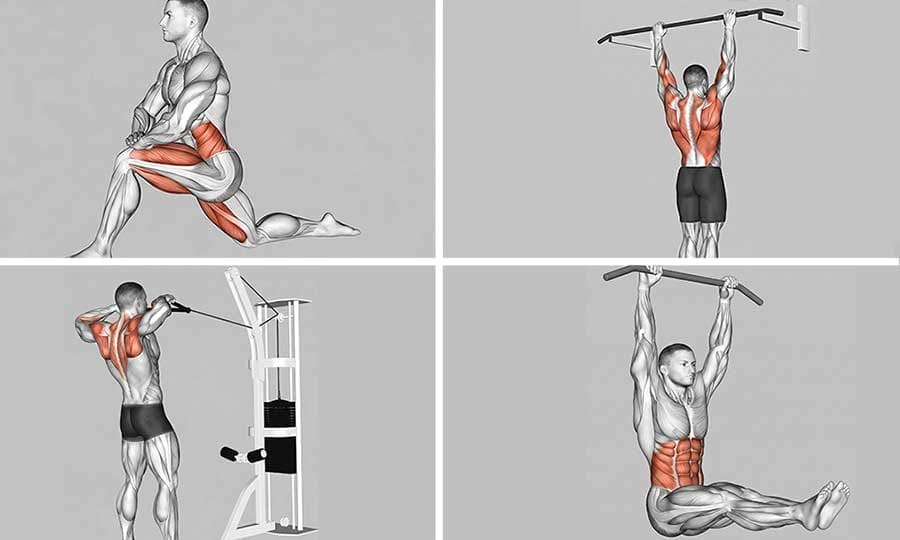
Add these exercises to your routine to make you sit and stand taller without effort, rather than fighting against a gradual slump:
- Kneeling lunge stretch: lengthens the hip flexors, counteracting anterior pelvic tilt.
- Dead hangs: decompresses the spine and stretches the lats and shoulders.
- Face pulls: strengthens the rear deltoids and upper trapezius, counteracting rounded shoulders and forward neck tilt.
- Hanging leg raises: builds lower abdominal and hip flexor strength for pelvic stability.
- Planks: builds full core stability across the abs, obliques, and deep spinal stabilisers.
Neutral Postures + Movement Is The Ideal
Sitting neutrally in an office chair works best as a starting point—not a cure-all. Even with proper technique, long stretches of stillness still wear down your body and energy reserves.
Below is how movement and physical conditioning truly optimizes a desk work routine:
Personal: Neutral Posture + Fitness
Any chair with the core adjustable trio (lumbar support, armrests, recline) can support a neutral posture. In my experience, it doesn’t matter if you sit upright in a “perfect” posture with a steep ~100° recline or lean back slightly more.

As long as you maintain your lower back curve and keep your head balanced above your shoulders, you’ll reduce musculoskeletal strain.
Less physical strain frees up energy you can put toward workouts that actually build postural strength and stamina.
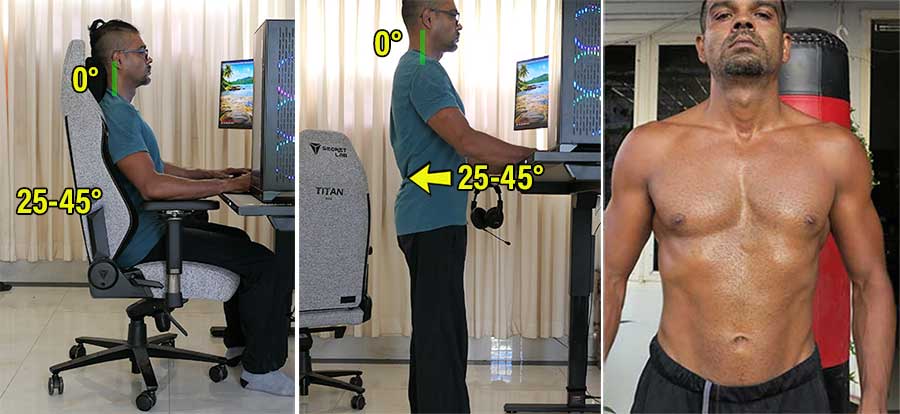
My routine: I use a ~100° recline for crisp neutral alignment at the start and end of work blocks, shifting positions freely in between. I take standing breaks every 15 minutes and train 4x a week with targeted posture work.
Common Pain-Free Desk Worker Habits
A December 2025 ChairsFX survey of 200 full-time U.S. IT desk workers (evenly split between remote and on-site environments) about their desk work habits. It found that only 32% of remote and 26% of on-site staff reported pain-free deskwork.

Looking closely at the pain-free group, these patterns stood out:
- Frequent Exercise Matters Most: Workers free of weekly pain exercise more regularly, whereas remote workers dealing with pain are more than five times as likely to log zero exercise days (21.43% vs. 3.96%).
- More Frequent Movement Breaks: Those without pain take five or more movement breaks per day at higher rates than workers who sit for long stretches or take fewer breaks.
- Better Energy and Focus Payoffs: More than 70% of pain-free respondents finish the day with moderate-to-high energy (vs roughly half or fewer among those in pain), alongside longer blocks of focused output.
Survey Analysis: Common Habits of Zero-Pain Desk Workers
Optimizing Your Office Chair’s Impact
For best results during full-time desk work, treat yourself the way esports pros do—as a cognitive athlete.

No matter which office chair you use, put these habits together to sustain energy, focus, and physical resilience throughout the day:
- Neutral Postures: Aim to sit in a clean neutral posture using a ~100-110° recline as your default sitting posture.
- Dynamic Sitting: Move frequently from your neutral baseline to vary muscle load and keep blood flowing while seated.
- Frequent breaks: Take a walking break every 15-30 minutes to relieve static load on seated muscles.
- Posture Exercises: Build lasting endurance with regular mobility stretches, dead hangs, and core work to offset prolonged sitting.
- Healthy Habits: Consistent sleep and clean nutrition keep energy steady so fatigue doesn’t drag your posture down.
Footnotes
- Canadian Centre for Occupational Health and Safety. ‘Working in a Sitting Position’. Ergonomic Fact Sheet, revised September 28, 2022. https://www.ccohs.ca/oshanswers/ergonomics/sitting/sitting_position.html, (accessed April 2, 2023).
- International Organization for Standardization (ISO). ‘ISO 9241-5:2024 – Ergonomics of human-system interaction — Part 5: Workstation layout and postural requirements’. ISO Standards, September 2024. https://www.iso.org/standard/86222.html, (accessed 28 Nov. 2026).
- Jennifer Pynt. ‘Rethinking design parameters in the search for optimal dynamic seating’, J Bodyw Mov Ther. 2015 Apr;19(2):291-303; Epub 2014 Jul 22. DOI: 10.1016/j.jbmt.2014.07.001 (accessed 25 March 2026).

