

The most reliable way to judge a Herman Miller office chair is to sit in one. If that isn’t an option, I’ve done the testing for you. This guide reviews six Herman Miller chairs that stand out for working from home. It highlights who each model suits —and who it doesn’t. Read this curated breakdown of the 6 best Herman Miller office chairs to find the right fit for your home office.

Recently, ChairsFX surveyed 200 full-time U.S.-based IT workers (100 remote, 100 on-site) about their desk-work habits. Among remote workers, 49.5% sit for more than eight hours per day, while 69.3% experience musculoskeletal pain severe enough to disrupt work weekly.
Despite their long sitting hours, 65.7% report four hours or less of truly productive work per day, while only 39.6% use ergonomic seating.

Against this backdrop, this article asks a practical question: is investing in a high-end Herman Miller chair actually worth it?
Do these chairs meaningfully reduce pain, improve focus and productivity, or simply offer premium build quality and aesthetics?
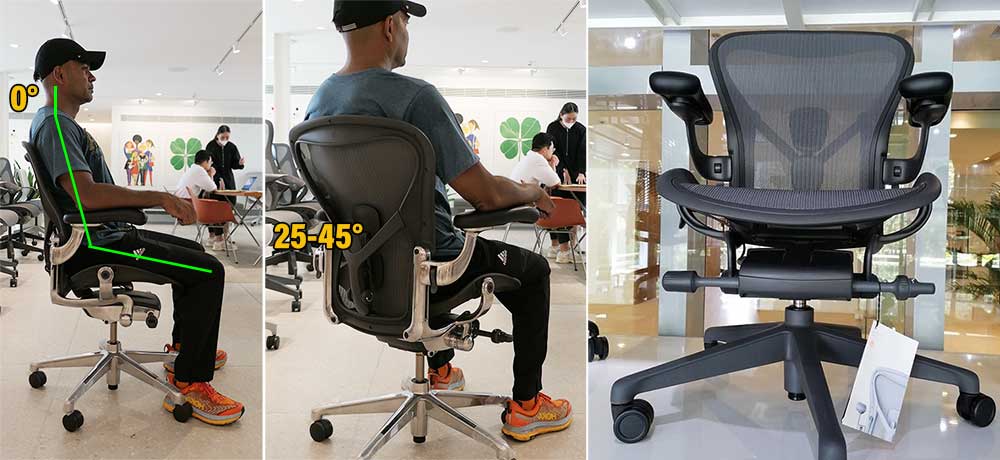
The answers below evaluate those questions across the six Herman Miller models most relevant to high-productivity desk work.
Best Herman Miller Office Chairs
Herman Miller’s Aeron and Embody chairs rank on ChairsFX #1 and #2 among this year’s best premium office chairs.
Both feature distinct back-support systems that promote crisp neutral posture. However, as with any ergonomic chair, the benefits aren’t automatic.
To get the intended results, users must understand each chair’s support concept, adjust it correctly, and apply best practices.
These include sitting with proper form, taking regular breaks, and developing stronger core muscles.

Beyond the Aeron and Embody, Herman Miller offers four additional models that provide more straightforward neutral-posture support – while delivering similar build qualities and the same 12-year warranty as the flagship chairs. My rankings:
- Herman Miller Aeron: super-suspension mesh ($1930+)
- Embody Office Chair: best back support ($2045+)
- Mirra 2 Office Chair: best lumbar-powered chair ($1400+)
- Verus Task Chair: simplest lumbar-powered chair ($870+)
- Sayle Office Chair: affordable + artsy design ($775+)
- Cosm Office Chair: easy to use semi-automatic ($1690+)
Aeron Remastered Office Chair
Since its debut in 1994, the Aeron has been regarded as the gold-standard work chair for demanding professionals. It’s designed to keep users upright in neutral working postures, buffeted by adaptive mesh that stimulates movement while proving balance.
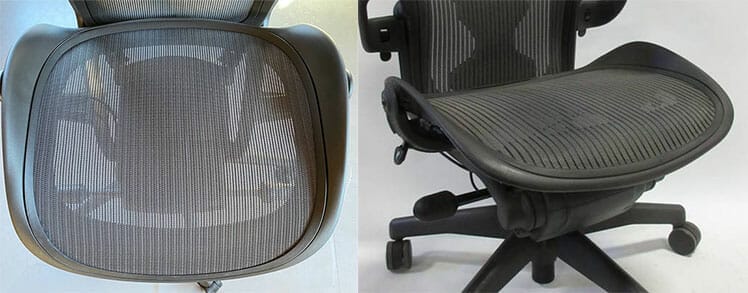
8Z Pellicle mesh provides variable tension zones designed to keep the sitting perfectly balanced at all times. It makes the Aeron extremely easy to use: simply plant your feet, tuck your hips, and sit down.

Its primary limitation: the Aeron is built for working postures with only a modest recline. Those seeking a plush, lounge-style chair will be disappointed. For a high-end chair designed unapologetically for work, however, it remains the gold standard.
4.5 out of 5.0 stars
- Concept: ultra-adaptive mesh that keeps a seated body perfectly balanced at all times
- Size rating: 3 sizes (A, B, C) support people 4’10” to 6’6″; 300 lbs
- Warranty: 12 years
Pros
- Foolproof neutral posture support
- Easy to use
- The adaptive mesh upholstery keeps your body balanced
- Potent synchronous tilt functions
- Customizable builds (choose your style, lumbar support type, etc)
Cons
- The limited recline range (93° to 104°) forces users upright at all times
- Hard plastic edges lining the seat prevents users from sitting cross-legged
- The depth-adjustable Posturefit lumbar isn’t height-adjustable, like the simple lumbar slider (details).
- The armrests are only 3D adjustable.
Aeron Chair Specifications
For a detailed feature analysis, see our Aeron Remastered review. Summary of specs:
Functionality
- Upholstery: 8Z Pellicle mesh with variable tension zones.
- Lumbar support: depth-adjustable Posturefit or height-adjustable lumbar pad (details).
- Backrest recline: lock tilt at 93°, 100°, 104°.
- Seat: -1° to 16° tilt; height-adjustment.
- Armrests: fixed; height-adjustable ($125); 3-directional (up, down, pivot for $255)
- Warranty: 12 years
- Seat: 17″ (W) x 16.75″ (D)
- Backrest: 21.5″ (W) x 22″ (H)
- Seat height: 16″ to 20.4″
- Size rating: 5’2″ to 6’6″; up to 350 pounds
Sizes A (small) and C (XL) are also available (specs)
Aeron Chair Advice
The Aeron is positioned as the archetypal high-end work chair. It enforces upright, neutral postures that can reduce musculoskeletal strain and, in theory, preserve more energy for cognitive work.
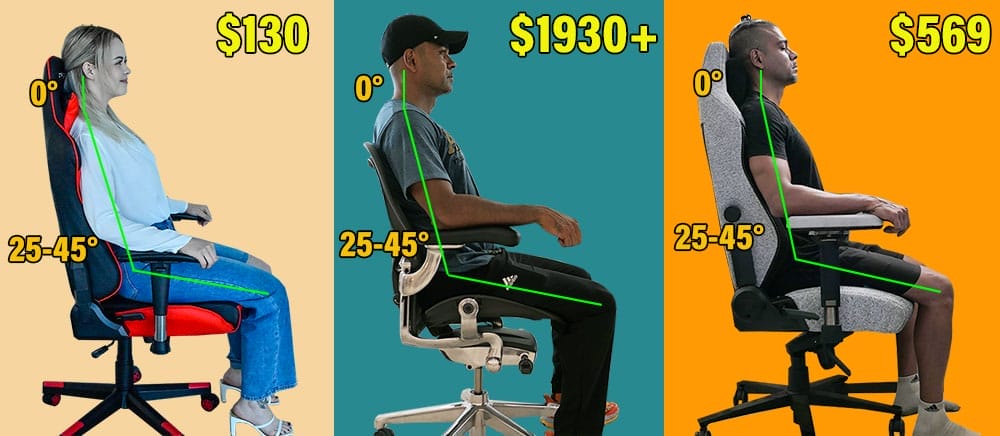
Its premium status is driven primarily by brand reputation and a 12-year warranty. Beyond those factors, the Aeron performs the same fundamental task as far less expensive chairs—such as the sub-$200 Staples Hyken: supporting neutral posture during desk work.
- You want a chair that forces you to sit in clean neutral postures.
- You’re willing to pay a premium for the premium build quality and 12-year warranty.
- You appreciate the high-quality adaptive mesh upholstery.
- You spend long hours at a desk and want a chair that encourages focus.
- You enjoy the premium “luxury” appeal of iconic furniture.
- You don’t mind having a limited recline range (93–104°).
- You like to sit cross-legged while working.
- You want a chair with a deep recline functionality that supports lounging.
- You’re on a tight budget and willing to forego luxury extras (like the 12-year warranty).
- You prefer a softer, cushioned seat over the firm feel of taut mesh.
Learn more: Hands-on Aeron Remastered Office Chair Review
Aeron Chair from Herman Miller $1930+
The Aeron Gaming Chair edition is also available for $1930.
Herman Miller Embody
First released in 2008, the Embody differs from the Aeron with a wider seat pan, a highly flexible backrest that conforms closely to the spine, and a distinctive support concept.
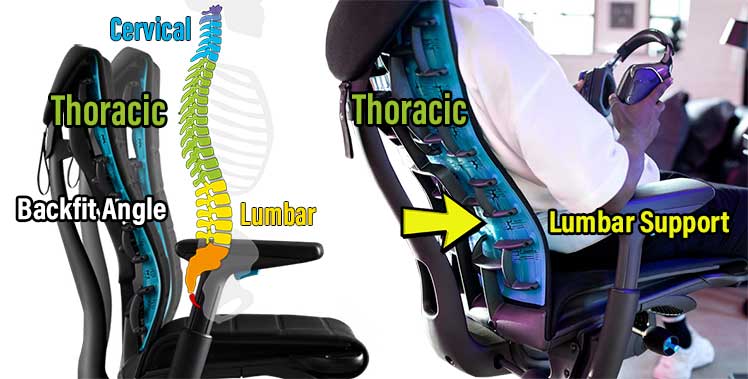
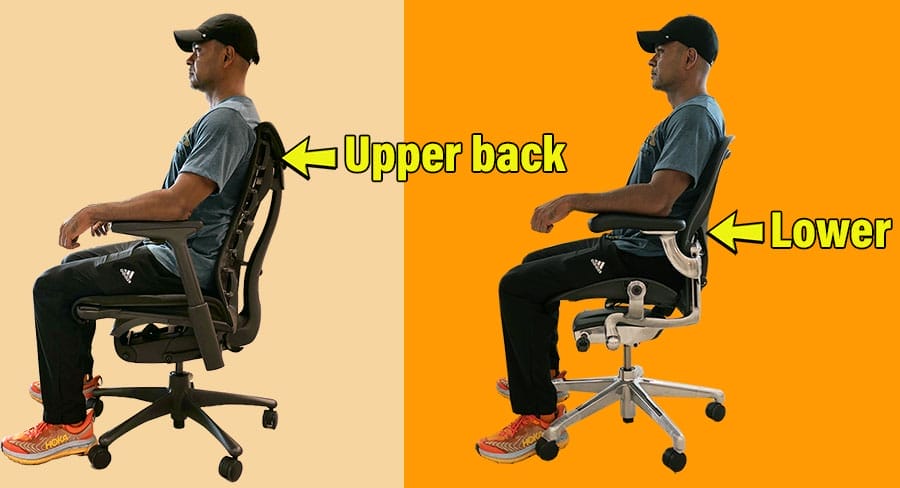
Unlike most Herman Miller chairs, which emphasize lumbar support, the Embody prioritizes the upper back. This approach is effective but less intuitive. The backrest height is fixed; only the upper and lower backrest angles are adjustable.
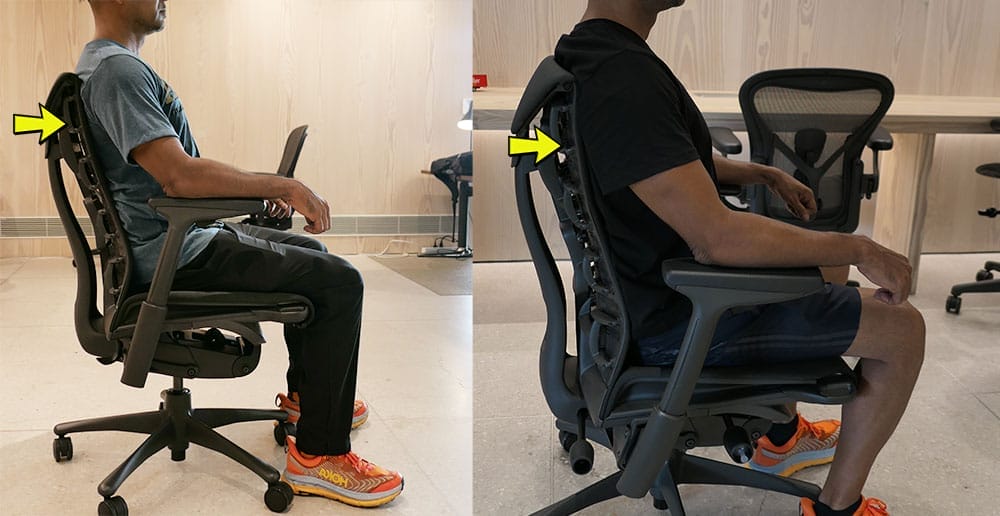
To achieve proper support, the upper curve must be angled to “cup” the upper spine, while the lower section is set to support the lumbar curve. At my height (5’9″ or 177 cm), this system works exceptionally well – when adjusted correctly.
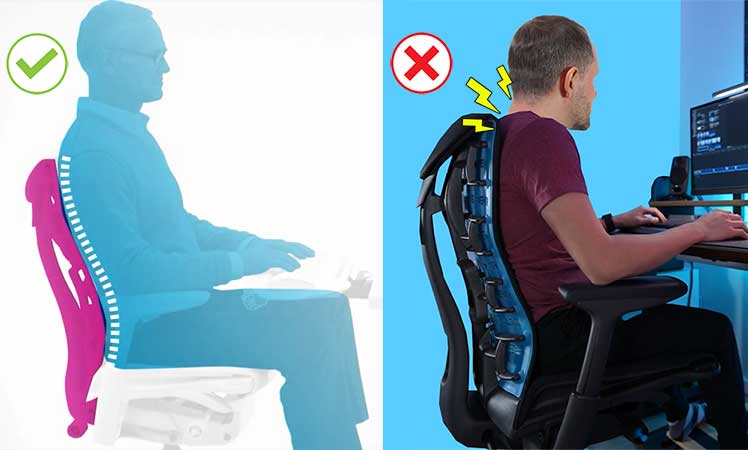
However, without proper setup, the Embody can encourage a slouched posture rather than supporting a neutral one. For this reason, it’s not ideal for ergonomic beginners without a firm grasp of neutral posture biomechanics.
4.0 out of 5.0 stars
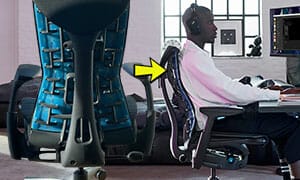
- Concept: The angle-adjustable backrest supports the upper back curve
- Seat: 23.25″ (W) x 20.3″ (D) seat
- Size rating: 5’4″ to 6’2″; 300 lbs
- Warranty: 12 years
Pros
- Gorgeous Pixelated backrest
- Spacious seat pan
- Excellent build quality
- Provides incredible back support — with proper configuration and usage.
Cons
- The built-in lumbar support isn’t effective
- The upper back support concept is tricky to get right.
- The armrests are only 2D adjustable.
Key Features
For a detailed analysis of features, see our Embody User Review. Summary of specs:
Functionality
- Synchro-tilt: seat pan angle 3° to 15°; backrest 94° to 120°
- Pixelated back support: the backrest has a central spine with flexible ribs. Each rib adjusts when you lean back to support the natural curve of your spine.
- BackFit angle adjustment: this lets you position the back of the chair to fit the curvature of your back.
- Seat adjustments: adjust the seat’s height and depth.
- Armrests: 2D-adjustable
- Backrest: adjust recline tension; 3-position tilt-lock; synchro-tilt
- Seat: 21.25″ (W) x 15″-18″ (D)
- Backrest: 14″ (W) x 23.5″ (H)
- Armrests: 11.5-21″ width range; 4-8.75″ height range.
- Seat height range: 16-20.5″
- Size Rating: 5’4″ and 6’2″; 300-pound weight capacity
Feature highlights:
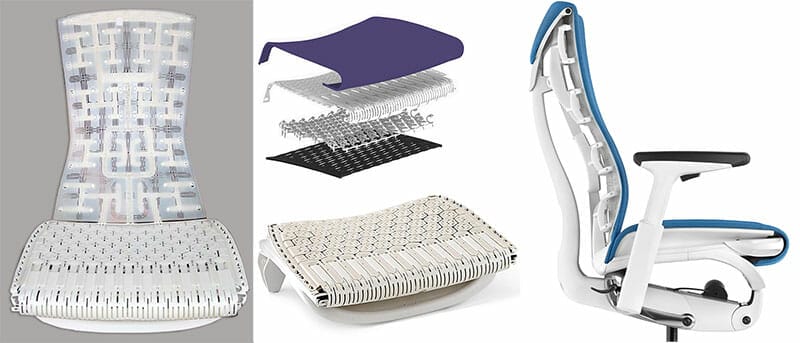
Instead of thighs pressing into the seat, the flexible layers adjust to enhance weight distribution.
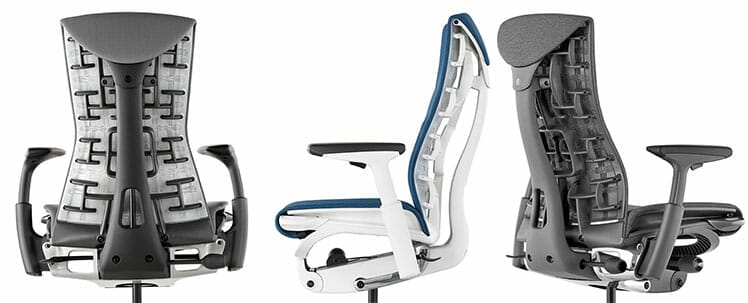
With a proper Backfit configuration that hugs your upper spine, this ultra-adaptivity is outstanding. No matter what position your move into, the backrest will stick to your spine like glue.
 Its seat pan has a 3-15° tilt range; that syncs with a backrest recline range of 94-120°.
Embody Advice
Many people tout the Embody as the most attractive chair in the Herman Miller collection. Its ribbed backrest and spacious dimensions make it look like the captain’s chair in a spaceship.
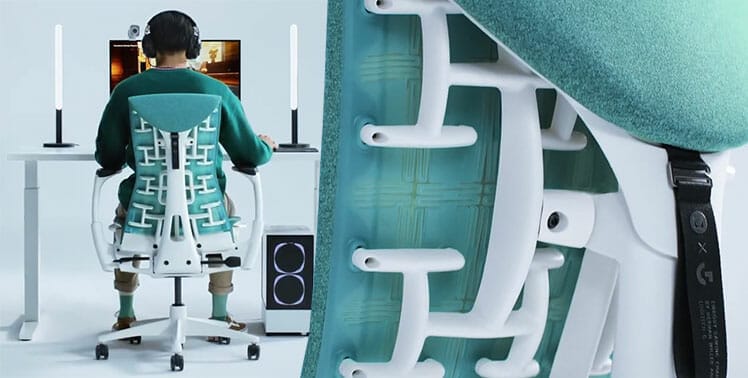
Beyond the styling, the Embody has the most adaptive backrest in the collection, plus the widest armrest adjustability, although they’re only 2D — annoying for such a pricey chair.
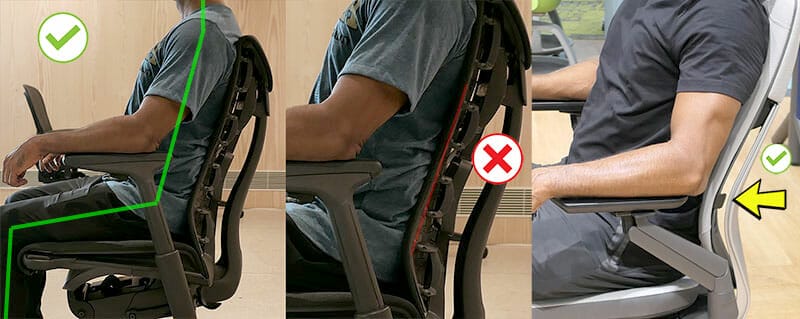
On the downside, beyond the complexity of the Backfit support angles, lumbar support is almost non-existant. While the upper back concept provides sufficient support, the lack of adjustable lumbar support on such a pricey chair is also annoying.
- You prioritize upright neutral posture support over deep, lounge-style reclines.
- You’re comfortable dialing in nuanced angle adjustments to support and “cup” the upper spine.
- You’re willing to pay more for the premium build quality, fancy backrest, and 12-year warranty.
- You spend long hours at a desk and want a chair that actively encourages focus.
- You’re unfamiliar with neutral posture or unwilling to learn how to configure this chair properly.
- You want fully adjustable armrests with extensive range and flexibility.
- You prefer strong, traditional lumbar support over upper-back-led support.
- You expect a plush, cushioned seat rather than a firm, thinly padded one.
Final advice: If you’re able to configure the Embody’s upper-back support correctly, its support concept can feel exceptional. If not, it may feel like an expensive chair that’s frustratingly difficult to get comfortable in.
Learn more: Embody Gaming Chair Functions and Styles Review
Embody from Herman Miller $2045+
The Embody Gaming Chair is also available for $2045 (6 styles).
Herman Miller Mirra 2
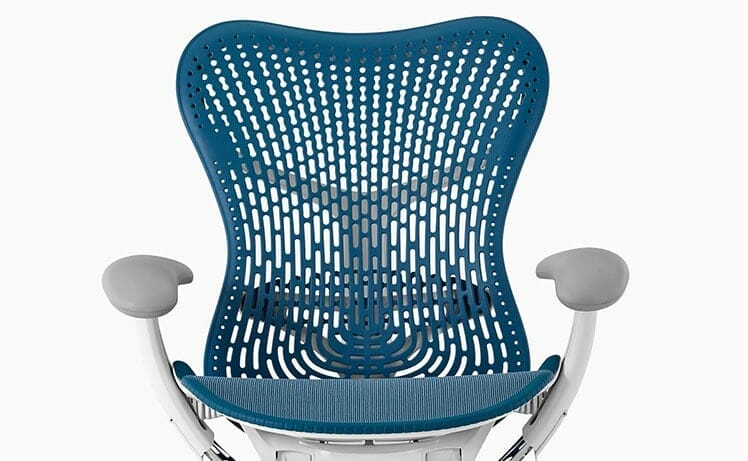
The Mirra 2 is like a gentler version of the Aeron with an Embody-like flexible backrest. Key differences include a more forgiving mesh seat pan, height x depth-adjustable lumbar support, and a poly backrest that is breathable, flexible, and comfortable.
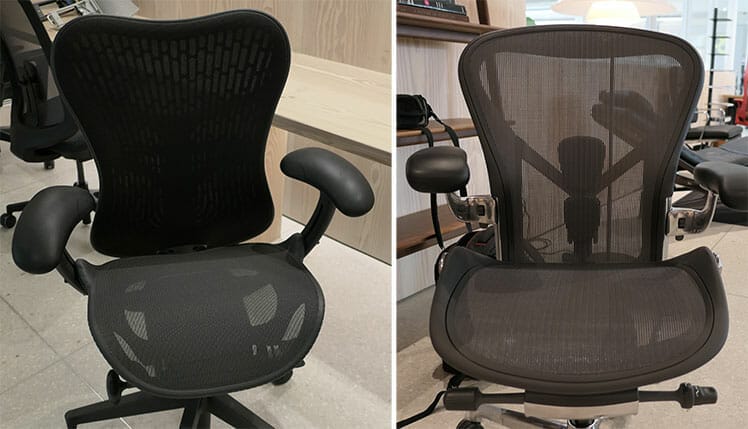
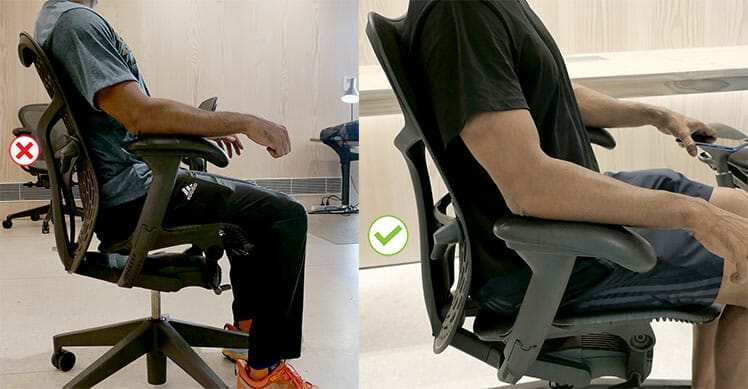
I’m a big fan of the lumbar support. It’s easy to adjust up and down – try to aim it slightly above your beltline.
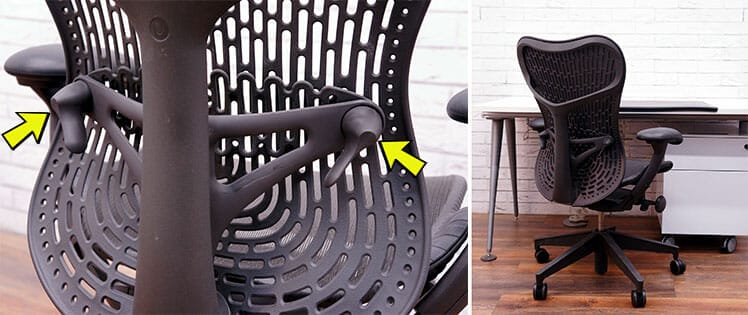
You can also tweak the depth by turning the knobs on either side of the backrest. Even for beginners, it’s extremely easy to configure and use.
The biggest downside compared to the Aeron is that it’s not as iconic. Otherwise, it’s equally breathable, cheaper, and significantly more adjustable than the Aeron.
Mirra 2 Features
Functional highlights include the Harmonic tilt, with two recline modes. In tilt-lock mode, you can lock the backrest at 95, 99, 122°. In free recline mode, you get a range of 94.3 to 106.8°.
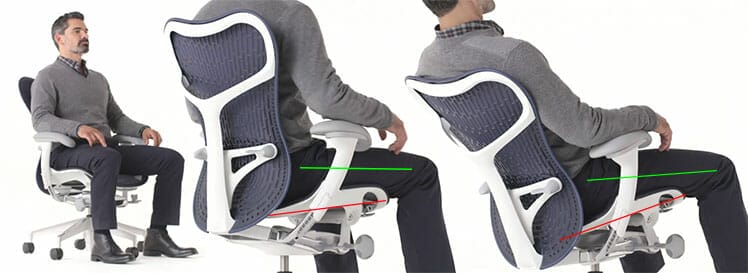
Both modes combine with a 5-degree seat tilt. The point of the Harmonic (synchro) tilt is to keep the feet flat and the thighs parallel to the floor.
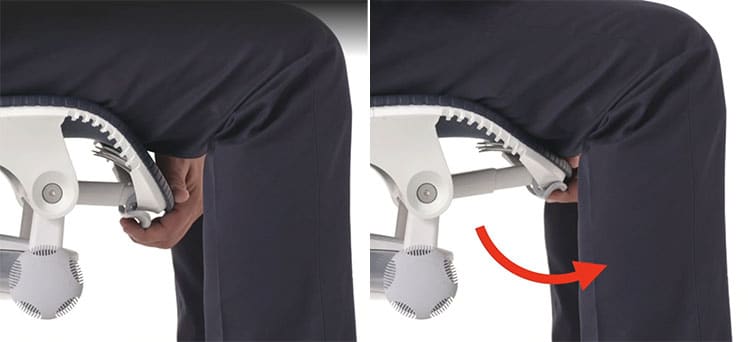
Another unique feature is the depth-adjustable seat. Instead of sliding, the edge can curl down to shorten the depth.
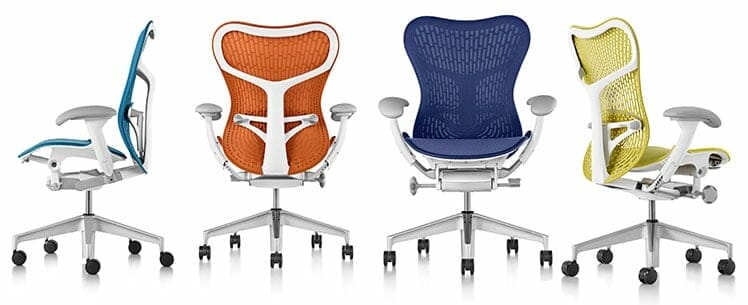
Overall, it provides better adjustability than the Aeron, with similar build and tilt qualities, for a lower price – plus a wider range of color options.
Functionality
- Backrest: Harmonic tilt with 3-position tilt-lock (95, 99, 122 degrees); triflex back.
- Synchro-tilt: 5° seat angle tilt + recline range of 94.3 – 106.8°.
- Posturefit lumbar support: 4.5″ height-adjustment range; 1″ depth adjustment.
- Seat: 5° seat angle tilt; height and depth adjustment.
- Armrests: 4D adjustable (5″ height range, 2″ width range)
- Upholstery: Airweave mesh over a flexible plastic frame.
- Seat width x height: 19.25″ (W) x 16.25-18″ (D)
- Backrest (mid-back): 21″(W) x 23″ (H)
- Floor to seat range: 16-20.5″
- Size rating: 5’3″ to 6’1″; maximum weight capacity 350 pounds
Sizes A (small) and C (XL) are also available (specs)
Mirra 2 Advice
This is Herman Miller’s best lumbar-powered desk chair. It’s the only model with a height x depth-adjustable lumbar support. Its flexible backrest mimics the Embody’s ultra-adaptivity.
The only potential technical downside is the armrests – the adjustable inner width (18-21″, vs the Embody’s 11.5-21″ width range).
For sizes shorter than 5’3″, this limited width adjustment might force the elbows to flare too far outwards, which could lead to discomfort.
Otherwise, there’s a lot to like here. It’s like a flexible and affordable version of the Aeron, with more modern, colorful style options.
Verus Task Chair
Unlike Herman Miller’s fancy concept chairs, the Verus (released in 2019) is a straightforward lumbar-powered ergonomic chair. Instead of flashy gimmicks, it serves up a classic height-adjustable lumbar support style.
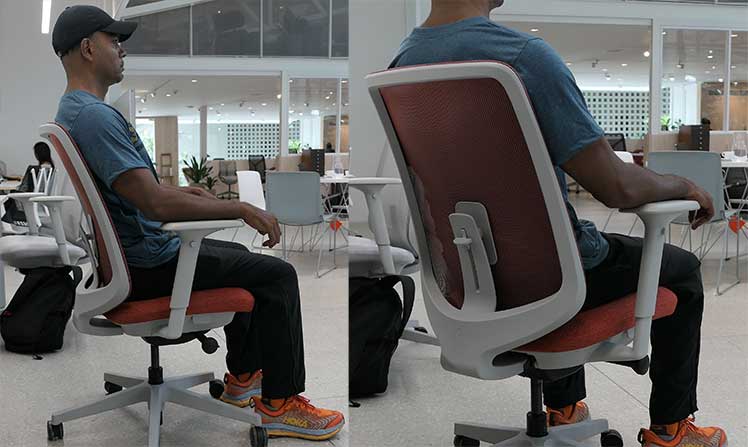
If looking for a flashy showpiece, this isn’t it. It looks like a run-of-the-mill mass-produced office chair. Even so, Herman Miller’s touch is evident in the rock-solid build that’s guaranteed for 12 years.
Verus Specifications
The Verus comes fully loaded with a seat slider, adjustable lumbar, tilt-limiter, and synchronous tilt. Herman Miller hasn’t published the exact recline range. Based on my tests, I guess it’s around 94-115°.
Functionality
- Backrest: 3-position tilt limiter; triflex or interweave back.
- Synchro-tilt: 5° seat angle tilt + recline.
- Lumbar support: built-in sacral support; 4.5″ height-adjustment range.
- Seat: 5° seat angle tilt; height and depth adjustment.
- Armrests: 3D adjustable (4″ height range, 2″ front-to-back; 1.25″ horizontal)
- Upholstery: mesh backrest, fabric padded seat.
- Seat width x height: 19.6″ (W) x 15.5-18.3″ (D)
- Floor to seat range: 16.75-20.75″
- Size rating: 5’6″ to 6’1″; maximum weight capacity 350 pounds
Verus Advice
The Verus chair is one of Herman Miller’s cheapest and easiest to use. It also comes in a choice of attractive backrest styles.
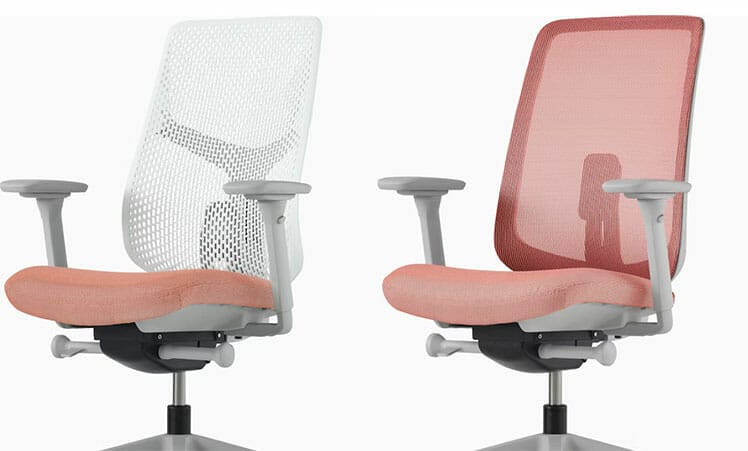
On the downside, Verus aesthetics won’t blow people away. It looks like a run-of-the-mill office chair.
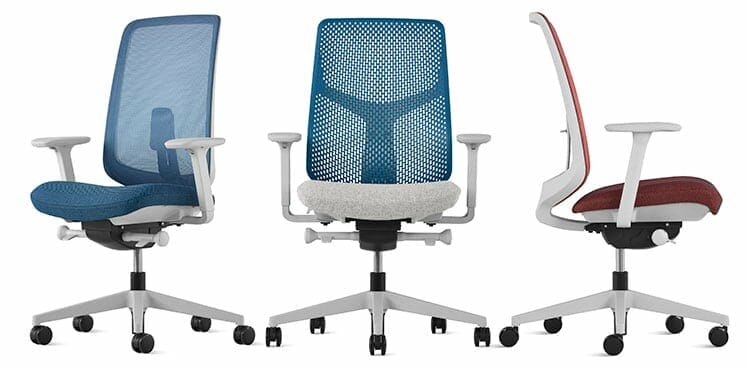
Thrill seekers looking for something flashy may find this underwhelming. But bargain hunters looking for affordable Herman Miller quality should consider this chair.
Sayle Ergonomic Office Chair
The Sayl chair smashes together elements from the Aeron and Embody chairs into a cheaper but powerful package.
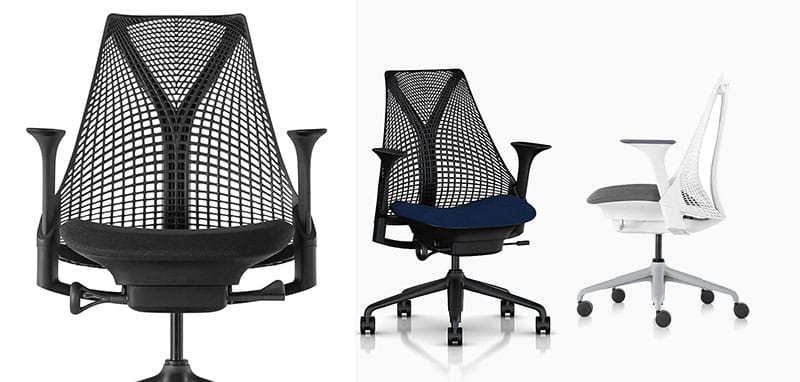
Like the Aeron, the Sayle has a robust synchronous tilt range. Its seat pan angles from -3° to 13°, while the backrest reclines in three positions: 91°, 101°, or 124°. Like the Embody, it has an adaptive plastic polymer backrest.

Like the Embody, it has an adaptive plastic polymer backrest that flexes as the user shifts positions. However, compared to the Embody’s Pixelated backrest, the Sayle’s back looks like a laundry basket.
Features
Like the Aeron, the Syle has a Posturefit (depth-adjustable) lumbar support system and powerful sync-tilting features. During reclines, it auto-tilts upwards with a 0-13° range.
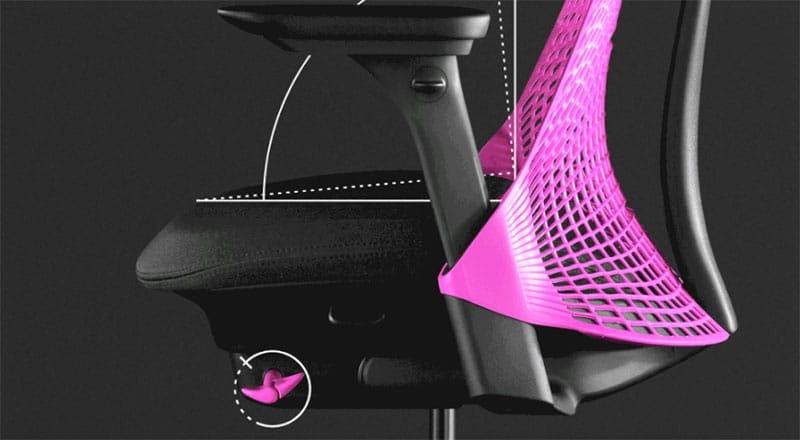
You can manually angle it down to -3° for forward-leaning support. Beyond its tilting functions, the odd-looking backrest is another highlight, with adaptive flexibility that sticks to your spine as you move around in the chair.
Functionality
- Synchro-tilt: seat pan angle -3° to 13°; backrest reclines to 91°, 101°, or 124°.
- 3D Intelligent backrest: an unframed 3D Intelligent back stretches or contracts to support the back as the user moves.
- Posturefit: a unit at the rear of the backrest supports the sacrum (lowest point of the spine) to reinforce the pelvis. That prevents slouching and sitting fatigue.
- Seat adjustments: contoured seat pad; adjust the seat’s height and depth; downwards tilt to -3°.
- Armrests: 4D adjustable (adjust height, angles, width, and depth).
- Warranty: 12 years.
- Seat: 24.5″ (W) x 16-18″ (D)
- Backrest: 16.8″ (W) x 20.9″ (H)
- Floor to seat range: 15″ to 20″
- Chair height: 33.75″ to 40.75″
- Size rating: 5’3″ to 6’7″; 350 pounds
Sayle Chair Advice
Physically, the Sayle delivers ultra-adaptive world-class support as you’d expect. But psychologically, I can’t shake the association with a laundry basket.
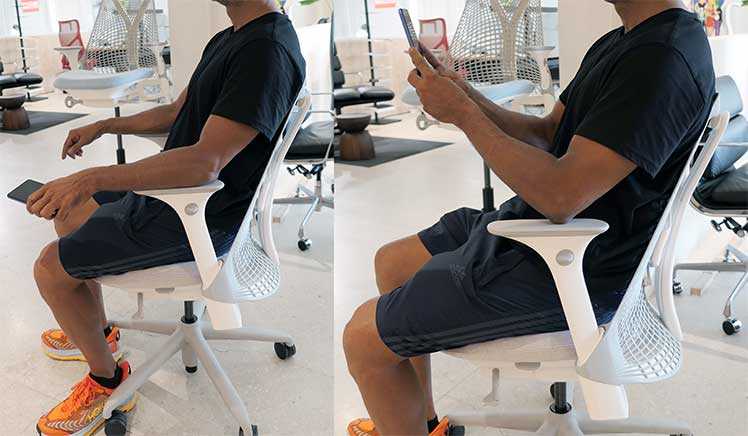
I do not like the plastic backrest (despite its adaptive, supportive merits), but that’s subjective. Many may find the bold, modern backrest styling a delight.

Bottom line: Those who appreciate the Sayle’s styling can get a high-end performance chair for almost half the price of an Aeron or Embody.
Sayle from Herman Miller $775-$1405
The Sayle Gaming Edition is also available in the Herman Miller Gaming Store for $1060.
Herman Miller Cosm
The Cosm supports seated movement similar to the Aeron chair, simplified. Released in 2018, this was Herman Miller’s first task chair with an automatic tilt. Instead of the user having to mess with complex settings, the chair (and gravity) does the work. A year after its release, it made the Time Magazine list: best inventions of 2019.
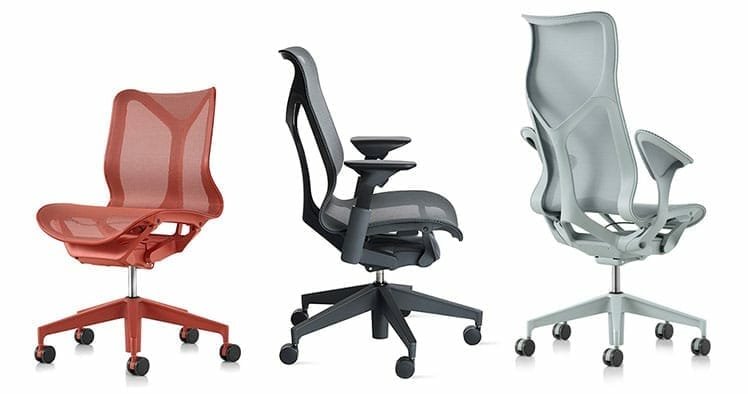
The three backrest options have different price ranges in the Herman Miller store:
- Low-back: $1095 (basic); $1195 with adjustable arms.
- Mid-back: $1395 (basic); $1495 with adjustable arms.
- High-back: $1595 (basic); $1695 with adjustable arms.
The only adjustable feature among all variants is the seat height. The tilting support is weight-based, adjusting based on the user’s level of recline. As the user leans back, the plastic frame flexes. That angles the seat up while adding more resistance to the backrest support.
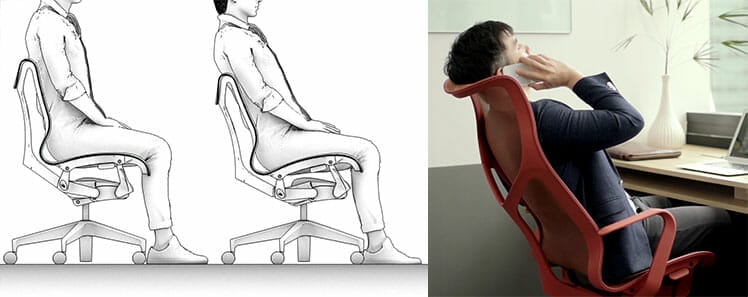
Given the high price, this model seems ideal for a certain class of work-at-home executives and high-end gamer/ PC enthusiasts. That is the class willing to pay a premium for fast results instead of complexity. In contrast, experienced ergonomic chair users will likely find the lack of adjustments (and high price) frustrating.
In either case, the buyer will end up with a robust office chair that’s comfortable, easy to use, and good for your back.
Summary of Cosm Specifications
Functionality
- Auto-harmonic tilt: seat pan angle 1.2° to 14°; backrest 94.1° to 106.9°
- Lumbar support: height-adjustable (7.5-8.7″)
- Frame and upholstery: flexible polymid plastic frame; breathable suspension mesh, Intercept suspension (gapless transition between the backrest and seat).
- Armrests: choice of height-adjustable (1D) t-arms or fixed “leaf” arms (they act as a hammock to cradle the forearms).
- Seat width x height: 20.5″ (W) x 15.9″(D)
- Backrest width:: 18.25″(W)
- Backrest height: 19.6″ (low back); 24.1″ (mid-back); 30.1″ (high-back).
- Seat height range: 14.8-21.4″
- Size rating: 5’3″ to 6’1″; maximum weight capacity 350 pounds
Cosm Chair Advice
These stylish, colorful chairs with self-adjusting ergonomic features that support good posture regardless of the user’s intentions.
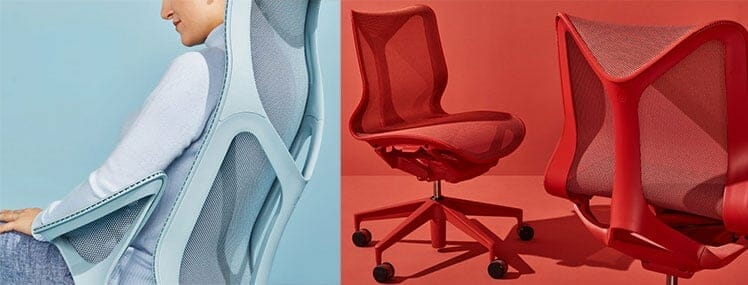
The self-adapting features would work well seating employees. As they’re forced to sit with good posture, users should enjoy higher energy levels and improved focus. As a result, productivity will improve.
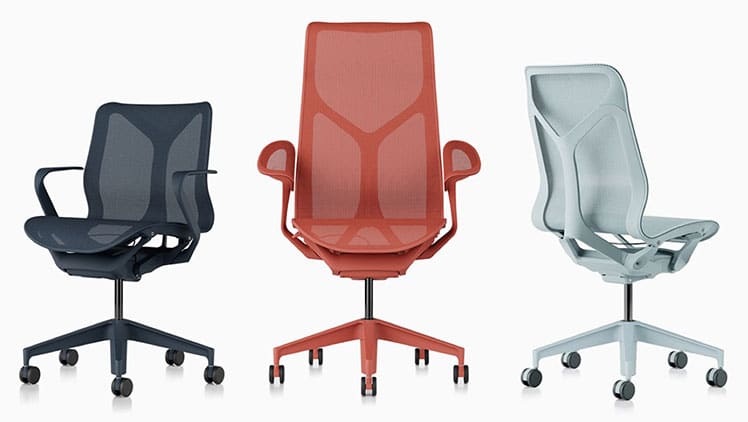
However, as a work-from-home chair, the lack of user-controlled customizations may frustrate – especially after paying so much.
Cosm Advice: Do you need ergonomic support but can’t be bothered fiddling with controls? Is style a high priority for you? If yes, the Cosm chair is for you.
Herman Miller Chair Comparisons
If you’re having trouble deciding on a chair, these comparisons will help you grasp each chair’s selling points.
Embody Vs Aeron
The Aeron provides lower back support with mesh suspension upholstery and a bladed seat pan that forces you to sit with planted feet.
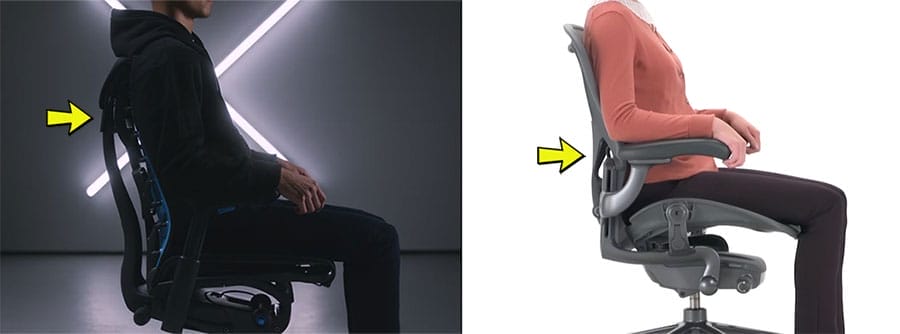
In contrast, the Embody provides upper back support with a flexible backrest and a taut, thinly padded seat. Head-to-head comparison:
| Feature | Embody | Aeron |
| Support concept | The backrest flexibly ‘cups’ the upper spine to hold it in place, with very mild lower back support | Strict neutral posture support that forces users to sit with planted feet |
| Ease of use | Difficult. It’s tricky to get the back support angles right | Easy. Simply tuck your hips, plant your feet, and lean back |
| Seat | Spring layered seat with a small layer of padding. | 8Z Pellicle Mesh |
| Lumbar support | Angle-adjustable built-in lumbar curve | Posturefit (depth-adjustable) or height-adjustable slider |
| Backrest | Pixelated backrest | 8Z Pellicle Mesh |
| Backrest recline angles | 94° to 120° with 4 locking positions | 93°, 100°, 104° with 3 locking positions |
| Sync-tilt | 94° to 120°, 11° seat tilt | 93-104° back, -1° to 16° seat |
| Price | $2045+ | $1930+ |
Verdict: The Aeron is simpler to use, while the Embody is more visually striking but harder to dial in. Choose the Aeron for reliable, no-guesswork posture support; choose the Embody if you’re willing to spend time configuring it — and can accept that it won’t suit everyone.
Mirra 2 vs Aeron
Both mesh chairs deliver strong neutral posture support. The Aeron enforces a disciplined, feet-planted posture, while the Mirra 2’s broader adjustability allows users to move and vary positions more freely.
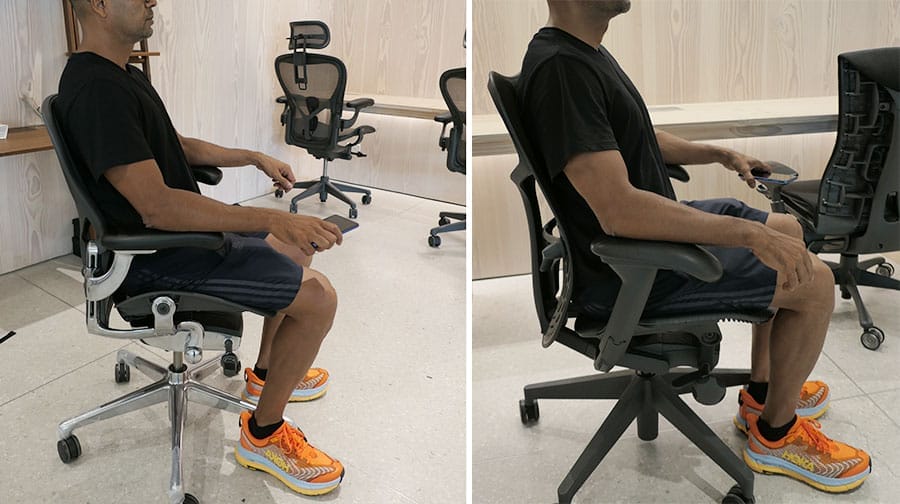
Here’s how the two models compare:
| Feature | Mirra 2 | Aeron |
| Support concept | Flexible neutral posture support that allows users to sit cross-legged | Strict neutral posture support that forces users to sit with planted feet |
| Seat | AireWeave 2 mesh | 8Z Pellicle Mesh |
| Lumbar support | Height (4″) x depth (1″ on each side) adjustable | Posturefit (depth-adjustable) or height-adjustable slider |
| Backrest | TriFlex Polymer Back or Butterfly Suspension Back (added mesh cover, $90 extra) | 8Z Pellicle Mesh |
| Backrest recline angles | 95°, 99°, 122° | 93°, 100°, 104° |
| Sync-tilt | 94.3-106.8° back, 5° seat tilt | 93-104° back, -1° to 16° seat |
| Price | $1400+ | $1930+ |
Verdict: Choose the Mirra 2 if you want neutral posture support with freedom to move and change positions throughout the day. Choose the Aeron if you prefer stricter guidance into a fixed, feet-planted working posture with minimal variation.
Mirra 2 Vs Sayle
Both chairs deliver strong neutral-posture support, but they get there differently. The Mirra 2 is a more traditional, feature-rich “do-it-all” task chair with a mesh seat and highly adjustable lumbar support.
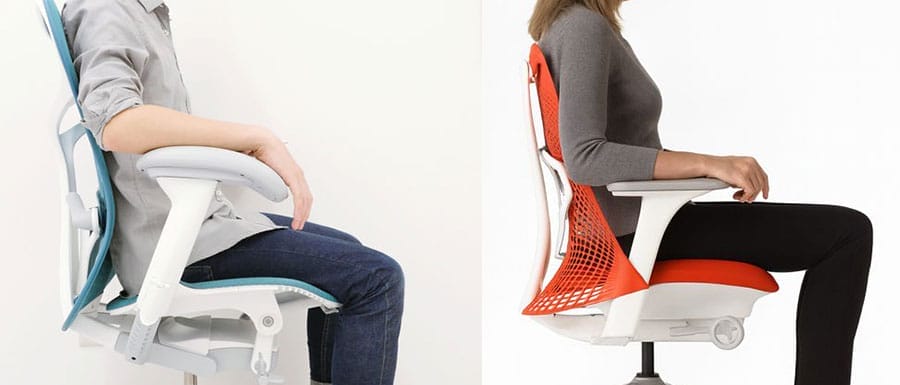
The Sayl is a simpler, more design-forward chair with a flexible polymer backrest and a wider sync-tilt range (including forward tilt).
| Feature | Mirra 2 | Sayl |
| Support concept | Flexible neutral-posture support with strong, tunable lumbar | Adaptive polymer backrest support with forward-lean capability |
| Seat | AireWeave mesh seat | Contoured seat pad (fabric) + seat slider |
| Lumbar support | Height-adjustable (~4.5″) + depth-adjustable (~1″) | Posturefit sacral support (reinforces pelvis to reduce slouching) |
| Backrest | TriFlex polymer or Butterfly Suspension back (mesh cover option) | Unframed 3D Intelligent polymer backrest (“suspension” style) |
| Backrest recline angles | 95°, 99°, 122° (tilt limiter) | 91°, 101°, 124° (tilt limiter) |
| Sync-tilt | 94.3–106.8° back, 5° seat tilt | Seat -3° to 13°; back 91° to 124° |
| Price | $1400+ | $775+ |
Verdict: Choose the Mirra 2 if you want a more adjustable, mesh-based chair with powerful, easy-to-tune lumbar support for long workdays. Choose the Sayl if you want a simpler chair with a wider range of working angles—especially forward-lean support—and you like its bold, design-first look.
Conclusion
Is it worth paying a premium for a Herman Miller chair? For many people, the answer is no.
High-quality back support for long hours of sitting is not rare or expensive in 2025. Plenty of well-designed chairs under $300–$500 can support neutral posture effectively.
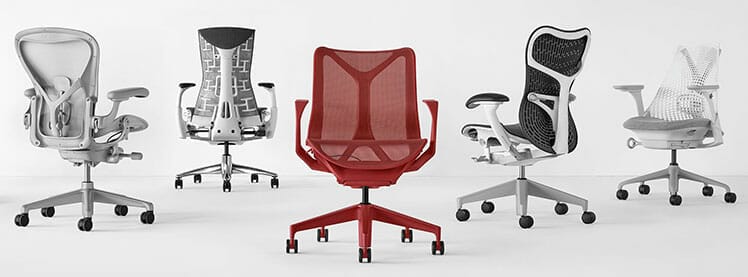
Herman Miller chairs command high prices primarily because of exceptional build quality, rigorous testing, and a 12-year, 3-shift warranty. You’re paying for longevity, consistency, and refinement — not access to basic ergonomic principles.
That said, if budget is no constraint and you want the most durable, best-engineered chairs on the market, Herman Miller remains a benchmark. Over a decade of daily use, their chairs can justify their cost in reliability and long-term comfort.

Bottom line: Herman Miller chairs aren’t necessary for good posture — but they are among the best-built tools available for people who sit for a living and value longevity as much as comfort.