

Everyone who uses a mobile device is susceptible to text neck syndrome. Neck and shoulder pain, stiffness, headaches, and fatigue are common downstream effects. The good news for ergonomic chair and standing desk owners is that practical, proactive text neck remedies exist.
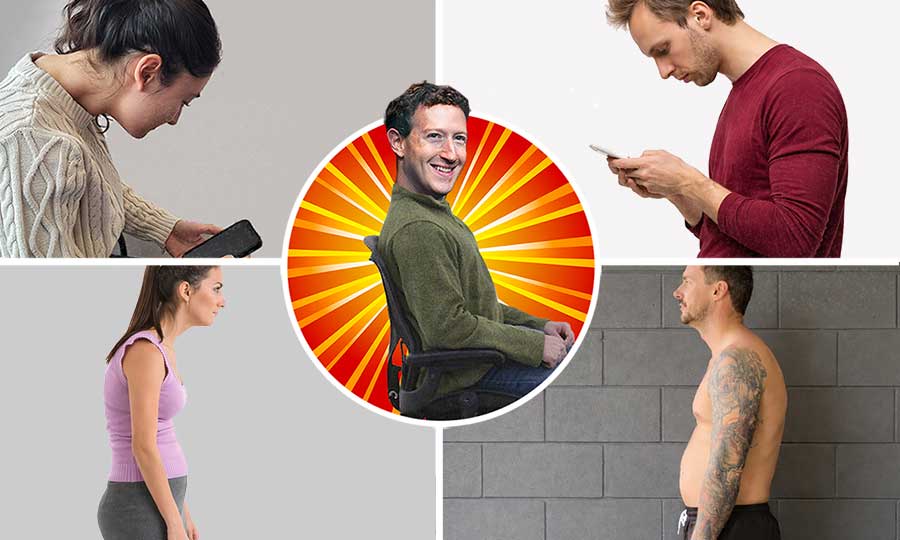
Beyond the furniture itself, you’ll need awareness and self-discipline. This article provides that awareness along with practical steps to maximize your ergonomic furniture for optimal results.
-
Text Neck and Related Adaptations:
Introduces text neck as the entry point to a broader chain of postural adaptations across the spine, including kyphosis and anterior pelvic tilt. -
Mobile Computing Biomechanics:
Explains how neck flexion increases cervical loading and sets practical neutral-posture benchmarks for phone use. -
DIY Ergonomic Text Neck Solutions:
Applies muscle memory and ergonomic tools (chairs and standing desks) to retrain toward neutral neck alignment.
How to Fix Text Neck: Quick Answer
Based on the results of this text neck rehabilitation experiment, it’s possible to use ergonomic furniture to retrain muscle memory toward neutral neck posture:
- Office chair method: Sit at 100° recline with lumbar support, remove headrest, let neck self-balance
- Gaming chair method: Use 100° recline, press down on armrests to extend spine until neck contacts headrest
- Standing desk method: Raise desk to support elbows at ~30° flexion, hold phone at eye level
Maintain any method consistently for two weeks. Fascia and muscle memory will adapt, making neutral posture automatic. Full instructions below.
Note: Severe or persistent neck pain should be evaluated by a healthcare provider.
Text Neck and Related Adaptations
Modern device use doesn’t create isolated problems. It produces a chain of biomechanical adaptations across the spine as the body rebalances load. Text neck is the most visible entry point—but not the only one.
What Is Text Neck Syndrome?
Text neck syndrome refers to a pattern of sustained forward head posture most commonly associated with smartphone and laptop use. Rather than a single injury, it’s a mechanical loading problem that alters how the neck supports the head.

In a healthy neutral posture, the head remains stacked directly above the shoulders and imposes a load of roughly 10–12 pounds on the cervical spine.
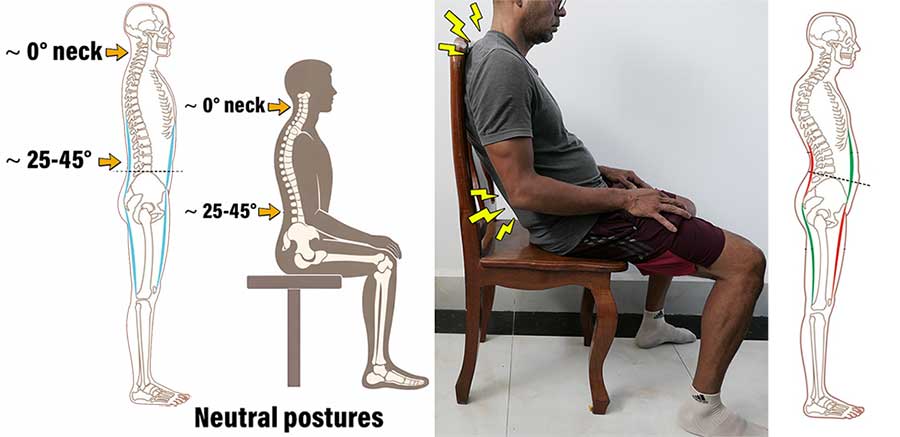
During mobile device use, many people flex the neck forward by ~45°. In a forward-tilted position, the load on the neck can increase to 50–60 pounds(1). This changes how cervical muscles and spinal structures function.
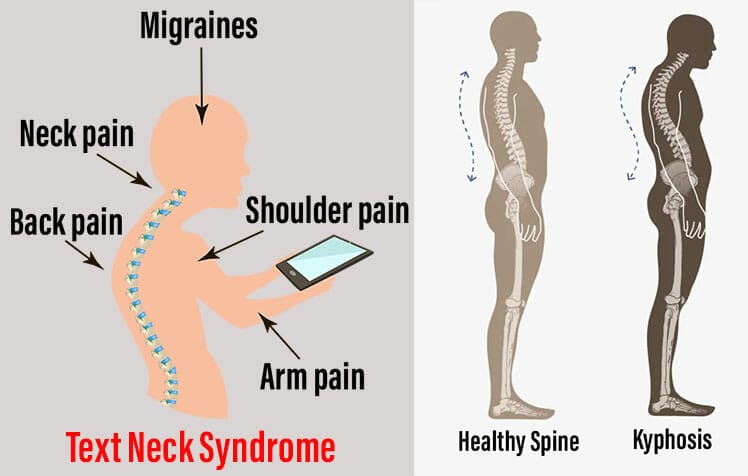
As misalignments persist, strain emerges… usually as neck and shoulder discomfort, stiffness, tingling sensations, or headaches(2). With continued exposure, more serious adaptations can develop, including:
- Thoracic kyphosis: excessive forward curvature of the upper back, often accompanied by upper-back stiffness and posterior chain tightness.
- Spinal disc degeneration: prolonged slumped postures increase disc stress, reducing mobility and, in later stages, contributing to inflammation and pain.
- Chronic fatigue: misaligned postural muscles require greater energy expenditure to maintain balance against gravity.
Key takeaway: Text neck syndrome is best understood as a postural adaptation, not an acute condition. Its significance lies in how sustained forward head posture progressively alters normal cervical mechanics over time.
What Is Anterior Pelvic Tilt?
Anterior pelvic tilt (ATP) often appears as a secondary adaptation alongside text neck. As the head shifts forward, the body must rebalance its center of mass to remain upright.
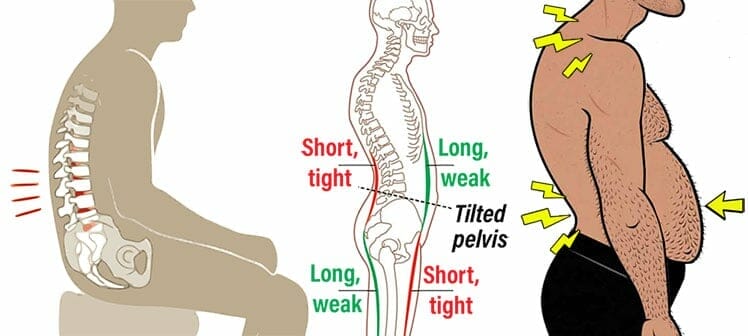
ATP rotates the pelvis forward (anteriorly), tightening lumbar extensors and hip flexors in the rear, while lengthening and under-using abdominal muscles in the front.
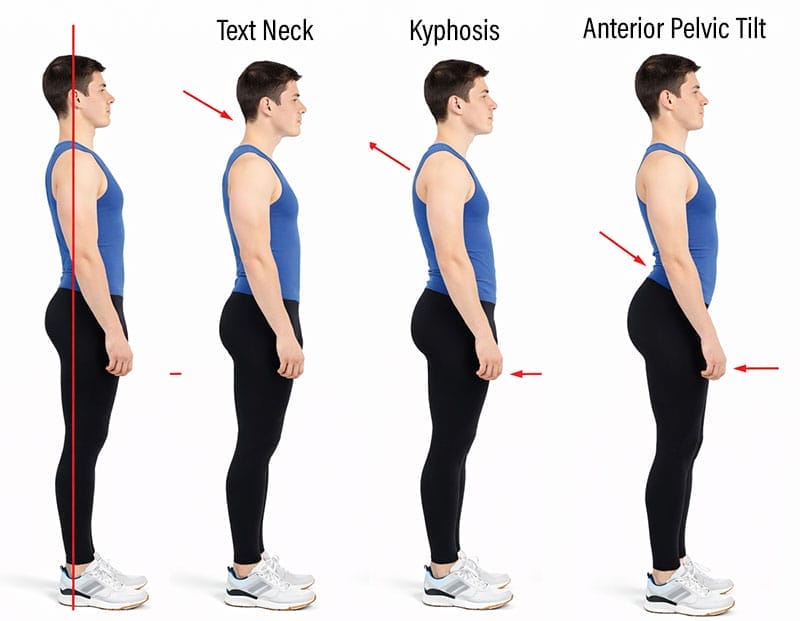
This response is part of a global sagittal chain compensation—a whole-spine adjustment that prevents forward collapse(3). The most common compensation pattern includes:
- Forward head posture (text neck)
- Rounded upper back (thoracic kyphosis) and exaggerated lumbar lordosis
- Anterior pelvic tilt
Like early-stage text neck, anterior pelvic tilt can exist without symptoms and appears to be highly prevalent.
For example, in a study of healthy adults in their early 20s with no reported musculoskeletal pain, 80% demonstrated a measurable anterior pelvic tilt during relaxed standing(4).
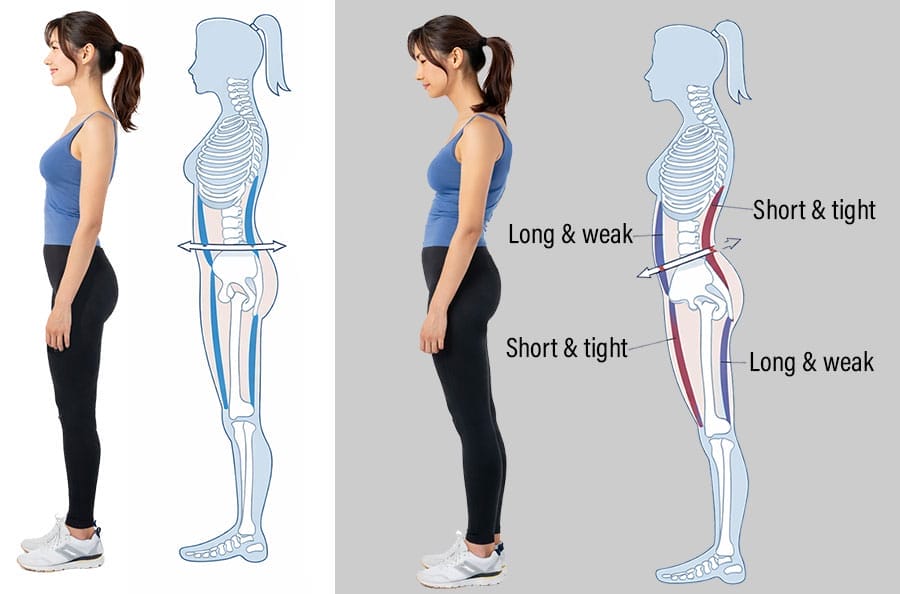
Importantly, these participants were pain-free. This supports the view that the body’s default standing alignment is shaped by anatomy, habitual posture, and load distribution, rather than serving as a reliable indicator of poor health.
By understanding the biomechanics behind that loading, we can modify posture, habits, and support to promote healthier force distribution.
Mobile Computing Biomechanics
- Text neck (worst case): the head tilts forward during prolonged computing sessions.
- Neutral mobile neck posture (optimal case): maintain a ~0° neck flexion by bending your elbows ~30°, holding the phone at eye level.
Text Neck Biomechanics
Text neck benchmark: A 15° forward neck tilt increases cervical load by approximately 145%, compared with a neutral (~0°) neck posture.
Mobile computing performed with a downward head position alters the natural curvature of the cervical spine. As the head shifts forward of the shoulders, neck and shoulder muscles must generate greater force to counterbalance the displaced load.
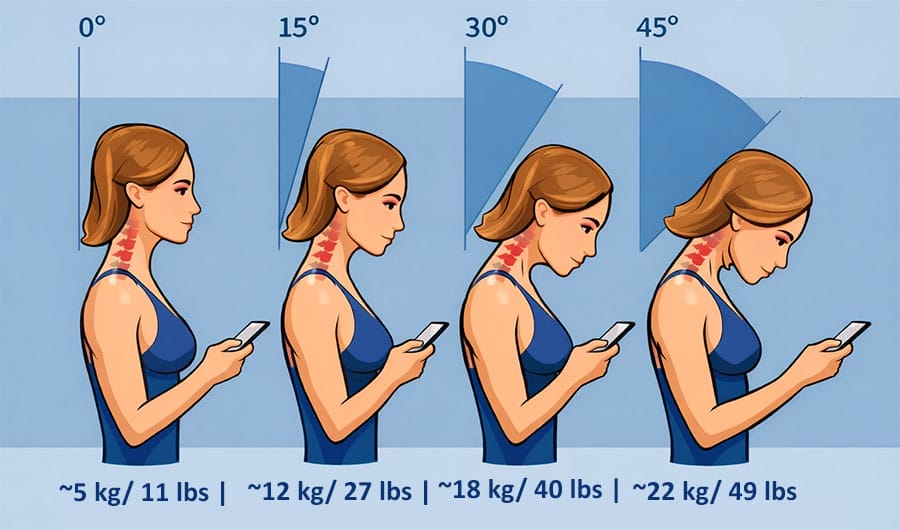
In a neutral (0°) posture, cervical load is approximately 10–12 pounds. At 15° of neck flexion, this load increases to roughly 27 pounds, and at 30° flexion it rises to around 40 pounds(1).
As flexion increases, muscular demand and stress on cervical structures increase accordingly.
When this loading pattern is sustained for long periods, cumulative stress develops across the cervical spine and surrounding musculature.

Neutral Mobile Computing Benchmarks
Mobile computing benchmark: Bend your elbows ~30° to hold your phone at eye level, while maintaining a ~0° neck angle.
Although no formal standards currently exist for mobile device posture, a recent smartphone ergonomics study provides a useful reference point(5). The study evaluated a neutral (~0°) neck position across varying elbow flexion angles (15°, 30°, 45°, and 60°) during mobile device use.
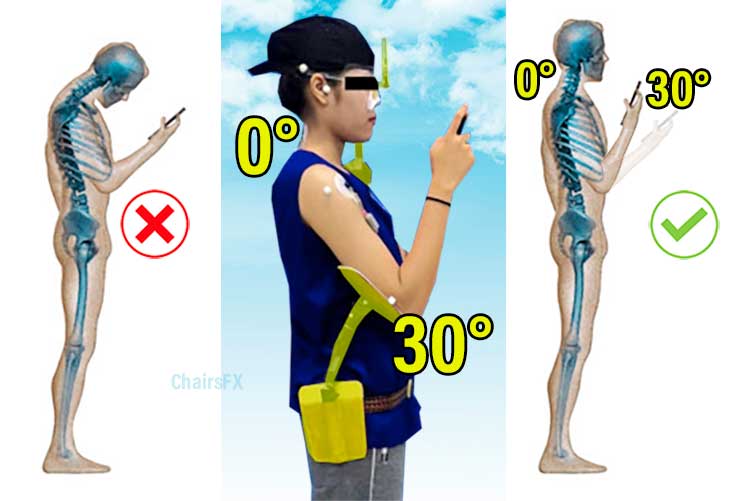
Among the tested conditions, approximately 30° of elbow flexion produced the lowest combined muscle activation across key neck and shoulder muscles, along with the lowest reported discomfort in both regions.
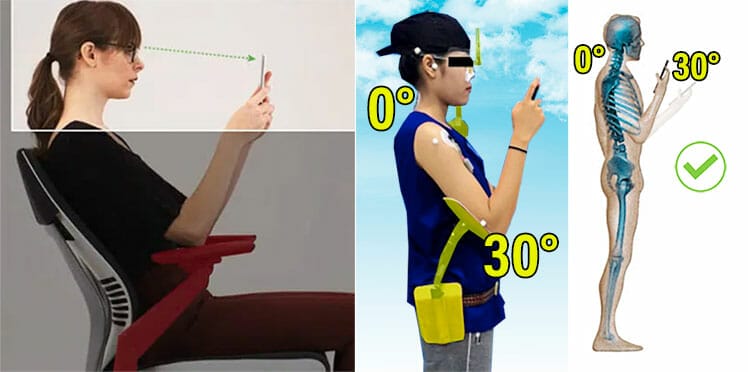
These findings provide a practical, biomechanically grounded benchmark for everyday mobile computing:
- Maintain a neutral neck position rather than flexing the head forward
- Raise the device toward eye level instead of lowering the head
- Use moderate elbow flexion (~30°) to support the arms
Related: Neutral Posture Biomechanics for Ergonomic Beginners
DIY Ergonomic Text Neck Solutions
The principle of muscle memory is straightforward: the body adjusts to the positions it holds most often. Using this principle with proper ergonomic furniture presents a powerful way to counteract text neck syndrome.

Postural change through ergonomic intervention is possible because of muscle memory and fascial adaptation. Fascia is a connective tissue network that surrounds muscles, organs, and bones.
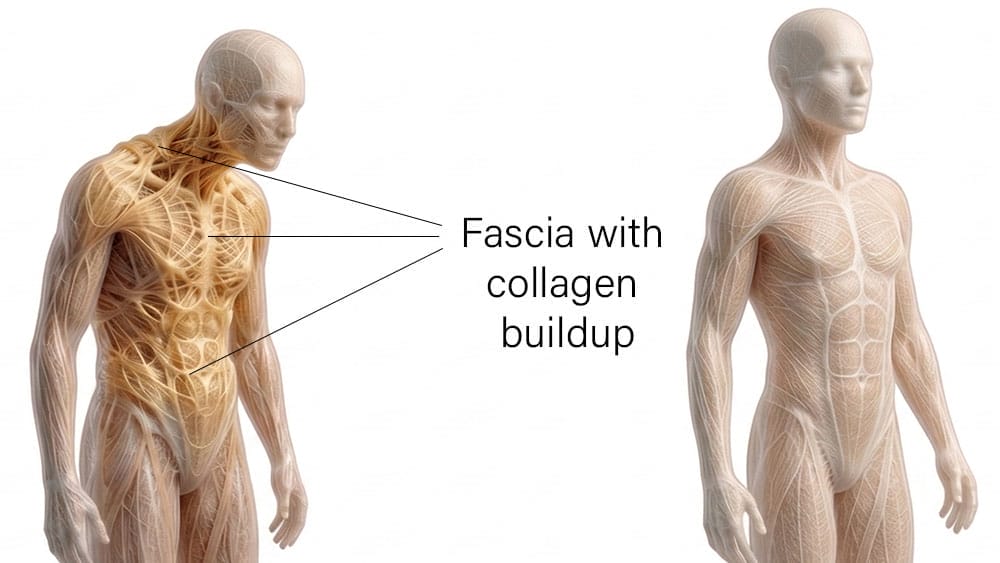
Right: evenly distributed fascia in a well-aligned body.
When the body is repeatedly held in a specific posture—healthy or otherwise—fascia adapts to sustained loading, becoming more supportive of the postures the body repeats most often(6).
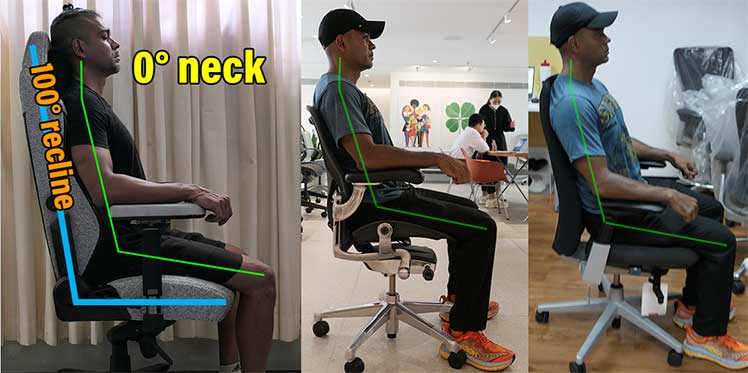
Below are three ergonomic methods that apply this concept:
-
Maintain a 0° Neck Posture in a Mid-Back Office Chair:
Uses headrest-free mid-back seating to force active neck engagement and retrain cervical balance through muscle memory. -
Maintain a 0° Neck Posture in a Full-Back Gaming Chair:
Explains how full-back chairs with headrests can support neutral neck posture when recline, lumbar height, and armrest loading are set correctly. -
Standing Desk Mobile Computing:
Shows how standing desks and elbow-supported phone use promote a 0° neck posture and rapidly retrain healthy mobile habits.
0° Neck Posture in a Mid-Back Office Chair
Most ergonomic office chairs default to a recline angle of roughly 100° (typically the uppermost setting) and include adjustable lumbar support. The key is to sit in this default recline with lumbar support positioned slightly above the beltline—without using a headrest.
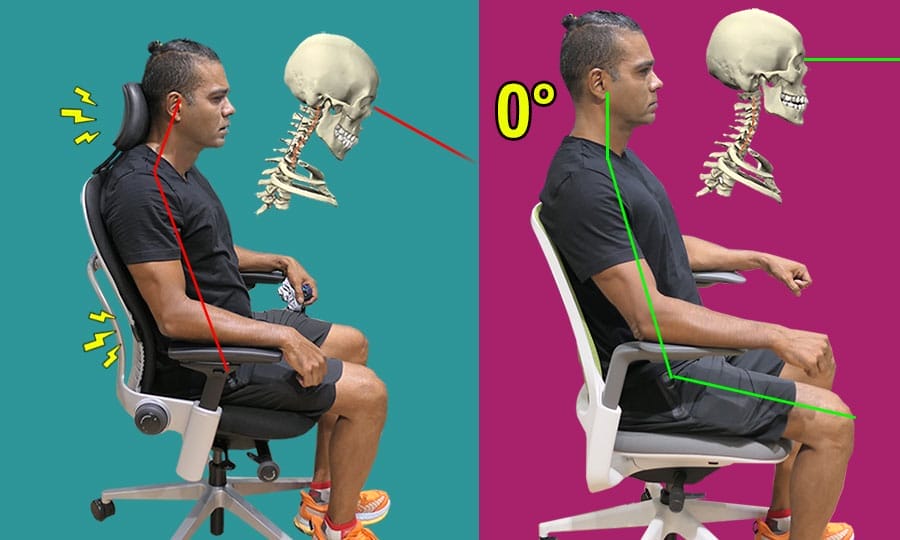
Office chair headrests are intended to support the neck during deeper reclines. When used in the upright position, they often push the head forward, reinforcing forward head posture.
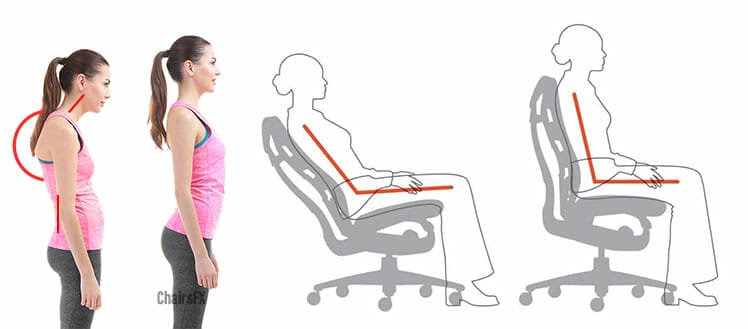
Removing the headrest allows the head to self-balance naturally above the shoulders. This makes mid-back seating a form of passive neck conditioning:
- The neck has no option but to engage
- Poor posture becomes uncomfortable quickly
- Muscle memory adapts toward balance
The tradeoff is immediate comfort. Perfect upright posture all day can feel restrictive, which is why many people abandon it before adaptations fully set in.
Best Premium Mid-Back Office Chairs
Related: Office Chair Headrests Distort Neck Posture | How to Sit Neutrally in an Office Chair
0° Neck Posture in a Full-Back Gaming Chair
Full-back chairs with headrests can also support healthy neck mechanics—with the right techniques. Set the recline to ~100°, adjust lumbar support slightly above the beltline, and keep both feet firmly planted. Then aim to keep your head evenly balanced over your shoulders.
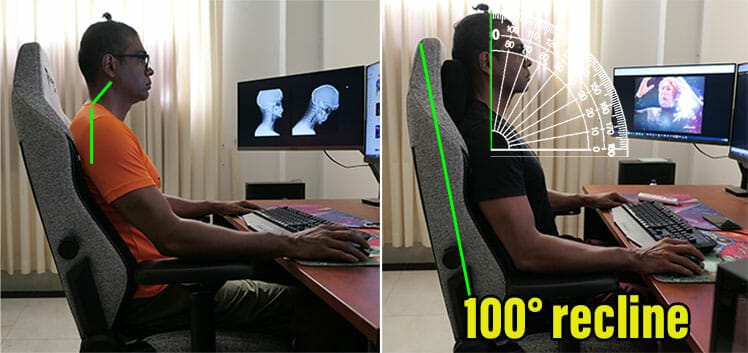
For individuals with established text neck habits, the neck may still hinge forward initially. In my case, Esports Doctor William Duncan explained the issue as follows:
“As you utilize more cervical extension, you’re resting more on the shape of the joints and bones rather than using soft tissue—muscles, tendons, and ligaments—to actively create support.”
To counter this, I applied additional downward pressure through the armrests to elevate my torso, until the back of my neck made contact with the headrest.
The headrest acted as a positional reference: when my neck stopped touching it, I immediately knew my head had hinged forward.
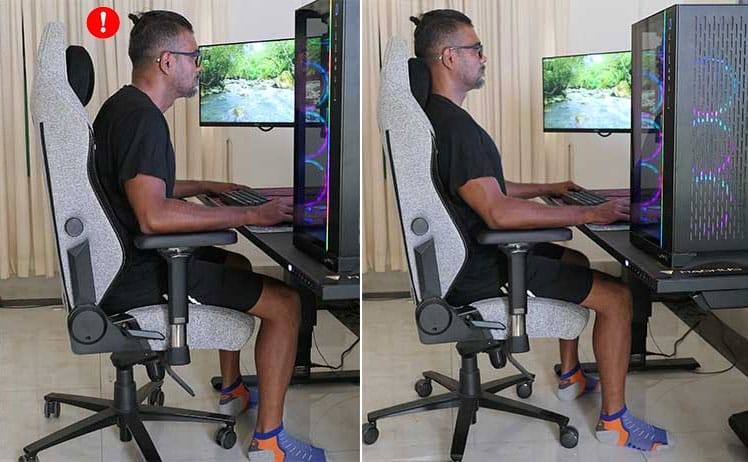
Then, I would “force” myself back upright. Perhaps because I do pull-ups regularly, I had enough strength to maintain that position for reasonably long periods, while my muscle memory adapted.
After a few days, maintaining neutral neck position became habitual rather than requiring conscious effort. Then I noticed something unexpected: I was sitting and standing taller—by roughly half an inch.
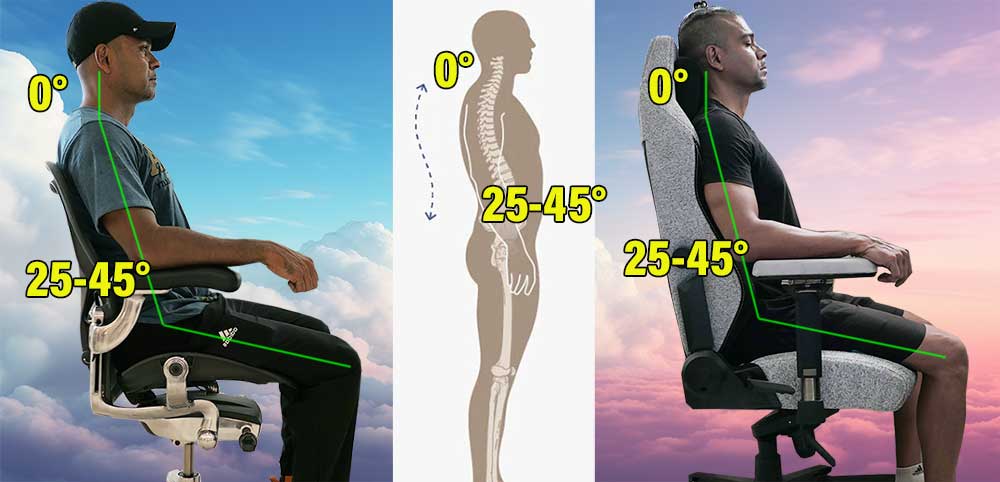
Suddenly seeing the world from a slightly higher perspective felt both pleasantly disorienting and rewarding. Now, maintaining this posture has become second nature—a habit I can sustain for long periods in any ergonomic chair.
Related: How I Fixed Text Neck Using a Gaming Chair | How to Sit in a Gaming Chair
Standing Desk Mobile Computing
Research suggests that approximately 30° of elbow flexion during texting helps preserve a 0° neck position. Based on my own experiences, standing desks offer a highly effective way to develop healthier texting habits.
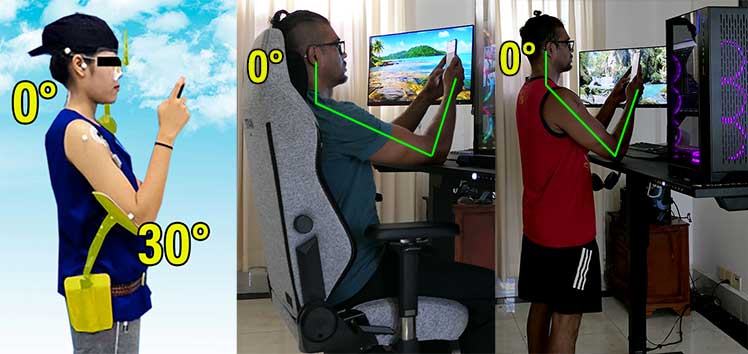
Standing desks support healthy texting posture while sitting or standing.
First, raise the work surface to support your elbows until you can comfortably hold your phone up to eye level. Then, practice using your phone while keeping your neck at a ~0° angle.
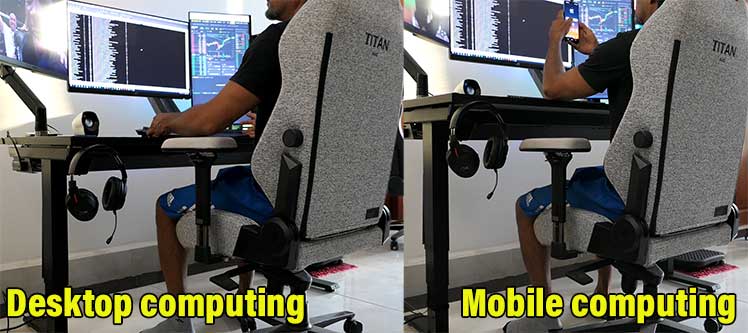
After approximately one week of practice, this posture began to feel natural. I noticed that I was automatically raising my arms to eye level during mobile use, replacing my previous habit of lowering my head.
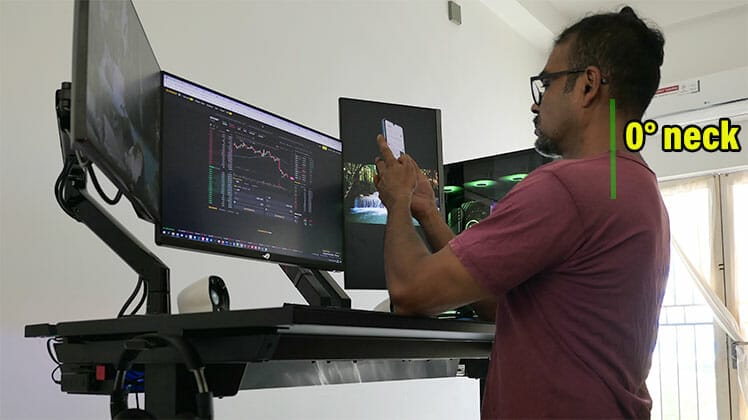
This shows how you can ‘re-program’ your muscle memory with discipline, biomechanical benchmarks, and the right ergonomic tools.
Conclusion: Posture Follows Repetition
Text neck is a near-universal byproduct of modern mobile computing. Because forward head posture is typically held for hours at a time, the body gradually adapts to it.
Muscles, fascia, and joint mechanics reorganize around the positions they experience most often. As a result, stiffness, fatigue, and low-grade pain become normalized, and many people stop noticing the postural cause altogether.
This is why text neck rarely feels like an injury. It feels like how the body is supposed to feel—tired, tight, and slightly misaligned. The problem is not awareness, but adaptation.
The same principle that creates the problem also provides the solution. Muscle memory and fascial adaptation are neutral mechanisms: they reinforce whatever posture is practiced most consistently.

By using ergonomic furniture to bias the body toward neutral neck positions—whether seated, standing, or during mobile use—it is possible to reverse text neck passively, without constant conscious correction.
When healthy postures are repeated daily, the body relearns them. Over time, neutral alignment stops requiring effort and begins to feel natural.
Final takeaway: Text neck is not defeated by willpower—it is defeated by habit, environment, and letting the body adapt in the right direction.
Footnotes
- Kenneth K. Hansraj, ‘Assessment of stresses in the cervical spine caused by posture and position of the head’. Surgical Technology International, Vol. 25, 2014, https://pubmed.ncbi.nlm.nih.gov/25393825/, (accessed 5 Jan. 2026).
- Pablo Robles. ‘Why your smartphone is causing you text neck syndrome’. January 25, 2019. https://multimedia.scmp.com/lifestyle/article/2183329/text-neck/index.html, (accessed 10 April 2022).
- MM Panjabi. ‘The stabilizing system of the spine. Part I. Function, dysfunction, adaptation, and enhancement.’ Journal of Spinal Disorders, December 1992. https://pubmed.ncbi.nlm.nih.gov/1490034/, (accessed 6 Jan. 2026).
- Lee Herrington. ‘Assessment of the degree of pelvic tilt within a normal asymptomatic population’, Manual Therapy, Volume 16, Issue 6, December 2011, Pages 646-648. https://www.sciencedirect.com/science/article/abs/pii/S1356689X11000816, (accessed 20 Feb. 2022).
- Suwalee Namwongsa, et al. ‘Effect of neck flexion angles on neck muscle activity among smartphone users with and without neck pain’, Ergonomics. 2019 Dec;62(12):1524-1533. DOI: 10.1080/00140139.2019.1661525, (accessed 11 April 2022).
- Chris Watts. ‘What is fascial fitness, and why should we care?’ News & Trends, July 11, 2019. https://www.scmp.com/magazines/style/news-trends/article/3018002/what-fascial-fitness-and-why-should-we-care, (accessed 5 Jan. 2026).
