

People new to ergonomic seating often wonder about gaming chair vs office chair similarities and differences. The confusion comes from a lack of clear definitions. There is no single authority that defines what “ergonomic” means—so advice is scattered across research, standards, and marketing.
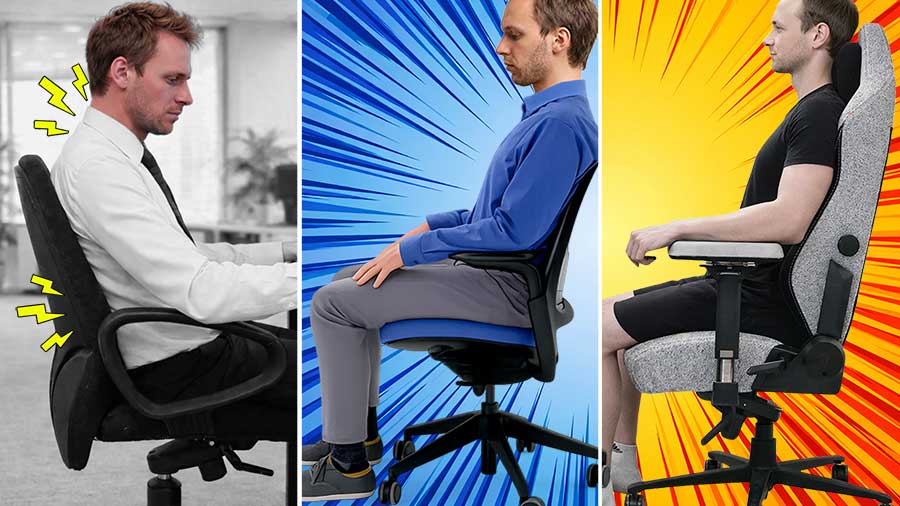
When those sources are consolidated, the picture becomes clear: ergonomic seating is designed to support neutral posture under gravity. That’s the real divide.
This article compares three categories—standard office chairs, ergonomic office chairs, and gaming chairs—by how each supports (or fails to support) healthy sitting postures during prolonged desk work.
Desk Chair Types at a Glance
At a surface level, desk chairs are commonly grouped into three categories:
- Standard office chairs: Typically have an adjustable seat height and the ability to recline or lock upright. They hold the body up against gravity but don’t support neutral postures.
- Ergonomic office chairs: Support neutral postures with adjustable lumbar support, adjustable armrests, and adjustable backrest recline.
- Gaming chairs: Support neutral postures with adjustable lumbar support, adjustable armrests, and adjustable backrest recline.
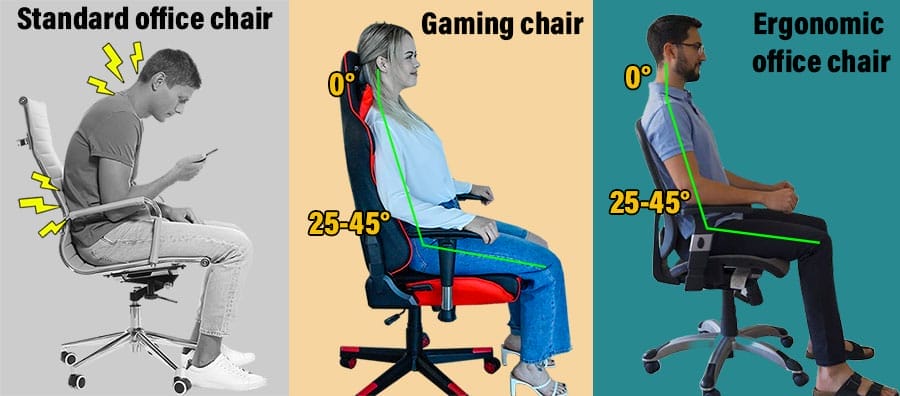
At the highest level, chairs fall into two categories: ergonomic and non-ergonomic. The next section defines this distinction using biomechanical benchmarks and institutional guidelines.
Ergonomic vs Non-Ergonomic Seating
Desk seating is best understood by posture support: chairs either assist neutral alignment under gravity or depend on continuous muscular control.
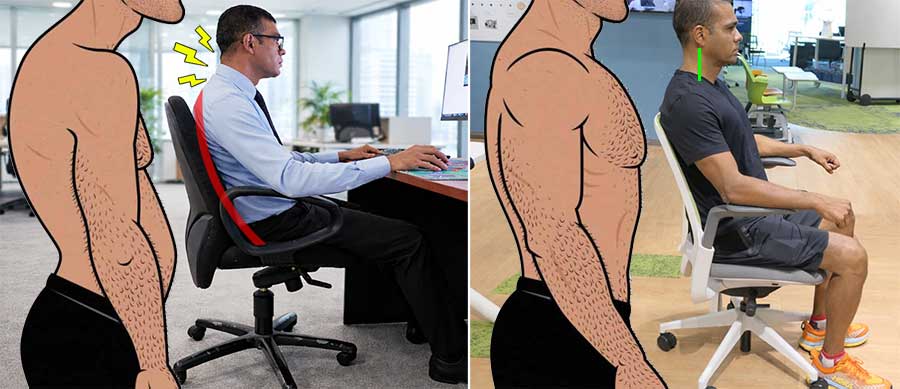
To clarify that distinction, this section covers:
- Biomechanics of healthy sitting — how gravity affects spinal alignment when seated
- Texting and forward head posture — how “text neck” compounds seated postural strain
- What makes a chair ergonomic — institutional guidelines and biomechanical benchmarks
Why Sitting Is a Biomechanical Problem
A typical standard (non-ergonomic) office chair allows seat-height adjustment, rocking or reclining, upright locking, and 360° swivel. These features are effective at holding the buttocks up against gravity.

However, gravity’s pull is strong enough that even when the pelvis is supported, the spine and head still tend to sag forward over time.
How Gravity Degrades Seated Posture
When standing, healthy adults typically exhibit a neutral lumbar lordosis of ~20–45°, with the head balanced over the shoulders at a ~0° neck tilt. When sitting without support, gravity pulls the torso downward and the lower back curve flattens by about 30–35% (~6–15°).(1)
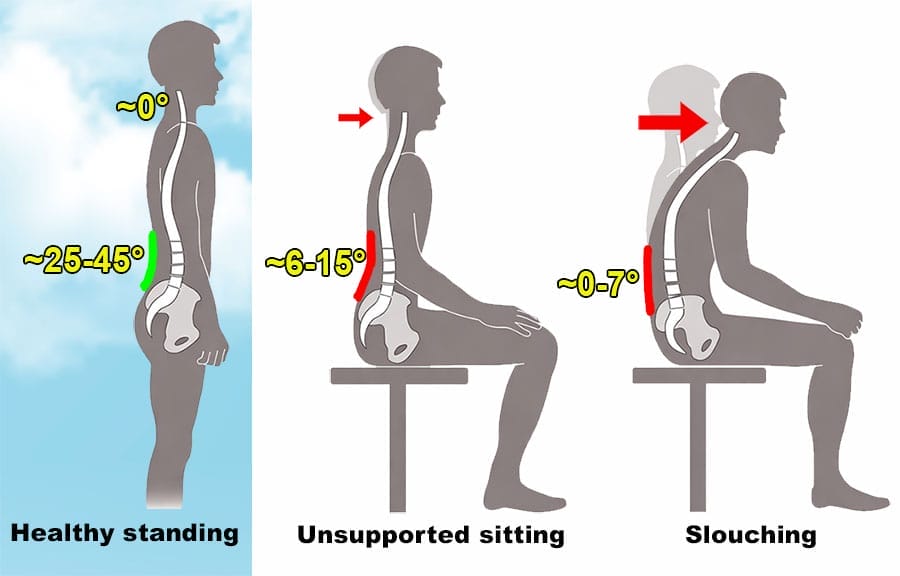
As muscles fatigue, posture degrades further into slouched sitting, where the lumbar curve may approach near-flat or slight flexion(2), while the upper back rounds and the head tilts forward.
Texting Amplifies Slouched Posture
In modern desk work, postural fatigue is intensified by two compounding exposures:
- Increased sitting time: according to a 2023 European Heart Journal study, the average person sits around 10.4 hours each day.(4)
- Increased cell phone use: a 2025 study of 1,000 Americans found they spent around 5 hours 16 minutes per day using their phones—a 14% increase from a similar 2024 survey.(5)

With a chronic forward head tilt, muscle memory begins to adapt to these sustained positions(6). In biomechanics, this process is described as a global sagittal-chain compensation(7), involving the spine and pelvis as a linked system.
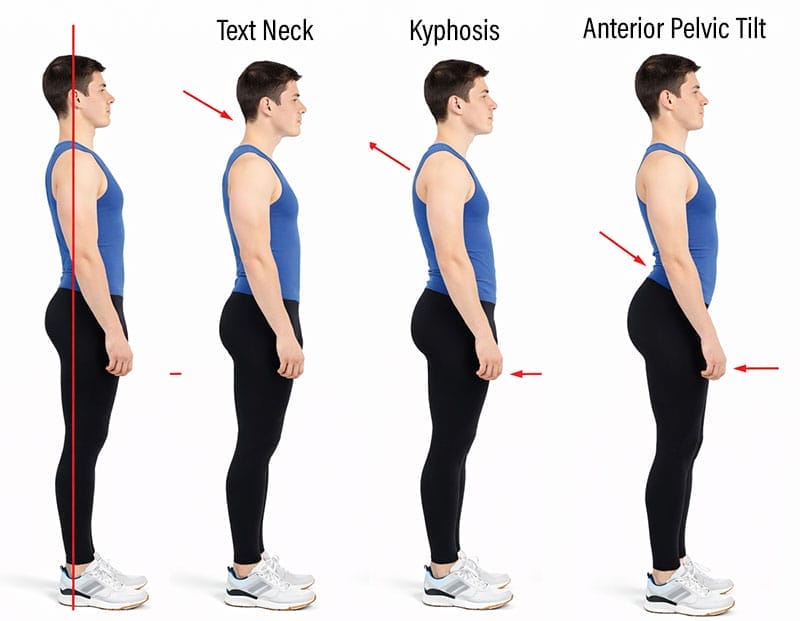
The global sagittal-chain pattern typically includes:
- Forward head posture (text neck)
- Rounded upper back (thoracic kyphosis) and exaggerated lumbar lordosis
- Anterior pelvic tilt
Key takeaway: Seated posture relies heavily on continuous back-muscle activation to resist gravity. As muscular endurance declines, posture degrades, increasing spinal load and distorting alignment. Ergonomic seating reduces this load by providing external structural support.
What Makes a Chair Ergonomic
“Ergonomic” seating addresses the gravitational failure point by supplying external structural support using three adjustable components.
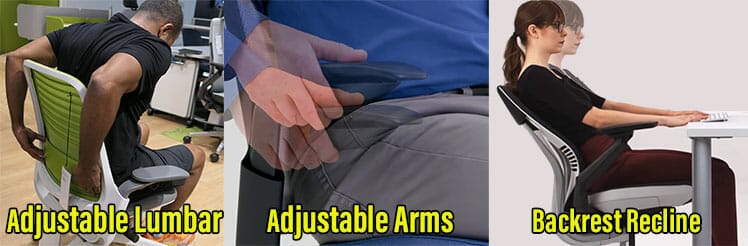
Commercial definitions of “ergonomic” are often vague or marketing-driven. For a non-commercial definition, this analysis relies on established institutional sources (OSHA, BIFMA, and the Handbook of Human Factors and Ergonomics).
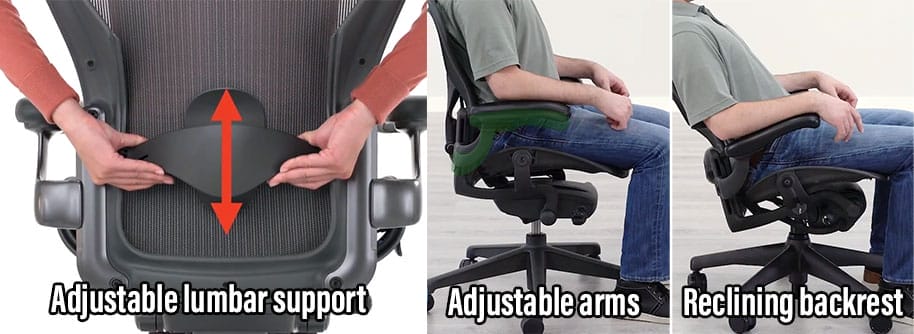
While terminology varies across guidelines, their functional requirements converge.
Per institutional guidelines (OSHA, BIFMA, and related standards), a chair qualifies as ergonomic when it provides the core features needed to support neutral sitting postures:
- Adjustable lumbar support: Positions the lower back to preserve a lordotic curve closer to that seen in healthy standing posture, limiting pelvic rollback and lumbar flattening(3).
- Adjustable armrests: Support the weight of the arms so it is not transferred to the shoulders and upper spine. Light forearm contact also provides additional bracing, reducing the effort required to hold the torso upright.
- Adjustable backrest recline: Studies show that reclining the backrest to approximately 100–130° reduces intervertebral disc pressure compared with upright sitting, lowering mechanical load on the lumbar spine during seated work.
These features define ergonomic seating. How they are implemented—and how much posture control they demand from the user—varies by chair category.
Gaming vs Office Chairs: Compare
Once “ergonomic” is defined by neutral posture support rather than style or branding, similarities and differences become much simpler.
Similarity: Neutral Posture Support
Both gaming chairs and ergonomic office chairs can support neutral sitting postures when properly configured. The distinction lies in how neutral posture is maintained: some chairs enforce it through structure, while others rely more on user control.
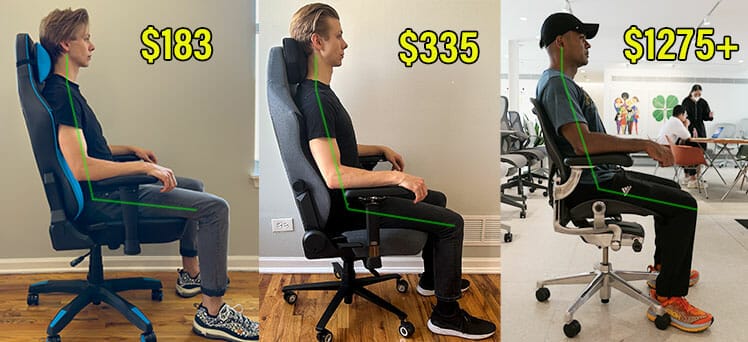
From a biomechanical standpoint, the goal is identical in both categories: maintain a supported lower-back curve, a balanced neck, and low muscular strain during seated work. When those conditions are met, chair category becomes secondary to setup and use.
Proof of Concept: Neutral Posture Is Achievable in Both
This “neutral posture support” equivalence is not theoretical. I validated it through hands-on testing using neutral-posture benchmarks, with first-hand guidance from three esports doctors.
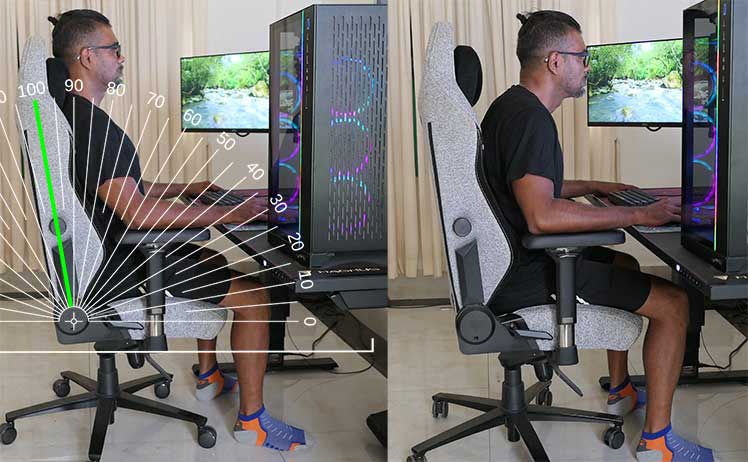
By dialing in chair setup and posture cues, I retrained from text neck to a stable neutral sitting posture—locked in as muscle memory within roughly two weeks—using a Secretlab Titan Evo.
When properly configured, my default posture in the Titan Evo matches the same neutral biomechanical angles I maintain in a Herman Miller Aeron.
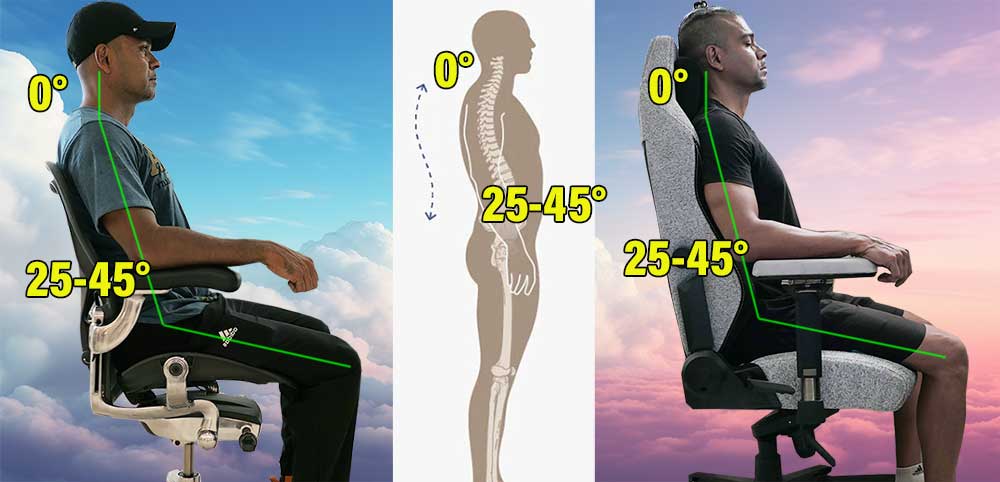
Equivalent neutral posture outcomes across chair categories.
In both cases, the outcome depended on the same fundamentals: a ~100° recline, lumbar support positioned just above the beltline, feet planted, active torso control, and keeping the head balanced over the shoulders.
The chair supplied the structural support. The result was determined by setup and user behavior.
Full breakdown: Perfect Neutral Neck Posture in a Gaming Chair
Difference: Freedom vs Constraint
The primary difference lies in how posture is enforced—or not.
Ergonomic office chairs (often called task chairs) are designed for focused desk work. Their geometry and limited recline ranges encourage upright, task-oriented sitting and make sloppy postures harder to sustain.
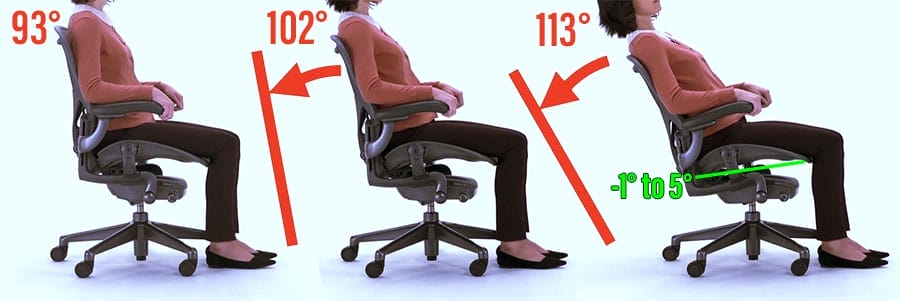
This structure makes them easy to use correctly, but also limits variation. Gaming chairs take the opposite approach. Full-back support and wide recline ranges allow users to choose how they want to sit—upright, reclined, or somewhere in between.
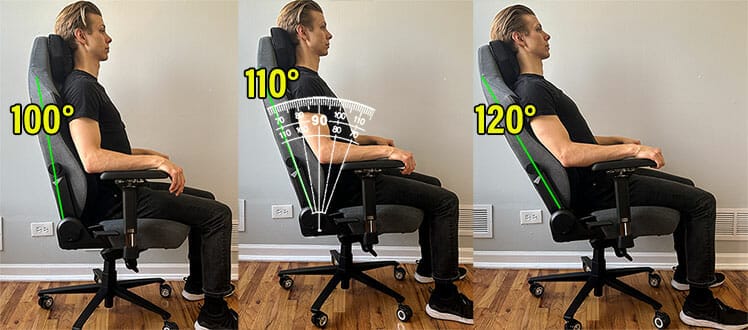
The advantage is flexibility and psychological comfort. The downside is that this freedom makes it easier to let posture slide if the user lacks awareness or discipline.
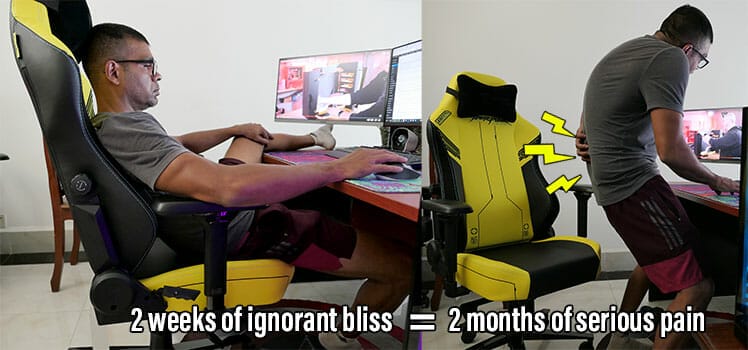
In short:
- Office chairs guide posture through restriction
- Gaming chairs rely more on user control and habits
Neither approach is inherently superior; they trade enforcement for flexibility.
Comfort, Limitations, and Proper Use
Once neutral posture support is understood, it becomes clear that chairs solve only part of the desk-work problem. Comfort is not a single concept, and no chair—gaming or office—can compensate for poor habits or prolonged misuse.
Physical vs Psychological Comfort
Seated comfort has two distinct components: physical and psychological. Physical comfort is biomechanical. It refers to an absence of discomfort achieved by maintaining neutral spinal alignment with low muscular strain.
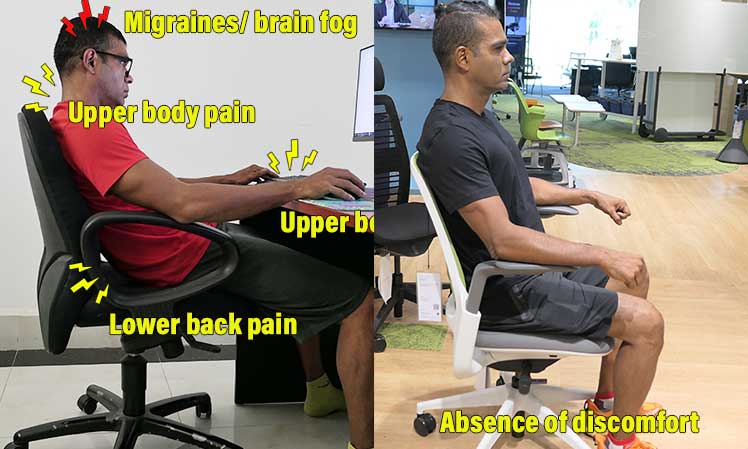
This is objective and largely chair-agnostic. If a chair supports neutral postures using lumbar support, arm support, and recline, it delivers physical comfort—regardless of price, brand, or category.
Psychological comfort is subjective. It includes factors like cushioning, materials, visual appeal, perceived luxury, recline depth, and freedom of movement.
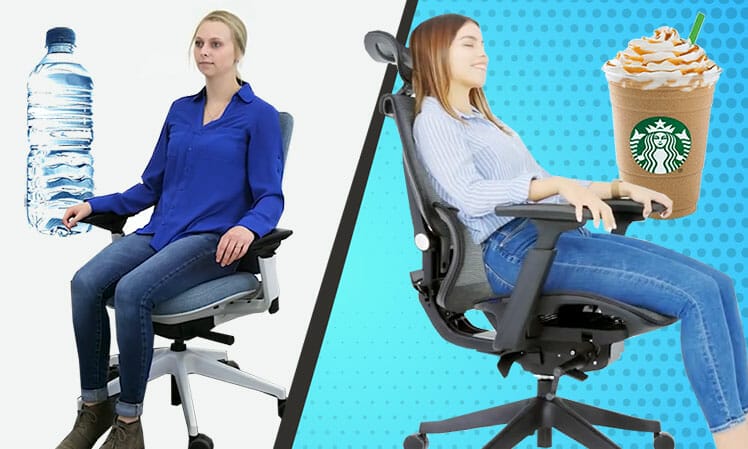
These elements influence how a chair feels to the user, but they do not change the underlying biomechanics.
This distinction explains why two chairs with identical ergonomic capability can feel very different—and why comfort debates often miss the point.
The Limitations of Any Chair
Even a perfectly ergonomic chair has limits. Ergonomic science has been consistent for decades: chairs are meant to support dynamic neutral postures (0° neck; 25–45° lumbar curve)—but the “dynamic” part matters most.
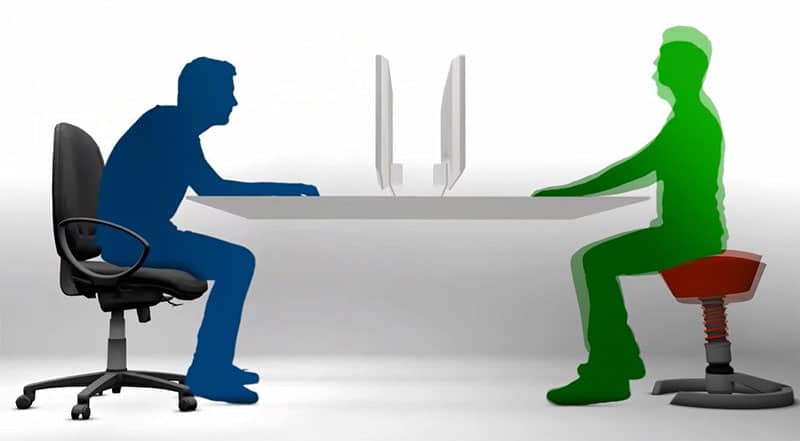
In the past decade, esports performance coaching has pushed the same conclusion: frequent movement, supported by good sleep, nutrition, and exercise, does more for long-term comfort and performance than chair features alone.
Neutral posture reduces strain, but static sitting remains harmful over time, regardless of how “correct” the posture looks. Long-term back health and sustained performance depend far more on:
- Frequent posture changes
- Standing and walking breaks
- Adequate strength and endurance
- Sleep, nutrition, and recovery habits
This pattern is reflected in real-world data: in a ChairsFX study of IT desk workers, pain-free participants were far more likely to exercise at least five days per week than chronic pain sufferers (≈35% vs ≈11%), regardless of chair type.

A chair supports alignment between breaks—it does not replace movement, conditioning, or lifestyle fundamentals. This is also why “dynamic sitting” mechanisms and tilt features are often overvalued—microbreaks and walking do more than chair motion ever will.
Muscle Memory and Postural Adaptation
The body adapts to the positions it holds most often(6). This process—often called muscle memory adaptation—works for both good and bad postures.

If neutral alignment is practiced consistently, it becomes easier and more automatic over time. If slouched or asymmetrical positions are repeated, those postures begin to feel “normal,” even when they increase strain.
This is why:
- Gaming chairs require more postural awareness and discipline
- Ergonomic office chairs reduce misuse by limiting options
- No chair can fix posture without user participation
The chair provides the tools. The body learns from how those tools are used.
Which Chair Should You Choose?
Once ergonomics is defined by neutral-posture support—not branding—the decision becomes practical rather than ideological.
- Choose an ergonomic office chair (task chair) if you spend long hours in focused desk work, tend to slouch unconsciously, or want posture to be gently enforced. The constrained geometry makes correct sitting easier and misuse harder.
- Choose a gaming chair if your work includes frequent breaks, media consumption, or relaxed computing, and you value positional freedom. Gaming chairs work best for users who are willing to actively manage posture rather than rely on the chair to do it for them.
- Either chair type is appropriate if it includes adjustable lumbar support, adjustable armrests, and a reclining backrest. At that point, outcomes depend more on setup and habits than on chair category.
If you already own a fully ergonomic chair, replacing it is rarely the solution. Improving configuration, movement frequency, and strength yields far greater returns.
Quick Chair Setup Checklist
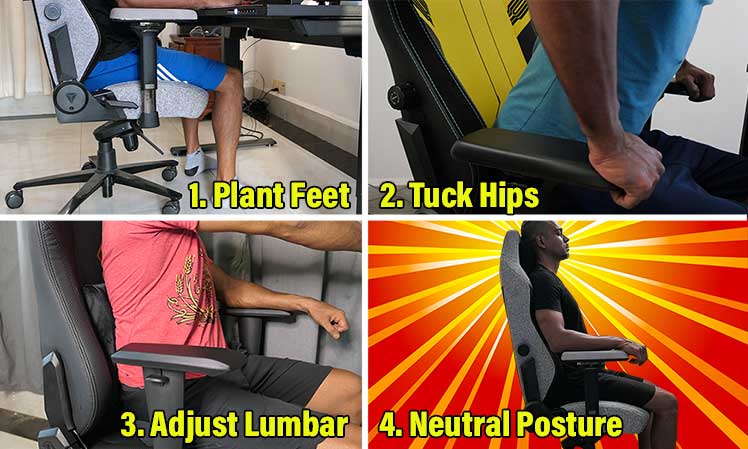
Even the best chair fails if it’s set up poorly. Use this baseline before evaluating comfort:
- Seat height: Adjust so feet rest flat on the floor and knees sit roughly level with—or slightly below—the hips.
- Lumbar support: Position it to support the natural inward curve of the lower back (not the sacrum, not the mid-back).
- Armrests: Set height and width so shoulders remain relaxed and elbows rest lightly at your sides—no shrugging, no reaching.
- Backrest & recline: Use a slight recline rather than sitting bolt upright; neutral posture is easier to maintain when the backrest shares the load.
- Headrest (if present): Use it to support a neutral neck—not to push the head forward.
Once configured, practice neutral sitting for short intervals, then move. Chairs support alignment between breaks—they do not replace movement.
User guides: How to Sit in a Gaming Chair | How to Sit in an Ergonomic Office Chair
Conclusion: Gaming vs Office Chairs
“Ergonomic” has no single definition because it is derived from multiple sources: biomechanics research, institutional guidelines, and applied studies rather than a central authority.

When these sources are aligned, a consistent principle emerges—ergonomic seating supports neutral posture under gravity.
By that definition, gaming chairs and ergonomic office chairs are more similar than they are different. Both can support neutral sitting postures that reduce the gravitational collapse responsible for slouching.

However, seating alone does not determine posture or comfort. Chairs support alignment between breaks, but long-term outcomes depend on movement, strength, and usage habits regardless of chair category.
Footnotes
- Andersson, B. J. G., Ortengren, R., & Herberts, P., “Quantitative electromyographic studies of back muscle activity related to posture and loading.” Orthopedic Clinics of North America, 1991. https://pubmed.ncbi.nlm.nih.gov/9383867/, (accessed 6 Jan. 2026).
- Claus, A. P., Hides, J. A., Moseley, G. L., & Hodges, P. W., “Is ‘ideal’ sitting posture real? Measurement of spinal curves in four sitting postures.” Manual Therapy, 2009. https://pmc.ncbi.nlm.nih.gov/articles/PMC4591449/, (accessed 6 Jan. 2026).
- D. De Carvalho, B. Silva, & others, “The impact of office chair features on lumbar lordosis, intervertebral joint and sacral tilt angles: a radiographic assessment.” Ergonomics, Oct. 2017. https://pubmed.ncbi.nlm.nih.gov/27915585/, (accessed 6 Jan. 2026).
- “How much do you sit, stand, and move each day?” Harvard Health Publishing, Harvard Medical School. https://www.health.harvard.edu/heart-health/how-much-do-you-sit-stand-and-move-each-day, (accessed 6 Jan. 2026).
- “Phone Screen Time Statistics.” HarmonyHIT, HarmonyHIT.com. https://www.harmonyhit.com/phone-screen-time-statistics/, (accessed 6 Jan. 2026).
- S Argyrou et al. ‘The Effectiveness of an Exercise Program Based on Motor Learning Principles for the Correction of Forward Head Posture: A Randomized Controlled Trial.’ Brain Sciences, August 2025. https://www.mdpi.com/2076-3425/15/8/873, (accessed 6 Jan. 2026).
- MM Panjabi. ‘The stabilizing system of the spine. Part I. Function, dysfunction, adaptation, and enhancement.’ Journal of Spinal Disorders, December 1992. https://pubmed.ncbi.nlm.nih.gov/1490034/, (accessed 6 Jan. 2026).
